
1. Introduction
This manual provides detailed instructions for the installation, operation, and maintenance of the DIXELL XR20CX-4N0C0 110V Refrigeration Controller. This device is designed for refrigeration applications, offering precise temperature control and management. Please read this manual thoroughly before installation and operation to ensure proper functioning and safety.
2. Safety Information
Adherence to safety precautions is crucial for preventing personal injury and damage to the controller or connected equipment. Always follow local electrical codes and regulations.
- Electrical Hazard: Disconnect all power to the controller and connected equipment before performing any installation, wiring, or maintenance.
- Qualified Personnel: Installation and wiring should only be performed by qualified and authorized personnel.
- Proper Grounding: Ensure the controller and all connected components are properly grounded.
- Voltage Compatibility: Verify that the supply voltage matches the controller's specified voltage (110V).
- Environmental Conditions: Do not expose the controller to excessive moisture, dust, or extreme temperatures outside its operating range.
3. Product Overview
The DIXELL XR20CX-4N0C0 is a compact digital controller designed for refrigeration units. It features a clear display for temperature readings and status indicators, along with intuitive buttons for parameter adjustment.
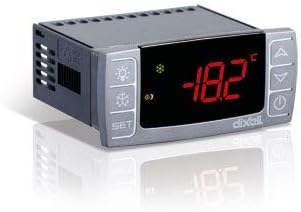
Figure 3.1: Front view of the DIXELL XR20CX-4N0C0 Refrigeration Controller. The display shows a temperature of -18.2°C, and various control buttons are visible on the sides.
Key Features:
- Digital temperature display (LCD or LED).
- 110V operating voltage.
- Precise temperature control for refrigeration applications.
- User-friendly interface with dedicated function buttons.
4. Setup
4.1 Installation
The controller is designed for panel mounting. Ensure adequate ventilation around the unit to prevent overheating.
- Cut a rectangular opening in the panel according to the controller's dimensions.
- Insert the controller into the opening from the front.
- Secure the controller using the provided mounting clips from the rear of the panel.
4.2 Electrical Connections
All electrical connections must be made with the power supply disconnected. Refer to the wiring diagram provided with the controller for specific terminal assignments.
- Power Supply: Connect the 110V AC power supply to the designated power terminals.
- Temperature Sensor: Connect the NTC or PTC temperature sensor to the sensor input terminals. Ensure correct polarity if applicable.
- Compressor Output: Connect the compressor load to the compressor relay output terminals.
- Defrost Output (if applicable): Connect the defrost heater or fan to the defrost relay output terminals.
5. Operating Instructions
5.1 Display Overview
The digital display shows the current temperature measured by the probe. Various icons may illuminate to indicate the status of the compressor, defrost cycle, or alarms.
5.2 Button Functions
| Button | Function |
|---|---|
| SET | Access/confirm parameter settings. |
| UP (▲) | Increase value, scroll up. |
| DOWN (▼) | Decrease value, scroll down. |
| DEFROST (Snowflake) | Initiate manual defrost cycle. |
| LIGHT (Lightbulb) | Control internal light (if connected). |
| ON/OFF (Power) | Turn the controller on or off. |
5.3 Basic Operation
Upon power-up, the controller will display the current temperature. The compressor will activate or deactivate based on the setpoint and differential.
5.4 Parameter Settings
To access and modify parameters:
- Press and hold the SET button for a few seconds to enter the parameter menu.
- Use the UP or DOWN buttons to scroll through the parameters.
- Press SET to view the value of a selected parameter.
- Use UP or DOWN to change the value.
- Press SET again to confirm the new value and return to the parameter list.
- To exit the parameter menu, press the SET button until the display returns to the temperature reading, or wait for the timeout.
Common parameters include:
- Set Point (SP): The desired temperature.
- Differential (Hy): The temperature difference that causes the compressor to turn on/off.
- Defrost Interval (Id): Frequency of automatic defrost cycles.
- Defrost Duration (Md): Length of the defrost cycle.
6. Maintenance
Regular maintenance ensures the longevity and optimal performance of your controller.
- Cleaning: Periodically clean the front panel with a soft, damp cloth. Do not use abrasive cleaners or solvents.
- Inspection: Annually inspect wiring connections for tightness and signs of wear or corrosion.
- Ventilation: Ensure that the ventilation openings on the controller are not obstructed.
7. Troubleshooting
This section provides solutions to common issues you may encounter.
| Problem | Possible Cause | Solution |
|---|---|---|
| Display is blank | No power supply; Incorrect wiring | Check power connections and voltage. Verify wiring against diagram. |
| Temperature reading is incorrect | Faulty sensor; Sensor not properly connected | Check sensor wiring. Replace sensor if necessary. |
| Compressor not turning on/off | Setpoint or differential incorrect; Faulty relay; Wiring issue | Verify setpoint and differential settings. Check compressor wiring. Consult a technician if relay is suspected. |
| Controller displays an error code | Specific internal fault or sensor error | Refer to the controller's specific error code list in the full technical manual (if available) or contact support. |
8. Specifications
Technical specifications for the DIXELL XR20CX-4N0C0 controller.
| Attribute | Value |
|---|---|
| Model | XR20CX-4N0C0 |
| Brand | Xiltek (Manufactured by DIXELL Italy) |
| Voltage | 110 Volts |
| Display Type | LCD or LED |
| Application | Refrigeration Controller |
9. Warranty and Support
This DIXELL XR20CX-4N0C0 controller is covered by a standard manufacturer's warranty against defects in materials and workmanship. For specific warranty terms and duration, please refer to the documentation provided at the time of purchase or contact your vendor.
For technical support, troubleshooting assistance, or warranty claims, please contact the supplier or the manufacturer, DIXELL Italy, through their official channels. Ensure you have your model number (XR20CX-4N0C0) and purchase details ready when contacting support.