
1. Introduction
This manual provides essential information for the proper installation, operation, and maintenance of your ERP 316217002 Oven Sensor. This component is designed to accurately monitor the temperature within your oven, ensuring correct cooking temperatures and efficient appliance operation. Please read these instructions thoroughly before proceeding with installation or use.
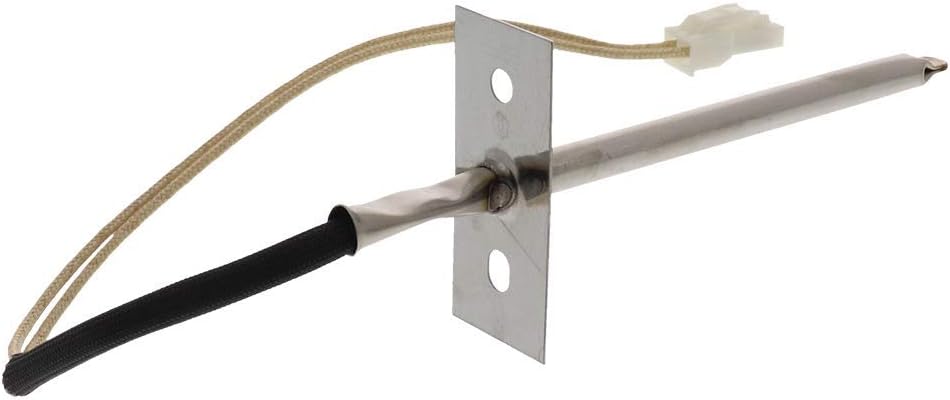
Image 1.1: The ERP 316217002 Oven Sensor. This image shows the complete sensor unit, including the metal probe, mounting bracket, and electrical connector with wiring.
2. Safety Information
WARNING: Before attempting any installation, repair, or maintenance on an appliance, always disconnect the power supply to the appliance at the circuit breaker or fuse box. Failure to do so can result in electric shock, serious injury, or death.
- Wear appropriate personal protective equipment, such as gloves and eye protection.
- Ensure the work area is well-lit and clear of obstructions.
- If you are unsure about any step, consult a qualified appliance technician.
- Keep children and pets away from the work area.
3. Product Description
The ERP 316217002 Oven Sensor is a replacement part designed for various oven and range models. Its primary function is to detect the internal temperature of the oven cavity and send this information to the oven's control board. This allows the control board to regulate the heating elements, maintaining the desired cooking temperature. The sensor features a durable stainless steel probe and an electrical connector for secure attachment.
3.1. Compatibility and Replacement Part Numbers
This oven sensor is compatible with a range of appliances and can replace the following part numbers:
- 08017097
- 1015027
- 316111201
- 316111203
- 318087600
- 318198500
- 318198510
- 318198520
- 5303208888
- 7316217002
- AP3363354
- AH820208
- EA820208
- PS820208
4. Setup and Installation
The installation of the oven sensor typically involves accessing the rear of the oven or the oven cavity, depending on the appliance model. The following are general steps; always refer to your specific appliance's service manual for detailed instructions.
- Disconnect Power: Ensure the oven's power supply is completely disconnected at the circuit breaker.
- Access Sensor: Locate the existing oven sensor. It is usually found inside the oven cavity, often at the top rear or side, secured by screws. In some models, access may be from the back of the appliance.
- Remove Old Sensor: Carefully remove the screws holding the old sensor in place. Gently pull the sensor out, feeding the wire through the opening. Disconnect the electrical connector.
- Install New Sensor: Connect the new ERP 316217002 Oven Sensor to the electrical harness. Ensure the connection is secure.
- Mount Sensor: Feed the wire back through the opening and position the new sensor in its mounting location. Secure it with the screws previously removed.
- Restore Power: Once the sensor is securely installed and all connections are made, restore power to the oven.
- Test Operation: Turn on the oven and set it to a desired temperature to verify proper function.

Image 4.1: Oven Sensor with a 3-1/4 inch dimension indicated. This image highlights the length of the sensor probe, which is important for proper fit.
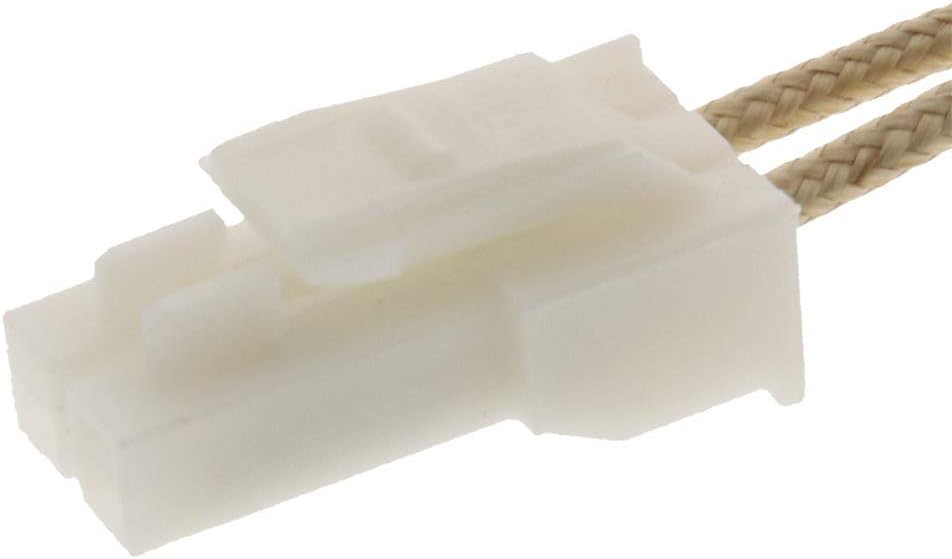
Image 4.2: Close-up view of the oven sensor's electrical connector. This shows the white plastic connector designed for a secure electrical attachment.
5. Operating Principles
The ERP 316217002 Oven Sensor operates as a thermistor, a type of resistor whose resistance is highly dependent on temperature. As the oven heats up, the temperature of the sensor increases, causing its electrical resistance to change. The oven's control board measures this resistance and translates it into a temperature reading. This feedback loop allows the control board to cycle the heating elements on and off as needed to maintain the set temperature, ensuring consistent and accurate cooking results.
6. Maintenance
The ERP 316217002 Oven Sensor is designed for durability and typically requires minimal maintenance. If the sensor becomes soiled, ensure the oven is cool and disconnected from power before gently wiping the sensor probe with a damp cloth. Avoid using abrasive cleaners or harsh chemicals that could damage the sensor's surface or internal components. Ensure the sensor is completely dry before restoring power to the oven.
7. Troubleshooting
If your oven is exhibiting temperature-related issues, the oven sensor may be a contributing factor. Common symptoms of a faulty oven sensor include:
- Oven Overheating: The oven reaches temperatures significantly higher than the set temperature (e.g., 500 degrees Fahrenheit when set lower).
- Oven Not Heating Correctly: The oven fails to reach the set temperature or heats inconsistently.
- Error Codes: The oven display shows specific error codes related to temperature sensing. Consult your oven's user manual for error code definitions.
- Long Preheat Times: The oven takes an unusually long time to preheat.
Before replacing the sensor, it is recommended to perform an Ohm reading test if you have the appropriate tools and knowledge. A typical oven sensor should have a resistance reading of approximately 1080 ohms at room temperature (70°F / 21°C). Significant deviations from this value may indicate a faulty sensor.
8. Specifications
| Feature | Detail |
|---|---|
| Brand | ERP |
| Model Number | 316217002 |
| Material | Stainless Steel |
| Included Components | Oven Sensor |
| Power Source | Electric/Gas (compatible with both types of ranges) |
| Upper Temperature Range | 500 Degrees Fahrenheit |
| Item Length | 7 Inches |
| Item Weight | 14 Grams |
| Product Care Instructions | Oven Safe, Wipe Clean |
9. Warranty Information
All ERP purchases, including the 316217002 Oven Sensor, come with a one-year warranty from the date of purchase. This warranty covers defects in materials and workmanship under normal use. For warranty claims or further details, please contact ERP customer support.
10. Support
For technical assistance, troubleshooting guidance, or questions regarding your ERP 316217002 Oven Sensor, please refer to the ERP official website or contact their customer service department. When contacting support, please have your product model number (316217002) and purchase information readily available.