
1. Introduction
The VILTROX EF-NEX IV is a fourth-generation electronic lens mount adapter designed to allow Canon EF and EF-S series lenses to be used on Sony E-mount cameras, including Sony A9, A7, A6XXX, and NEX series models. This adapter facilitates communication between the lens and camera, enabling features such as autofocus, aperture control, and EXIF data transmission. Key enhancements include an integrated USB port for firmware updates and a quick switch between Contrast Detection Auto Focus (CDAF) and Phase Detection Auto Focus (PDAF) modes.
2. Product Features
- Allows mounting of Canon EF/EF-S lenses onto Sony A7 series full-frame, Sony A9, A7, A6XXX, and NEX series cameras.
- Integrated USB port for convenient adapter firmware updates.
- Features two auto-focus mode switches: PDAF (Phase Detection Auto Focus) and CDAF (Contrast Detection Auto Focus).
- Supports EXIF signal transmission, including aperture and focal distance data.
- Enables aperture adjustment and metering directly from the camera body.
- Supports lens Image Stabilizer functions.
- Built-in metal electronic contacts and an advanced focus system for faster and more accurate autofocus performance.
- Offers good stability with anti-shaking functionality.
- Includes a detachable tripod foot mount adapter with a 1/4" screw for enhanced convenience and stability.
- Constructed with a CNC-machined adapter tube and camera mount in one piece for optimal strength.
3. Package Contents
The VILTROX EF-NEX IV package includes the following items:
- 1 × VILTROX EF-NEX IV Lens Adapter
- 1 × Front Lens Cap
- 1 × Rear Lens Cap
- 1 × User Manual

This image displays the retail packaging for the VILTROX EF-NEX IV lens adapter, including the adapter itself, front and rear caps, and the user manual.
4. Product Overview
Familiarize yourself with the various components of the VILTROX EF-NEX IV lens adapter:
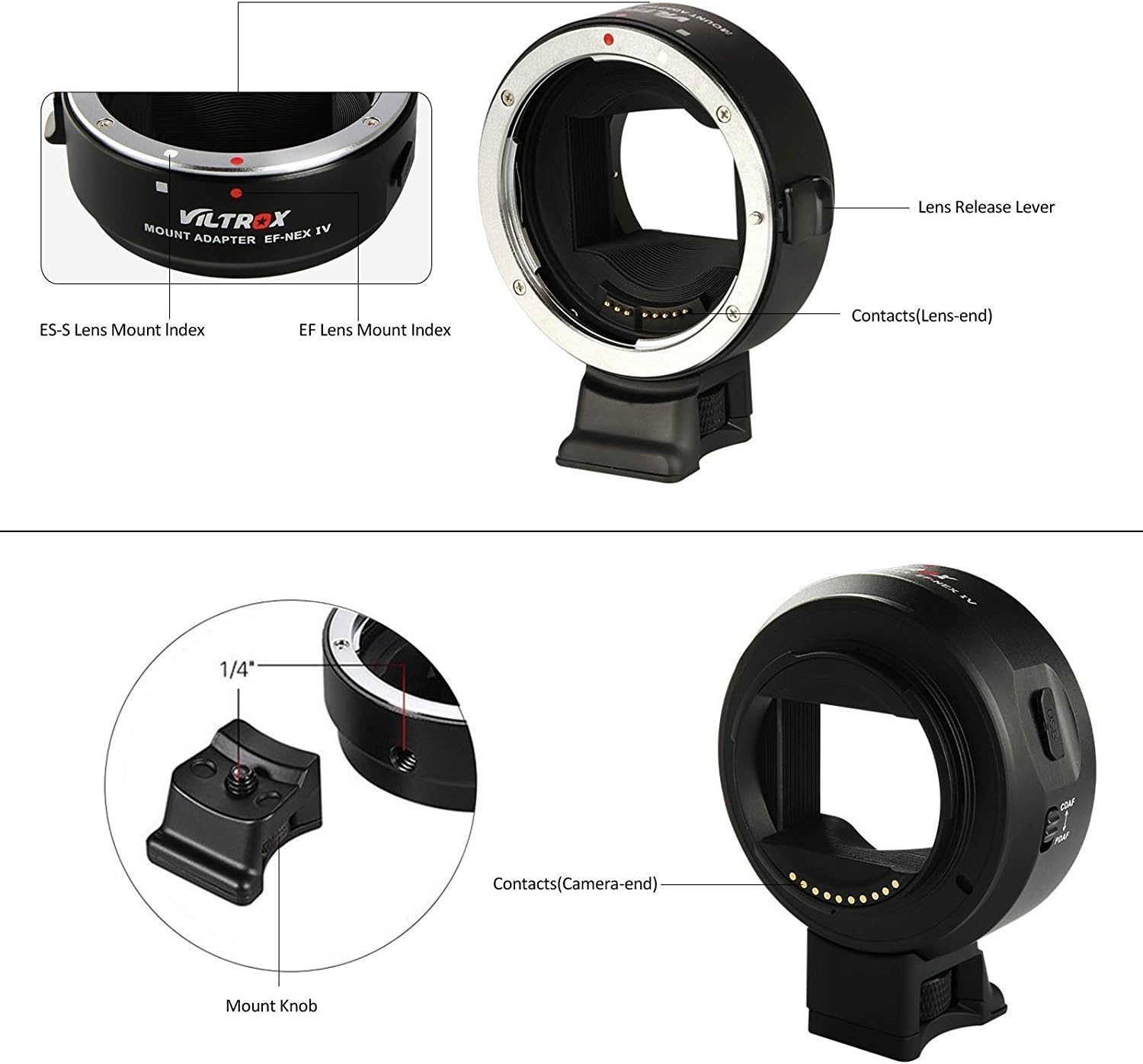
This image illustrates the key components of the VILTROX EF-NEX IV lens adapter, including the lens release lever, lens-end contacts, EF and EF-S mount indexes, camera-end contacts, and the detachable mount knob.
- Lens Release Lever: Used to detach the lens from the adapter.
- Contacts (Lens-end): Electronic pins that communicate with the lens.
- EF Lens Mount Index: Alignment mark for Canon EF lenses.
- EF-S Lens Mount Index: Alignment mark for Canon EF-S lenses.
- Contacts (Camera-end): Electronic pins that communicate with the camera body.
- Mount Knob: Secures the detachable tripod foot.

This image highlights the integrated USB port for firmware updates and the switch for selecting between CDAF (Contrast Detection Auto Focus) and PDAF (Phase Detection Auto Focus) modes on the VILTROX EF-NEX IV adapter.
- USB Port: For connecting to a computer to update firmware.
- Focus Mode Switch: Toggles between CDAF and PDAF autofocus modes.
5. Setup
5.1 Attaching the Adapter to the Camera
- Ensure both the camera and adapter are clean and free of dust.
- Align the red dot on the adapter with the white dot on your Sony E-mount camera body.
- Insert the adapter into the camera mount and rotate it clockwise until it clicks into place.
5.2 Attaching a Canon EF/EF-S Lens to the Adapter
- Align the red dot on the Canon EF/EF-S lens with the corresponding red dot (EF) or white square (EF-S) on the VILTROX EF-NEX IV adapter.
- Insert the lens into the adapter and rotate it clockwise until it clicks into place.
5.3 Detaching the Lens and Adapter
- To detach the lens from the adapter, press the lens release lever on the adapter and rotate the lens counter-clockwise.
- To detach the adapter from the camera, press the camera's lens release button and rotate the adapter counter-clockwise.
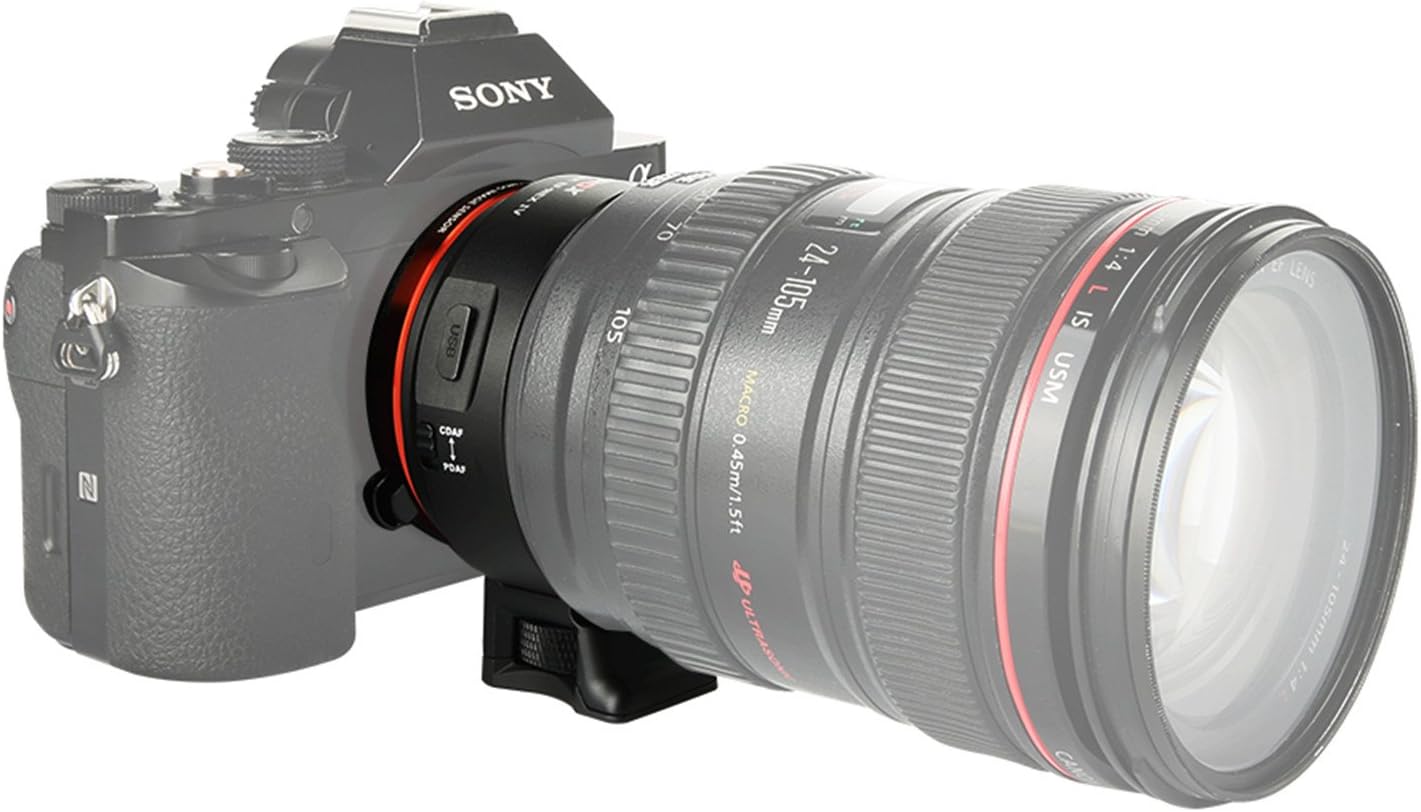
This image shows the VILTROX EF-NEX IV lens adapter connecting a Canon EF lens to a Sony E-mount camera body, demonstrating its physical integration.
6. Operating Instructions
6.1 Auto Focus Mode Selection (CDAF/PDAF)
The EF-NEX IV adapter features a switch to select between two autofocus modes:
- CDAF (Contrast Detection Auto Focus): Provides good contrast for accurate focusing, allowing focus points across the entire frame.
- PDAF (Phase Detection Auto Focus): Offers faster focusing for both AF-S (Single-shot AF) and AF-C (Continuous AF) modes. The focus area may be limited depending on the camera model.
To change AF mode: Switch to your desired AF mode on the EF-NEX IV adapter first. Then, turn off your camera, remove the battery, or re-attach the adapter with the lens. The new AF mode will become active after turning the camera back on.
6.2 Aperture Adjustment and Metering
The adapter supports on-camera aperture adjustment and metering, allowing you to control the lens's aperture directly from your Sony E-mount camera body.
6.3 Image Stabilization
The VILTROX EF-NEX IV adapter supports the image stabilization function of compatible Canon lenses.
6.4 EXIF Data Recording
The adapter records EXIF data, including aperture and focal distance, ensuring that this information is stored with your images.
7. Firmware Update
The VILTROX EF-NEX IV features an integrated USB port for firmware updates. This allows for performance improvements and compatibility enhancements.
- Connect the adapter to your computer using a USB cable. The adapter does not need to be attached to a camera for this process.
- Download the latest firmware file from the official VILTROX website.
- Execute the downloaded firmware update file according to the instructions provided on the VILTROX website.

This composite image shows detailed views of the VILTROX EF-NEX IV adapter, including the overall design, the USB port, the CDAF/PDAF switch, and the camera-end electronic contacts.
8. Compatibility
The VILTROX EF-NEX IV adapter is compatible with Canon EF and EF-S lenses, as well as lenses manufactured by Sigma, Tokina, and Tamron that are designed for Canon EF/EF-S mounts.
Note: Sony VG series camcorders do not support autofocus when used with this adapter. For specific lens and camera compatibility, please refer to the latest information on the VILTROX official website. If you encounter compatibility issues with a specific camera model, providing this information to VILTROX can assist in future firmware updates.

This table provides a list of compatible Canon EF, EF-S, Sigma, Tamron, and Yongnuo lenses that can be used with the VILTROX EF-NEX IV lens adapter.
9. Maintenance
- Keep the electronic contacts on both the adapter and your lenses clean. Use a clean, dry microfiber cloth to gently wipe them if necessary. Avoid touching the contacts with your fingers.
- Always attach the front and rear caps to the adapter when it is not in use to prevent dust and debris from entering.
- Store the adapter in a cool, dry place, away from direct sunlight, extreme temperatures, and high humidity.
- Avoid dropping or subjecting the adapter to strong impacts, as this can damage the internal electronics or mechanical components.
10. Troubleshooting
- Lens not recognized / No communication: Ensure the adapter and lens are securely mounted and clicked into place. Check that the electronic contacts on both the adapter and lens are clean. Restart the camera after re-attaching.
- Autofocus not working or slow: Verify that the AF mode switch on the adapter is set correctly (CDAF or PDAF) and that the camera has been restarted after changing the mode. Ensure the lens is compatible and its firmware is up to date. Some older lenses may have limited AF performance.
- Aperture control issues: Ensure the lens is fully seated and the contacts are clean. Check camera settings for aperture control.
- Firmware update failure: Ensure the USB cable is properly connected and that you are using the correct firmware file from the official VILTROX website. Try a different USB port or computer if issues persist.
- General instability: Ensure all components are securely attached. If issues persist, check the VILTROX website for the latest firmware updates, as these often include bug fixes and performance improvements.
If you encounter persistent issues not covered here, please contact VILTROX customer support with details of your camera model, lens model, and the issue experienced.
11. Specifications
| Brand | VILTROX |
| Model Number | VT-EF-NEXIV |
| Focus Type | Auto Focus (CDAF & PDAF) |
| Lens Compatibility | Canon EF/EF-S series lenses (and compatible third-party lenses) |
| Camera Compatibility | Sony E-mount cameras (A9, A7, A6XXX, NEX series) |
| Firmware Update | Via integrated USB port |
| Tripod Mount | Detachable 1/4" screw mount |
12. Warranty and Support
For information regarding warranty coverage, please refer to the warranty card included with your product or visit the official VILTROX website. For technical support, firmware updates, or any inquiries, please contact VILTROX customer service through their official channels.