
AdirOffice 671-100-BLK
AdirOffice Electronic Pistol Safe Instruction Manual
Model: 671-100-BLK
1. Introduction
This manual provides essential instructions for the safe and effective use of your AdirOffice Electronic Pistol Safe. Please read this manual thoroughly before installation and operation to ensure proper functionality and security. Keep this manual for future reference.
Safety Information
- Always store firearms unloaded and separate from ammunition.
- Keep the safe locked and the access code confidential.
- Do not store the override keys inside the safe. Keep them in a secure, separate location.
- Ensure the safe is securely mounted to prevent unauthorized removal.
- This safe is designed to deter theft and unauthorized access, but it is not impenetrable.
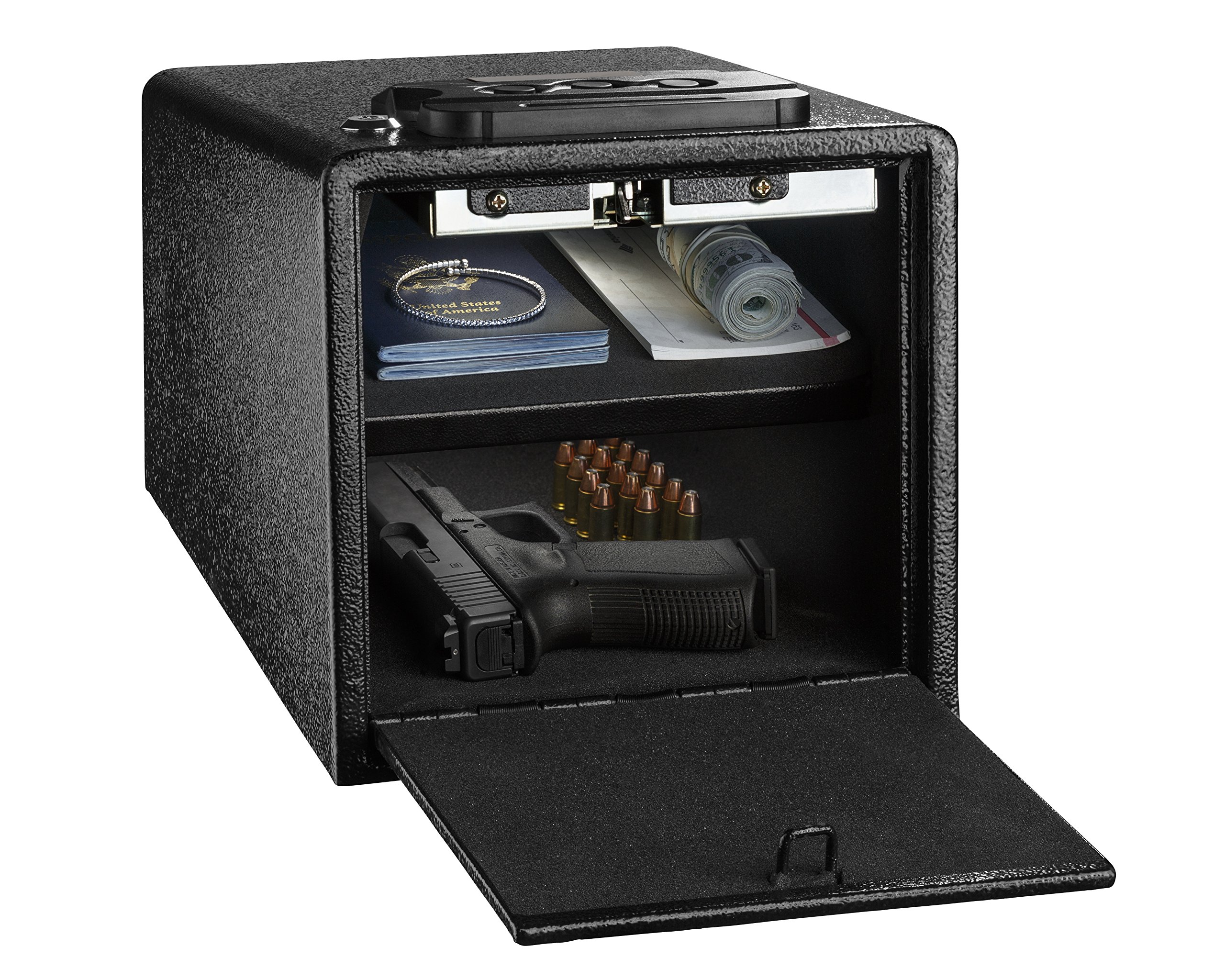
Image 1.1: AdirOffice Electronic Pistol Safe, open to show interior storage.
2. Package Contents
Verify that all items listed below are included in your package:
- AdirOffice Electronic Pistol Safe
- Override Keys (2)
- Mounting Screws (for installation)
- Instruction Manual (this document)
- Foam Lining (pre-installed inside the safe)
3. Setup
3.1 Battery Installation
- Locate the battery compartment, typically on the inside of the safe door or on the back panel of the keypad.
- Insert the required number of AA batteries (not included), ensuring correct polarity (+/-).
- Close the battery compartment cover securely.
Note: If the batteries are low, the safe may not retain the programmed code. Replace batteries promptly when the low battery indicator appears or if the keypad becomes unresponsive.
3.2 Mounting the Safe
For enhanced security, it is recommended to mount the safe to a strong horizontal or vertical surface.
- Choose a suitable location for mounting, such as a shelf, floor, or wall stud.
- Open the safe door to access the pre-drilled mounting holes located at the bottom or back of the safe.
- Position the safe and mark the drilling points on the chosen surface through the pre-drilled holes.
- Drill pilot holes into the surface at the marked points.
- Align the safe with the pilot holes and secure it using the provided mounting screws. Tighten all screws firmly.

Image 3.1: Illustration of the safe's mounting points for secure installation.

Image 3.2: Example of safe placement on a shelf.
4. Operating Instructions
4.1 Setting Your User Code
- With the safe door open, locate the red or green reset button on the inside of the door or near the battery compartment.
- Press the reset button. You should hear a beep, and the indicator light on the keypad will illuminate.
- Within 5 seconds, enter your desired 3-8 digit code on the keypad.
- Press the '#' or 'ENTER' button to confirm. You should hear a confirmation beep.
- Test the new code with the door open to ensure it works correctly before closing the safe.
4.2 Opening the Safe with Your Code
- Enter your programmed 3-8 digit user code on the keypad.
- Press the '#' or 'ENTER' button.
- The safe door will spring open automatically.
4.3 Opening the Safe with Override Keys
In case of forgotten code, dead batteries, or electronic malfunction, the safe can be opened using the override keys.
- Locate the keyhole, usually concealed behind a small cover on the keypad panel.
- Remove the cover and insert one of the override keys.
- Turn the key clockwise while simultaneously turning the handle or allowing the door to spring open.
- Remove the key and store it in a secure location, separate from the safe.

Image 4.1: Safe interior with foam lining for protection.
Image 4.2: The safe features an alarm for incorrect code entries.
5. Maintenance
5.1 Battery Replacement
Replace batteries annually or when the low battery indicator light illuminates. Always use new, high-quality AA alkaline batteries.
- Open the safe using your code or the override key.
- Locate the battery compartment.
- Remove old batteries and dispose of them properly.
- Insert new batteries, ensuring correct polarity.
- Close the battery compartment.
5.2 Cleaning
Clean the exterior of the safe with a soft, damp cloth. Avoid abrasive cleaners or solvents that could damage the finish or electronic components.
6. Troubleshooting
- Safe does not open with code:
- Ensure batteries are fresh and installed correctly. Replace if necessary.
- Re-enter the code carefully, ensuring each digit is pressed firmly.
- If the code was recently changed, try the old code or reset the code following Section 4.1.
- Use the override key to open the safe and then re-program your code.
- Code does not 'stay' or resets:
- This is often an indication of low batteries. Replace all batteries with new ones.
- Ensure the code programming steps (Section 4.1) are followed precisely, including pressing '#' or 'ENTER' to confirm.
- Door mechanism gets stuck or does not open smoothly:
- Check for any obstructions around the door or inside the safe that might be preventing smooth operation.
- Ensure the safe is mounted on a flat, stable surface and not warped or under stress.
- If the issue persists, contact customer support.
- Keypad is unresponsive:
- Replace batteries.
- If still unresponsive, use the override key to open the safe and contact customer support.
7. Specifications
| Feature | Detail |
|---|---|
| Model Number | 671-100-BLK |
| Manufacturer | AdirOffice |
| Lock Type | Electronic Keypad Lock |
| Material | Alloy Steel |
| Color | Black |
| Exterior Dimensions (D x W x H) | 8.7" x 11.8" x 6.8" (approx. 22.1 x 27.43 x 17.27 cm) |
| Interior Dimensions (D x W x H) | 11.0" x 7.9" x 6.9" (approximate, based on product images) |
| Item Weight | 5.35 kg (11.79 lbs) |
| Mounting Type | Floor Mount, Wall Mount |
| Power Source | AA Batteries (not included) |

Image 7.1: Safe dimensions overview.
8. Warranty and Support
For warranty information or technical support, please contact AdirOffice customer service. Refer to the product packaging or the official AdirOffice website for the most current contact details.
Ask a question about this manual
Ask about setup, troubleshooting, compatibility, parts, safety, or missing instructions. Manuals+ will review the question and use this page’s manual context to help answer it.