
1. Introduction
The YUCHENGTECH XNR-400A Melt Flow Rate Tester is designed for accurately determining the Melt-mass Flow Rate (MFR) of various thermoplastics. This instrument adheres to the ISO1133:1997 standard, offering a straightforward design, precise accuracy, and stable performance. It is user-friendly and suitable for testing both high-temperature melt materials (such as PC, FI plastics, nylon) and low-temperature melt materials (such as PE, PP, POM, PS, and ABS).
This tester is widely utilized in industries including plastics fabrication, plastic goods manufacturing, petrochemicals, as well as in academic institutions, research facilities, and commodity inspection departments.
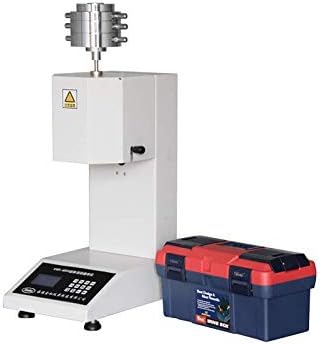
Figure 1: YUCHENGTECH XNR-400A Melt Flow Rate Index Tester with included toolbox and accessories.
2. Setup
2.1 Unpacking and Inspection
- Carefully unpack all components from the shipping container.
- Verify that all items listed in the packing list are present and undamaged. Report any discrepancies or damage to your supplier immediately.
- Retain all packaging materials for future transport or storage.
2.2 Environmental Requirements
- Indoor Temperature: Maintain an ambient temperature between 10°C and 35°C.
- Vibration: Ensure the installation area is free from significant vibrations.
- Corrosive Media: Avoid environments with corrosive gases or substances.
- Stability: Install the unit on a stable, level foundation. Use a spirit level to ensure proper leveling.
- Interference: The operating area should be free from strong magnetic field disturbances and significant air convection.
2.3 Power Connection
This model operates on 220V power. Ensure the power supply matches the instrument's requirements. Connect the power cord to a grounded outlet.

Figure 2: Front view of the XNR-400A Melt Flow Indexer, showing the digital display and control panel.
3. Operating Instructions
The XNR-400A Melt Flow Rate Tester utilizes a mass method (MFR) for measurement, providing high precision and accurate data. The liquid crystal display allows for setting time, temperature, and sampling times.
3.1 Basic Operation Steps
- Power On: Turn on the main power switch. The liquid crystal display will illuminate.
- Set Parameters: Use the control panel to set the desired test temperature and sampling time according to the material specifications. The temperature control accuracy is ±0.2°C, with a resolution of 0.1°C.
- Preheating: Allow the instrument to preheat to the set temperature. Monitor the display for temperature stabilization.
- Sample Loading: Carefully load the polymer sample into the cylinder. Ensure proper seating and avoid air bubbles.
- Initiate Test: Start the test sequence via the control panel. The instrument will begin the melt flow process.
- Data Collection: The instrument will automatically collect data based on the set sampling times.
- Test Completion: Upon completion, the results will be displayed. Record or print the data as required.

Figure 3: Angled view of the XNR-400A Melt Flow Indexer, highlighting the control panel and material loading area.
3.2 Key Features for Operation
- Digital Display: Provides clear readings for temperature, time, and test results.
- Programmable Settings: Allows users to set specific test parameters for various materials.
- High Precision: Ensures reliable and repeatable melt flow rate measurements.
4. Maintenance
Regular maintenance ensures the longevity and accuracy of your XNR-400A Melt Flow Rate Index Tester.
4.1 Cleaning
- After each test, ensure the cylinder and die are thoroughly cleaned to remove any residual polymer. Use appropriate cleaning tools and solvents as recommended for the specific polymer type.
- Wipe down the exterior of the instrument with a soft, dry cloth. Avoid using abrasive cleaners or solvents that could damage the finish or electronic components.

Figure 4: Close-up of the cutting mechanism, which requires regular cleaning to ensure accurate sample cutting.
4.2 Calibration
- Periodically check the temperature calibration using a certified thermometer. Adjust if necessary according to the calibration procedure outlined in the full technical manual (if available).
- Inspect the die and piston for wear or damage. Replace components as needed to maintain measurement accuracy.

Figure 5: Various weights and accessories used for testing and calibration of the Melt Flow Rate Indexer.
5. Troubleshooting
This section provides basic troubleshooting steps for common issues. For more complex problems, please contact technical support.
| Problem | Possible Cause | Solution |
|---|---|---|
| Instrument does not power on | No power supply; loose power cord; blown fuse. | Check power connection; ensure outlet is functional; inspect fuse and replace if necessary. |
| Temperature not stabilizing | Incorrect temperature setting; environmental factors (drafts); heater malfunction. | Verify settings; ensure stable environment; contact support if heater issue suspected. |
| Inaccurate MFR readings | Dirty die/cylinder; worn die/piston; incorrect sample preparation; calibration required. | Clean components thoroughly; inspect and replace worn parts; ensure proper sample loading; perform calibration. |
6. Specifications
| Parameter | Value |
|---|---|
| Die Diameter | Φ2.095 ±0.005mm |
| Die Length | 8.000 ±0.025mm |
| Inner Diameter of Cylinder | Φ9.550 ±0.025mm |
| Cylinder Length | 152 ±0.1mm |
| Diameter of Land of Piston | Φ9.475 ±0.015mm |
| Length of Land of Piston | 6.350 ±0.100mm |
| Temperature Range | Ambient ~ 400°C |
| Temperature Control Accuracy | ±0.5°C |
| Temperature Resolution | 0.1°C |
| Power Supply | 220V |
| Material | Metal |
7. Warranty and Support
For warranty information, technical support, or service inquiries, please contact YUCHENGTECH customer service. Refer to your purchase documentation for specific warranty terms and contact details.
YUCHENGTECH is committed to providing high-quality products and comprehensive after-sales service.

Figure 6: The included toolbox contains essential tools and accessories for the Melt Flow Indexer, facilitating maintenance and setup.