
1. Product Overview
Thank you for choosing the LuxPower Bike Light Set. This set includes a powerful 300-lumen LED headlight and a bright LED taillight, designed to enhance your visibility and safety during cycling. Both lights are rechargeable and water-resistant, making them ideal for various riding conditions.

Image 1.1: The LuxPower Bike Light Set, featuring the main headlight unit and the compact taillight unit.
2. Package Contents
Please verify that all items listed below are included in your package:
- 1 x LuxPower LED Headlight (300 Lumens)
- 1 x LuxPower LED Taillight
- 2 x USB Charging Cables
- 1 x Headlight Mounting Bracket
- 1 x Taillight Mounting Strap
- 1 x User Manual
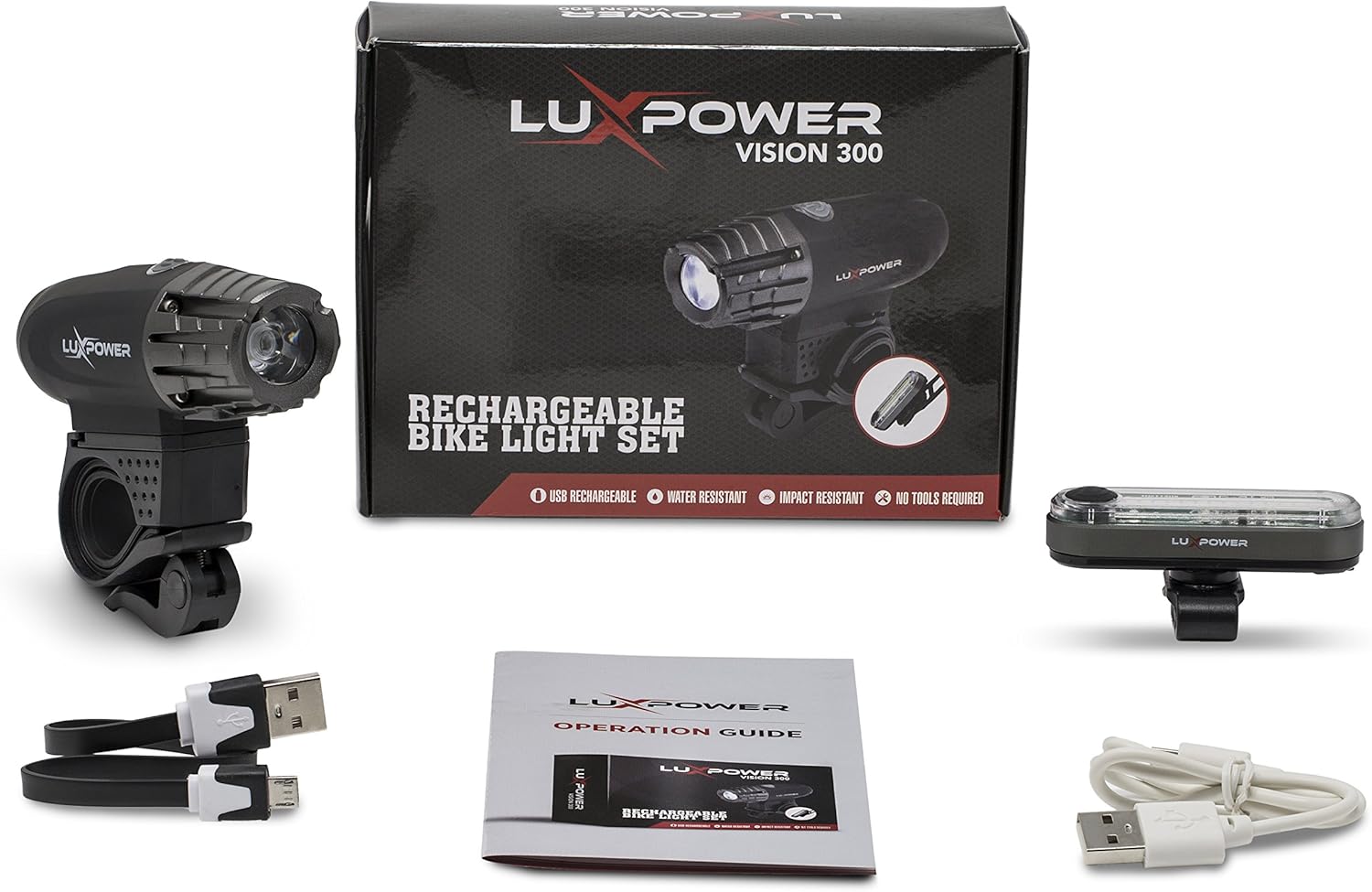
Image 2.1: All components included in the LuxPower Bike Light Set package.
3. Setup and Installation
3.1 Headlight Installation
- Attach the headlight mounting bracket to your bicycle's handlebar. Ensure it is securely fastened and positioned centrally.
- Slide the LuxPower headlight onto the bracket until it clicks into place.
- Adjust the angle of the headlight to illuminate the path ahead without blinding oncoming traffic.

Image 3.1: The LuxPower headlight securely installed on a bicycle handlebar.
3.2 Taillight Installation
- Wrap the taillight mounting strap around your bicycle's seat post.
- Secure the strap firmly, ensuring the taillight is facing directly backward.
- Adjust the position to ensure maximum visibility from the rear.

Image 3.2: The LuxPower taillight installed on a bicycle seat post.
4. Operating Instructions
4.1 Power On/Off
- To turn on the light, press and hold the power button located on the top of the light unit for 2 seconds.
- To turn off the light, press and hold the power button again for 2 seconds.
4.2 Mode Selection
Once the light is on, short press the power button to cycle through the available lighting modes:
- High: Maximum brightness for optimal visibility.
- Medium: Balanced brightness for general use.
- Low: Reduced brightness for extended battery life.
- Flash/Strobe: Flashing pattern for increased daytime visibility or emergency signaling.
4.3 Charging the Lights
Both the headlight and taillight are USB rechargeable. Use the provided USB cables for charging.
- Locate the USB charging port on each light unit. It is typically covered by a rubber flap to protect against water.
- Gently open the rubber flap.
- Connect one end of the USB charging cable to the light's port and the other end to a USB power source (e.g., computer, wall adapter, power bank).
- The indicator light will show the charging status (e.g., red for charging, green or blue for fully charged).
- Once fully charged, disconnect the cable and firmly close the rubber flap to maintain water resistance.

Image 4.1: Both the headlight and taillight are USB rechargeable.

Image 4.2: The LuxPower headlight connected to a USB power source for charging.

Image 4.3: The LuxPower taillight connected to a USB power source for charging.
5. Maintenance
- Cleaning: Wipe the light units with a soft, damp cloth. Do not use abrasive cleaners or solvents.
- Battery Care: To prolong battery life, avoid fully discharging the lights frequently. Recharge them regularly, especially if they will be stored for an extended period.
- Storage: Store the lights in a cool, dry place away from direct sunlight and extreme temperatures.
- Water Resistance: Ensure the USB port rubber flap is always securely closed when not charging to maintain water resistance.
6. Troubleshooting
| Problem | Possible Cause | Solution |
|---|---|---|
| Light does not turn on. | Battery is depleted. | Charge the light using the provided USB cable. |
| Light does not charge. | USB cable or power source issue. | Try a different USB cable or a different USB power source. Ensure the cable is fully inserted. |
| Light flickers or dims unexpectedly. | Low battery. | Recharge the light. |
| Mounting bracket feels loose. | Bracket not tightened sufficiently. | Ensure the bracket is securely tightened to the handlebar/seat post. |
7. Specifications
| Feature | Specification |
|---|---|
| Brand | LuxPower |
| Model Number | LP-BL300 |
| Brightness | 300 Lumens (Headlight) |
| Number of Settings | 4 (High, Medium, Low, Flash/Strobe) |
| Material | Stainless Steel |
| Water Resistance Level | Water Resistant (IPX6) |
| Mounting Type | Handlebar Mount (Headlight), Seat Post Mount (Taillight) |
| UPC | 755702029490 |
8. Warranty and Support
LuxPower products are manufactured to high-quality standards. For information regarding warranty coverage, returns, or technical support, please refer to the contact information provided on the product packaging or visit the official LuxPower website.
Please retain your proof of purchase for any warranty claims.