
Introduction
Thank you for choosing the Brookstone Big Blue True Wireless Earbuds. These earbuds are designed to provide a seamless audio experience, allowing you to enjoy music and manage calls wirelessly. This manual provides essential information on setting up, operating, maintaining, and troubleshooting your new earbuds.
Key Features:
- True wireless design for freedom of movement.
- Rich, full-range audio with deep bass.
- Integrated microphone with Qualcomm cVc noise-cancelling technology for clear calls.
- Bluetooth connectivity for easy pairing with your smartphone or device.

Image: Brookstone Big Blue True Wireless Earbuds in their black charging case.
Setup
What's in the Box
- Brookstone Big Blue True Wireless Earbuds (Left and Right)
- Wireless Charging Case
Charging the Earbuds and Case
- Place both earbuds into the charging case. Ensure they are seated correctly.
- Connect the charging case to a USB power source using the provided charging cable.
- The indicator lights on the case and earbuds will show charging status. Refer to the specific light patterns in your product packaging for details.
- Allow sufficient time for a full charge before first use.
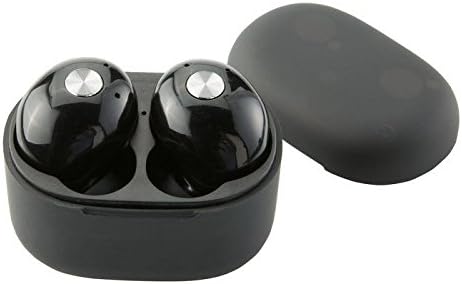
Image: Close-up view of the earbuds within the charging case, illustrating proper placement for charging.
Bluetooth Pairing
- Ensure the earbuds are charged.
- Remove both earbuds from the charging case. They will automatically enter pairing mode, indicated by flashing LED lights (refer to your product packaging for specific light patterns).
- On your smartphone or Bluetooth-enabled device, go to the Bluetooth settings.
- Search for new devices and select "BIG BLUE" (or similar name) from the list.
- Once connected, the earbud indicator lights will change, typically turning solid or off.
- If pairing fails, place the earbuds back in the case, close it, and repeat the steps.
Operating Instructions
Power On/Off
- Power On: Remove the earbuds from the charging case. They will automatically power on and attempt to connect to the last paired device.
- Power Off: Place the earbuds back into the charging case and close the lid. They will automatically power off and begin charging.
Music Playback and Call Management
The earbuds feature integrated controls for media playback and call handling. Specific functions may vary slightly; refer to your product's quick start guide for exact button presses.
- Play/Pause: Typically a single press on either earbud.
- Next Track: Often a double press on the right earbud.
- Previous Track: Often a double press on the left earbud.
- Answer/End Call: A single press on either earbud during an incoming call or active call.
- Reject Call: A long press on either earbud during an incoming call.
- Activate Voice Assistant: A triple press or long press on an earbud (check specific model instructions).

Image: A man wearing a Brookstone Big Blue True Wireless Earbud, demonstrating typical use.
Maintenance
Cleaning
- Use a soft, dry, lint-free cloth to clean the earbuds and charging case.
- Do not use abrasive cleaners, solvents, or aerosol sprays.
- Gently clean ear tips and speaker grilles with a dry cotton swab to remove earwax or debris.
Storage
- Always store the earbuds in their charging case when not in use to protect them and keep them charged.
- Store in a cool, dry place, away from extreme temperatures and direct sunlight.
Battery Care
- To prolong battery life, avoid fully discharging the earbuds and case frequently.
- Charge the device regularly, even if not in frequent use.
Troubleshooting
| Problem | Possible Solution |
|---|---|
| Earbuds not pairing with device. |
|
| Sound skipping or cutting out. |
|
| One earbud has no sound. |
|
| Earbuds not charging. |
|
Specifications
| Feature | Detail |
|---|---|
| Model Number | BIG BLUE |
| Wireless Communication Technology | Bluetooth |
| Included Components | Wireless Charging Case |
| Material | Plastic |
| Control Type | Media Control |
| Cable Feature | Without Cable |
| Item Weight | 2.4 ounces (0.15 Pounds) |
| Product Dimensions | 3.35 x 1.57 x 5.71 inches |
| Special Features | Microphone Included, Noise Cancellation, Wireless |
| Color | Black |
| Form Factor | In Ear |
| UPC / GTIN | 883594061516 |
Warranty Information
Brookstone products are designed with quality and reliability in mind. For specific warranty details regarding your Big Blue True Wireless Earbuds, please refer to the warranty card included in your product packaging or visit the official Brookstone website. Keep your proof of purchase for any warranty claims.
Customer Support
If you encounter any issues not covered in this manual or require further assistance, please contact Brookstone customer support. Contact information can typically be found on the product packaging or the official Brookstone website.


