
Retevis RT95
Retevis RT95 Dual Band Mobile Radio Instruction Manual
Model: RT95
Introduction
Thank you for choosing the Retevis RT95 Dual Band Mobile Radio. This manual provides essential information for the proper setup, operation, and maintenance of your device. The RT95 is a compact and versatile mobile transceiver designed for reliable long-range communication in various environments, including vehicles like trucks, jeeps, and RVs.
Key features include a 180-degree rotatable TFT color display, adjustable microphone gain, dual speakers, and compatibility with CHIRP software for easy programming. It supports dual-band monitoring (2m/70cm) and offers VFO mode for quick frequency adjustments without a computer. The robust design incorporates a built-in heat dissipation fan, shockproof and dustproof structure, and a voltage protection system for enhanced durability.
Package Contents
Please verify that all items listed below are included in your package:
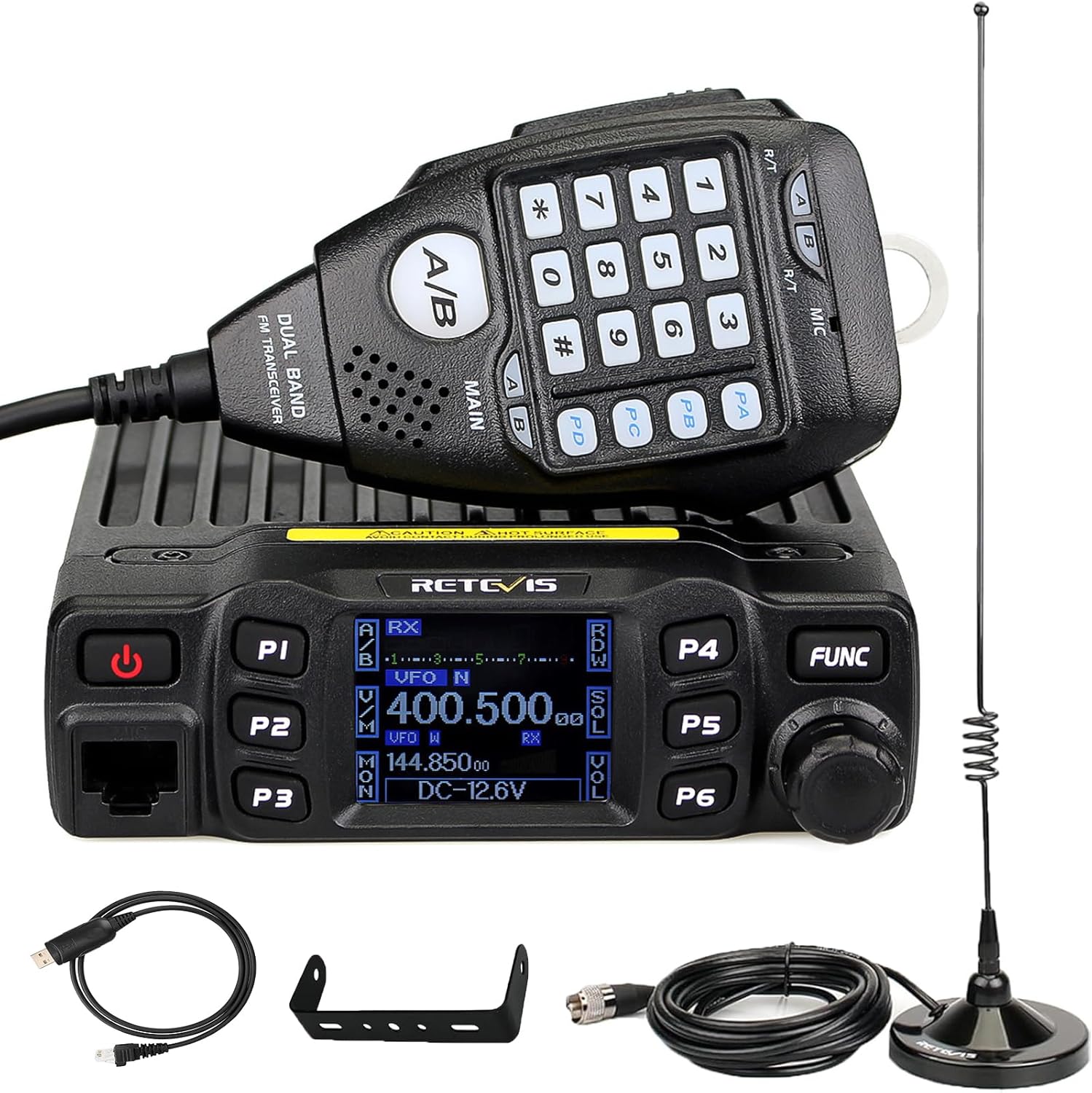
- 1 x Retevis RT95 Mobile Radio
- 1 x Power Cable
- 1 x Handheld Microphone
- 1 x Pack of Screws and Accessories
- 1 x User’s Manual
- 1 x Magnet Mount Antenna

Setup
1. Physical Installation
The compact size of the RT95 (approximately 7.87 x 7.28 x 3.35 inches) allows for flexible installation in various vehicles. Use the provided main bracket and screws to securely mount the radio. Ensure adequate ventilation around the unit, especially given its built-in heat dissipation features.
2. Power Connection
- Connect the provided power cable to the power input on the rear of the RT95 radio.
- Connect the other end of the power cable to a 13.8V DC power source. Ensure proper polarity (red to positive, black to negative) to prevent damage. The radio features a voltage protection system.
3. Antenna Connection
Connect the magnet mount antenna to the SO-239 antenna connector on the rear of the radio. Position the antenna on a metallic surface for optimal performance.
4. Microphone Connection
Plug the handheld microphone into the microphone/program jack on the front panel of the radio.
Operating Instructions
1. Powering On/Off
Press the red power button on the front panel to turn the radio on or off.
2. Display and Controls
The RT95 features a 180-degree rotatable TFT color screen, allowing for optimal viewing angles. The LCD brightness can be adjusted for clear visibility in various lighting conditions. Front panel buttons and microphone buttons are illuminated for night operation.


3. Frequency and Channel Selection
The RT95 is a dual-band mobile transceiver, capable of displaying and monitoring two frequencies simultaneously (2m/70cm bands). It supports 200 storage channels.

- VFO Mode: For instant frequency adjustment without a computer, use the VFO mode. Rotate the Channel switch/Push button/Key lock knob to change frequencies.
- Channel Mode: Access stored channels.
- Switching Bands: Use the A/B button on the handheld microphone to switch between the main operating bands.
4. Programming and Customization
The RT95 is compatible with CHIRP open-source software for easy import/export of channel parameters. You can also program many settings directly from the radio's front panel.

To access the main menu for deeper settings:
- Press and hold the FUNC button on the front panel.
- Use the Channel switch/Push button/Key lock knob to navigate through the menu options (e.g., FUNC MENU, CHAN MENU, MINI KEY, HAND KEY, DTMF MENU).
- Press the knob to select a menu.
- Within a menu, rotate the knob to adjust settings and press to confirm.
- Press the P3 button to go back to the previous menu.
Common programmable settings include CTCSS/DCS tones, DTMF, 5Tone, power adjustment, squelch level, display mode (frequency/channel/name), and auto power off (APO).
5. Audio Features
The RT95 features built-in dual speakers (on the radio unit and microphone) for clear and penetrating sound quality. Adjust the microphone gain level to ensure clear and interference-free calls.

The radio also supports VOX (Voice-Operated Transmit) for hands-free operation, enhancing safety during mobile use.

6. Video Demonstration: RT95 Function Introduction and Operation
Maintenance
- Cleaning: Use a soft, dry cloth to clean the radio's exterior. Avoid using harsh chemicals or abrasive cleaners.
- Heat Dissipation: Ensure the built-in heat dissipation fan and heat sink fins are free from dust and obstructions to maintain continuous and stable operation, especially during high power output.
- Environmental Protection: While the radio has a shockproof and dustproof structure, it is not water resistant. Avoid exposing the unit to moisture or extreme temperatures.
- Firmware Updates: Check the official Retevis website for any available firmware updates to ensure optimal performance and access to new features.
Troubleshooting
| Problem | Possible Cause | Solution |
|---|---|---|
| Radio does not power on. | No power, incorrect power connection, blown fuse. | Check power cable connection. Verify 13.8V DC power source. Check and replace the fuse if necessary. |
| No audio from speaker. | Volume too low, squelch too high, speaker setting incorrect. | Increase volume. Adjust squelch level. Check speaker output setting in FUNC MENU (SPK: MAIN/M&H). |
| Cannot transmit or receive. | Incorrect frequency/channel, antenna not connected, power level too low. | Verify frequency and channel settings. Ensure antenna is securely connected. Check power output setting. |
| Display is dim or unreadable. | LCD brightness setting. | Adjust LCD brightness in the FUNC MENU. |
| Radio overheats. | Poor ventilation, prolonged high power transmission. | Ensure adequate airflow around the unit. Reduce transmission time or power output if necessary. |
Specifications
| Feature | Detail |
|---|---|
| Model Number | RT95 |
| Product Dimensions | 7.87 x 7.28 x 3.35 inches |
| Item Weight | 2.2 pounds (1 Kilograms) |
| Number of Channels | 200 |
| Frequency Range | VHF, UHF (2m/70cm bands) |
| Talking Range Maximum | 5 Kilometer |
| Tuner Technology | Dual band |
| Voltage | 13.8 Volts |
| Water Resistance Level | Not Water Resistant |
| Special Features | Dual Band, Dual Band Mobile Transceiver, Mobile Two Way Radio, 180 Degree Rotatable LCD Display, Mic Gain, CHIRP Compatible, DTMF, 5Tone, Built-in Heat Dissipation Fan, Shockproof, Dustproof, Voltage Protection System, Emergency Alarm. |
Warranty and Support
For warranty information, technical support, or service inquiries regarding your Retevis RT95 Mobile Radio, please refer to the official Retevis website or contact their customer service directly. Details can typically be found on the product packaging or the official brand store.
Retevis Direct: Visit the Retevis Store on Amazon
Related documentsRT95


Ask a question about this manual
Ask about setup, troubleshooting, compatibility, parts, safety, or missing instructions. Manuals+ will review the question and use this page’s manual context to help answer it.