
EASYGUARD EC002-P3
EASYGUARD EC002-P3 PKE Car Alarm System User Manual
Model: EC002-P3 | Brand: EASYGUARD
Introduction
This manual provides detailed instructions for the installation, operation, and maintenance of your EASYGUARD EC002-P3 Passive Keyless Entry (PKE) car alarm system. This system integrates remote engine start, push button start/stop, and touch password entry functions to enhance vehicle convenience and security. It is designed for 12V petrol vehicles. For diesel vehicles with engine cranking/starting times over 3 seconds, an additional timer delay module may be required.
Key Features
- Push Button Start/Stop
- Passive Keyless Entry (PKE)
- Manual Arm/Lock & Disarm/Unlock
- Mute Alarm/Audible Alarm
- Remote Trunk Release
- Panic Mode
- Remote Engine Start/Stop
- Valet Mode On/Off
- Anti-Hijacking
- Central Door Locking Automation
- Touch Password Entry to Lock/Unlock the Car
- Emergency Override
- Automatic Window Closing (optional, requires extra window closer module)
- Password Revise & Reset
- Parameter Prolong Setting
- Programming Method
Included Components

Detailed Components
- Control Module: The central processing unit of the alarm system.

The main control module for the EC002-P3 system. - Key Fobs/Transmitters (2x): Used for remote control functions.
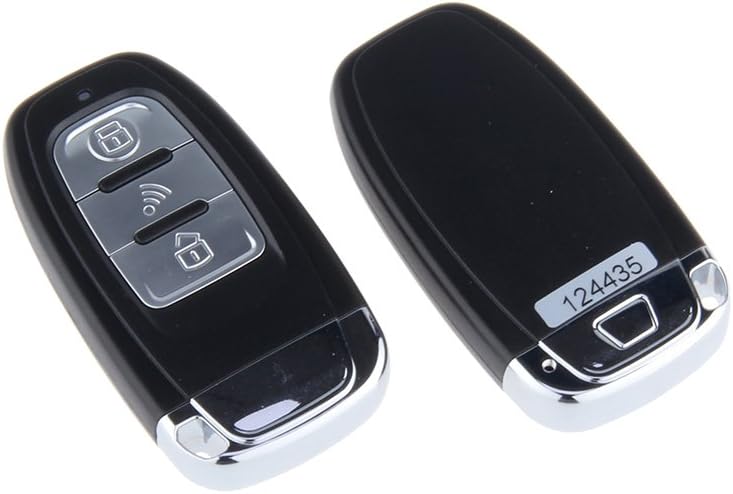
Two key fobs are included for remote operation. 
Illustration of key fob buttons: LED indicator, Arm/Panic mode, Start button/Trunk release, Disarm, and a slot for a spare key blade. - Push Start/Stop Button: For engine ignition.
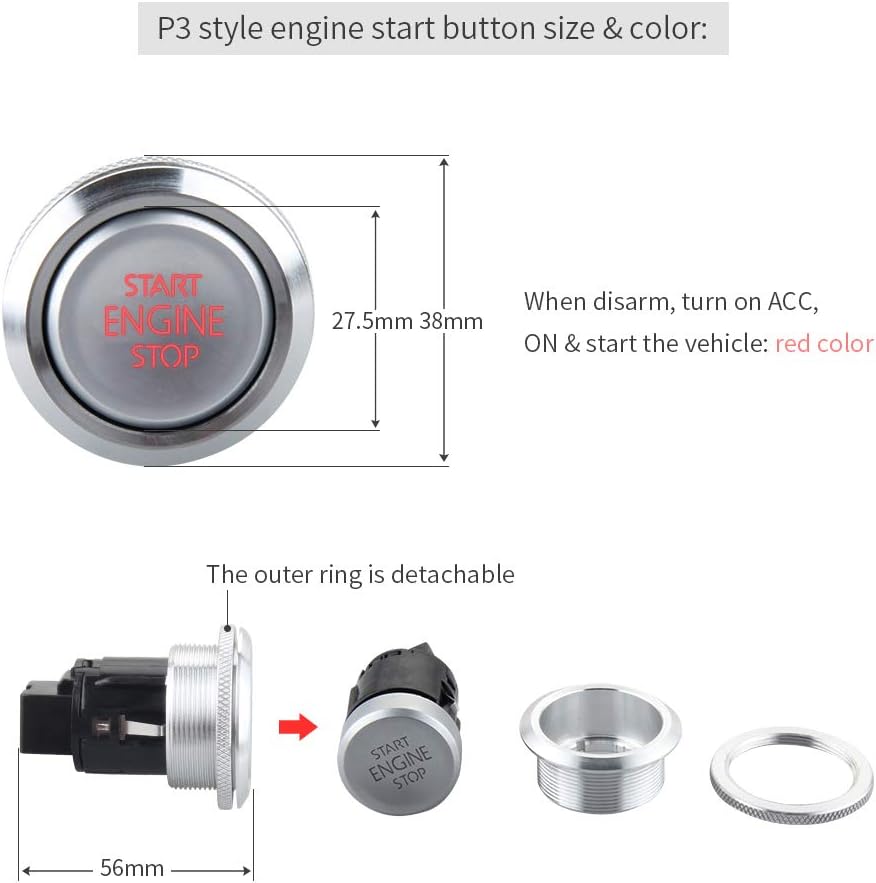
Dimensions and color indication of the P3 style engine start button. It illuminates red when disarmed, ACC, ON, or starting the vehicle. The outer ring is detachable. - PKE Antennas: For passive keyless entry functionality.
- Wiring Harnesses: Various harnesses for connecting components.
- Touch Password Keypad: For secure entry without a key fob.
- Siren: For audible alarm notifications.
- Shock Sensor: Detects impacts to the vehicle.
- LED Indicator: Visual status feedback.
- Reset Switch: For system reset.
- Button Hole Driller & Ignition Lock Cover: For installation of the push start button.

Included button hole driller (left) and ignition lock cover (right) for installation.
Setup and Installation Notes
Professional car alarm installer installation is required for this system. Incorrect installation can lead to vehicle damage or system malfunction. Wiring diagrams are available upon request.
- Bypass Module: If your vehicle has a chip immobilizer in its factory OEM key fob, an extra bypass module (e.g., ASIN: B00MEHBVIC) is required.
- Steering Lock: If your vehicle has a steering lock, it must be unlocked or released during installation.
- PKE Antenna Placement: Proper placement of the PKE antennas is crucial for optimal passive keyless entry performance.
PKE Antenna Installation Guide
Operating Instructions
Passive Keyless Entry (PKE)
The PKE feature automatically locks or unlocks your car doors as you approach or walk away from the vehicle with the key fob in hand or pocket.
- Automatic Unlock: When you approach the vehicle within 1-3 meters with the key fob, the doors will automatically unlock.
- Automatic Lock: When you walk away from the car for 2-3 meters with the key fob, the doors will automatically lock.

Remote Engine Start/Stop
This feature allows you to start or stop your vehicle's engine remotely, useful for pre-cooling in summer or pre-warming in winter.
- To Remote Start: Press and hold the remote start button on your key fob for approximately 3 seconds. The vehicle's lights will flash, and the engine will start.
- To Remote Stop: Press and hold the remote start button again for approximately 3 seconds. The engine will shut off.

Push Button Start/Stop
Once inside the vehicle with the key fob, you can start or stop the engine using the push button.
- ACC/ON Mode: Press the push button once for ACC, press again for ON.
- Engine Start: With your foot on the brake pedal, press the push button to start the engine.
- Engine Stop: With your foot on the brake pedal, press the push button to stop the engine.
Touch Password Entry
This feature allows you to unlock or lock your car by entering a pre-set password on the touch keypad, providing an alternative entry method.
Additional Operating Videos
Maintenance
To ensure the longevity and optimal performance of your EASYGUARD EC002-P3 system, consider the following maintenance tips:
- Battery Replacement: The key fobs require 2 CR2 batteries (included). Replace them when the indicator light dims or range decreases.
- Regular Checks: Periodically check all wiring connections for security and integrity.
- Keep Dry: Protect the control module and key fobs from moisture and extreme temperatures.
- Software Updates: Consult with a professional installer for any available software updates for the system.
Troubleshooting
If you encounter issues with your EASYGUARD EC002-P3 system, try the following basic troubleshooting steps. For complex issues, professional assistance is recommended.
- System Not Responding: Check key fob batteries. Ensure the key fob is within range. Try using the touch password entry.
- Remote Start Failure: Ensure all doors are closed, the hood is latched, and the vehicle is in park. Check for any active alarm triggers.
- PKE Malfunction: Verify PKE antennas are correctly installed and not obstructed. Ensure key fob batteries are strong.
- False Alarms: Adjust the sensitivity of the shock sensor. Ensure all doors, hood, and trunk are properly closed.
- Emergency Override: In case of system malfunction preventing vehicle operation, use the emergency override procedure detailed in the full installation guide.
Specifications
| Feature | Detail |
|---|---|
| Item Weight | 2.83 pounds |
| Product Dimensions | 9.45 x 7.87 x 3.94 inches |
| Item Model Number | EC002P-P3 |
| Batteries | 2 CR2 batteries required (included) |
| Wireless Remote | Yes |
| Maximum PKE Range | 2 Meters (approx. 6-9 feet) |
| Manufacturer | zhongshan easyguard electronics co.,ltd |
| First Available Date | November 9, 2017 |
Warranty and Support
For warranty information, technical support, or to request a detailed wiring diagram, please contact EASYGUARD customer service through your purchase platform or visit the official EASYGUARD store. Professional installation is highly recommended to ensure proper functionality and to avoid voiding any warranty.
Legal Disclaimer: This item is intended for purchase and use by individuals 18 years and older. Keep the item and its components away from children.
Related documentsEC002-P3


Ask a question about this manual
Ask about setup, troubleshooting, compatibility, parts, safety, or missing instructions. Manuals+ will review the question and use this page’s manual context to help answer it.