Download PDFFree PDF. The Save button below keeps a bookmark and private notes in your account.
APC BR1350MS UPS User Manual
Model: BR1350MS | Brand: APC
Introduction
This user manual provides essential information for the safe and efficient operation of your APC UPS 1350VA Sine Wave UPS Battery Backup and Surge Protector, model BR1350MS. This device offers guaranteed power and surge protection for wireless networks, computers, and other electronics, ensuring continuous operation during power outages and protection against voltage fluctuations, surges, and spikes.
Setup and Installation
1. Unpacking and Battery Connection
Upon unpacking, ensure all components are present: the UPS unit, user manual, and USB data cable. The UPS battery is disconnected for safety during shipping. Follow the instructions provided on the yellow sticker to connect the internal battery before initial use.
Image: Front-angled view of the APC BR1350MS UPS unit, displaying its LCD screen and front ports.
2. Connecting Devices
The BR1350MS features 10 NEMA 5-15R outlets. Six of these provide battery backup and surge protection, while four offer surge protection only. Connect critical equipment such as computers, monitors, and network devices to the battery backup outlets. Non-critical accessories like printers can be connected to surge-only outlets.
Battery Backup & Surge Protection Outlets (6): For computers, external hard drives, routers, and other essential electronics.
Surge Protection Only Outlets (4): For devices that do not require battery backup but need surge protection.
USB Charger Ports: (1) USB-C and (1) Type-A port (15W shared) are available on the front for charging mobile devices.
Image: The APC BR1350MS UPS unit positioned next to a desktop computer setup, illustrating its integration into a workspace.
3. Initial Charging and Software Installation
Plug the UPS into a wall outlet. Allow the unit to charge for at least 24 hours before connecting any devices to ensure full battery capacity. For advanced management and monitoring, install the PowerChute UPS management software. A dedicated data port is provided for connection (compatible with Windows 10, 22H2 Pro, 11 Pro; Mac OS uses native "Energy Saver" settings).
Operating Instructions
1. Power On/Off
Press the power button on the front panel to turn the UPS on or off. The LCD display will illuminate, indicating the unit's status.
2. LCD Display and Indicators
The front LCD display provides real-time information about the UPS status. You can cycle through various metrics by pressing the display button. Key indicators include:
Load: Displays the current power draw in watts and as a percentage of the UPS's capacity.
AC Voltage: Shows the incoming utility voltage.
Runtime: Estimates the remaining battery runtime in minutes during a power outage.
Hertz: Indicates the frequency of the AC power.
Battery Level: Shows the current charge level of the internal battery.
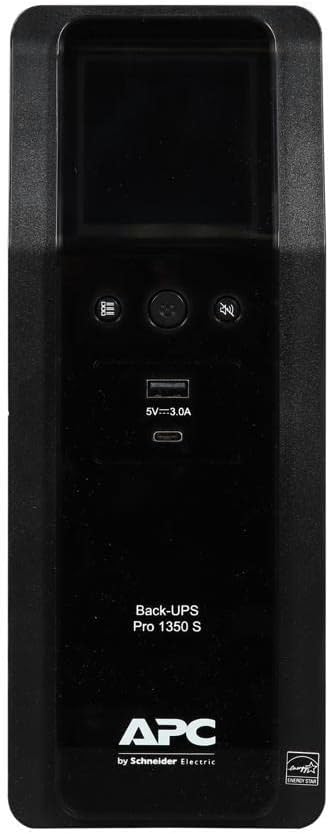
Image: Direct front view of the APC BR1350MS UPS, highlighting the LCD screen and control buttons.
3. Automatic Voltage Regulation (AVR)
The Sinewave UPS features Automatic Voltage Regulation (AVR), which automatically corrects minor voltage fluctuations (sags and surges) without switching to battery power. This protects connected equipment from unstable power conditions and extends battery life.
4. Battery Backup Function
In the event of a power outage, the UPS will automatically switch to battery power, providing continuous power to connected devices. The unit will emit an audible alarm to indicate it is operating on battery. The estimated runtime will be displayed on the LCD. During an extended outage, save your work and safely shut down your equipment before the battery is depleted.
Video: A demonstration of the UPS unit's operation, showing its display and functionality during a simulated power event. This video illustrates how the unit responds to power fluctuations and provides backup power.
Maintenance
1. Battery Replacement
The BR1350MS features a user-replaceable battery to prolong the life of your UPS. The recommended replacement battery model is APCRBC161 (sold separately). Refer to the detailed instructions in the full user manual for safe battery replacement procedures. Typically, batteries last 3-5 years depending on usage and environmental conditions.
2. Cleaning
Periodically clean the exterior of the UPS with a dry, soft cloth. Ensure vents are clear of dust and debris to maintain proper airflow and cooling.
3. Battery Recycling
When replacing the battery, dispose of the old battery responsibly. APC provides information about finding local battery recyclers. In some cases, you may be able to ship the old battery back to APC for recycling at no charge.
Troubleshooting
If you encounter issues with your UPS, refer to the following common troubleshooting steps:
Problem
Possible Cause
Solution
UPS does not turn on.
Battery not connected or low charge.
Ensure battery is properly connected. Charge the UPS for 24 hours.
UPS beeps continuously.
Operating on battery power during an outage or overload.
Save work and shut down equipment. Reduce connected load if overloaded.
Connected devices lose power.
Overload, battery depleted, or faulty outlet.
Check load percentage on LCD. Ensure devices are plugged into battery backup outlets.
USB charging port not working.
Device incompatibility or port issue.
Try a different USB cable or device. Ensure the UPS is powered on.
For more detailed troubleshooting or persistent issues, please contact APC customer support.
USB Charger Ports: (1) USB-C, (1) Type-A (15W shared)
Input Voltage: 120 Volts
Battery Type: Sealed Lead Acid
Product Dimensions: 14.49 x 3.94 x 10.24 inches (L x W x H)
Item Weight: 25.7 pounds
Color: Black
Manufacturer: APC
Country of Origin: Philippines
Image: The APC BR1350MS UPS unit shown with its key dimensions (length, width, height) indicated.
Warranty and Equipment Protection Policy
APC products are backed by a comprehensive warranty. In the rare event of a product defect, APC offers reliable warranty service. Additionally, the BR1350MS is covered by an Equipment Protection Policy, which provides financial protection for connected equipment if it is damaged by a power event while properly connected to the UPS. Please refer to the official APC website or the full warranty document for specific terms, conditions, and claim procedures. Note that using non-APC power bars in the output of the unit may void the Equipment Protection Policy.
Customer Support
For technical assistance, product inquiries, or warranty claims, please contact APC customer support. They offer various support channels, including online chat and phone support, to assist you promptly.
Online Support: Visit the official APC website for FAQs, documentation, and live chat support.
Phone Support: Refer to the APC website or your product packaging for regional contact numbers.
Ask about setup, troubleshooting, compatibility, parts, safety, or missing instructions. Manuals+ will review the question and use this page’s manual context to help answer it.