
Introduction
Thank you for choosing the Capello Extra Large Display Digital Alarm Clock. This manual provides detailed instructions to help you set up, operate, and maintain your new alarm clock. Designed for clarity and ease of use, this clock features a large digital display and a stylish wood-grain finish, making it a perfect addition to any bedroom or living space.
Product Overview
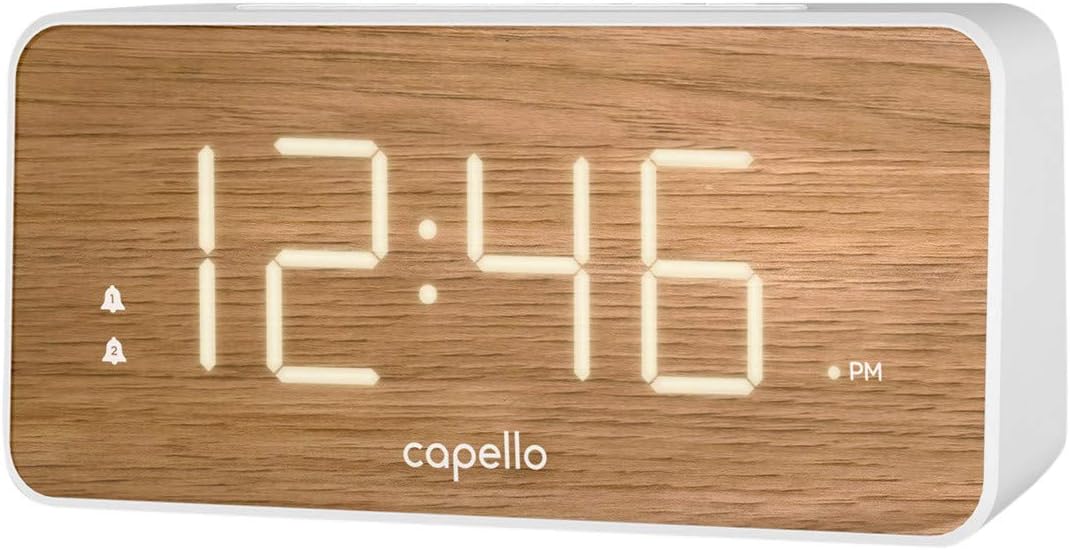
The Capello Digital Alarm Clock (Model: 43213-14795) features an extra-large digital display for easy readability from across the room. Its elegant white and pine D-frame design with a wood-grain finish complements various interior styles. The clock is equipped with intuitive controls for setting time and alarms, ensuring a user-friendly experience.
Setup
Power Connection
The alarm clock requires a continuous power supply via its included AC adapter for full functionality. Insert the adapter into a standard wall outlet and connect it to the clock's power input port. For backup during power outages, install 2 AAA batteries (not included) into the battery compartment located on the underside of the unit. These batteries will preserve time and alarm settings but will not power the display or alarm functions during an outage.
Setting the Time
- Press and hold the TIME SET button (or similar button, refer to specific button labels on your unit) until the hour digits begin to flash.
- Use the HOUR button to adjust the hour. Pay attention to the AM/PM indicator.
- Press the TIME SET button again to move to the minute digits.
- Use the MIN button to adjust the minutes.
- Press TIME SET once more to confirm and exit time setting mode.
Setting the Alarm
This clock supports dual alarms.
- Press and hold the ALARM 1 button until the alarm hour digits flash.
- Use the HOUR and MIN buttons to set the desired alarm time for Alarm 1.
- Press ALARM 1 again to confirm. The alarm indicator for Alarm 1 will illuminate.
- Repeat steps 1-3 for ALARM 2 if a second alarm is desired.
- To activate/deactivate an alarm, simply press the corresponding ALARM 1 or ALARM 2 button. The alarm indicator will show its status.
Operating Instructions
Snooze Function
When the alarm sounds, press the large SNOOZE button located on the top of the clock. This will temporarily silence the alarm for approximately 9 minutes, allowing for extra rest. The alarm will sound again after the snooze period ends.
Stopping the Alarm
To turn off the alarm completely after it sounds, press the corresponding ALARM 1 or ALARM 2 button. The alarm indicator will turn off, signifying that the alarm is deactivated for the next day.
Display Brightness
The display brightness can be adjusted to suit your preference. Locate the LIGHT or DIMMER button (often represented by a sun icon) on the top panel. Press this button repeatedly to cycle through different brightness levels (e.g., High, Medium, Low, Off).
Maintenance
To ensure the longevity and optimal performance of your Capello Digital Alarm Clock, follow these simple maintenance guidelines:
- Cleaning: Wipe the clock's surface with a soft, dry cloth. Do not use abrasive cleaners, waxes, or solvents as they may damage the finish.
- Placement: Place the clock on a stable, flat surface away from direct sunlight, heat sources, and excessive moisture.
- Battery Replacement: Replace backup batteries annually or when the display shows signs of dimming during a power outage. Ensure correct polarity when inserting new batteries.
Troubleshooting
If you encounter any issues with your alarm clock, please refer to the following common problems and solutions:
| Problem | Possible Solution |
|---|---|
| Display is blank or dim. | Ensure the AC adapter is securely plugged into both the clock and a working wall outlet. Check the display brightness setting using the LIGHT/DIMMER button. |
| Alarm does not sound. | Verify that the alarm is activated (alarm indicator is lit). Ensure the alarm time is set correctly (AM/PM). Check if the volume is set to an audible level. |
| Time is incorrect. | Reset the time following the 'Setting the Time' instructions. If using backup batteries, ensure they are fresh and correctly installed. |
| Buttons are unresponsive. | Unplug the AC adapter, remove backup batteries, wait for 1 minute, then reconnect power. This performs a soft reset. |
Specifications
- Brand: Capello
- Model Number: 43213-14795
- Color: White
- Display Type: Digital
- Style: Modern
- Special Feature: Large Display, Alarm
- Product Dimensions: 8.74"W x 5.83"H
- Power Source: AC Powered (with battery backup for settings)
- Material: Plastic
- Item Weight: 1.01 Pounds
Official Product Videos
No official product videos from the seller are available for this item at this time.
Warranty and Support
For warranty information and customer support, please refer to the manufacturer's official documentation included with your product or visit the Capello website. Keep your purchase receipt for warranty claims.