
1. Introduction
This manual provides instructions for the WishRing RC 1:10 Roof Luggage Rack with integrated LED Light Bar, Model 515. This accessory is designed to enhance the appearance and functionality of 1/10 and 1/8 scale RC rock crawlers and rally vehicles, including models like Tamiya CC01, CR01, D90, and Axial SCX10. Constructed from durable aluminum alloy, it features four white LED lights for improved visibility and realism.
The package includes one set of the luggage rack with four pre-installed white LED lights.

Figure 1: Overview of the WishRing RC Roof Luggage Rack with LED Light Bar. This image displays the complete black aluminum alloy roof rack with its integrated four-light LED bar and wiring.
2. Setup and Installation
The WishRing RC Roof Luggage Rack is designed for straightforward installation on compatible RC vehicle bodies. Basic assembly of the rack components and secure mounting to your vehicle's roof are required.
2.1 Components Overview

Figure 2: Side view of the roof rack, highlighting the wiring for the LED lights. The red and black wires are visible, leading to a connector.
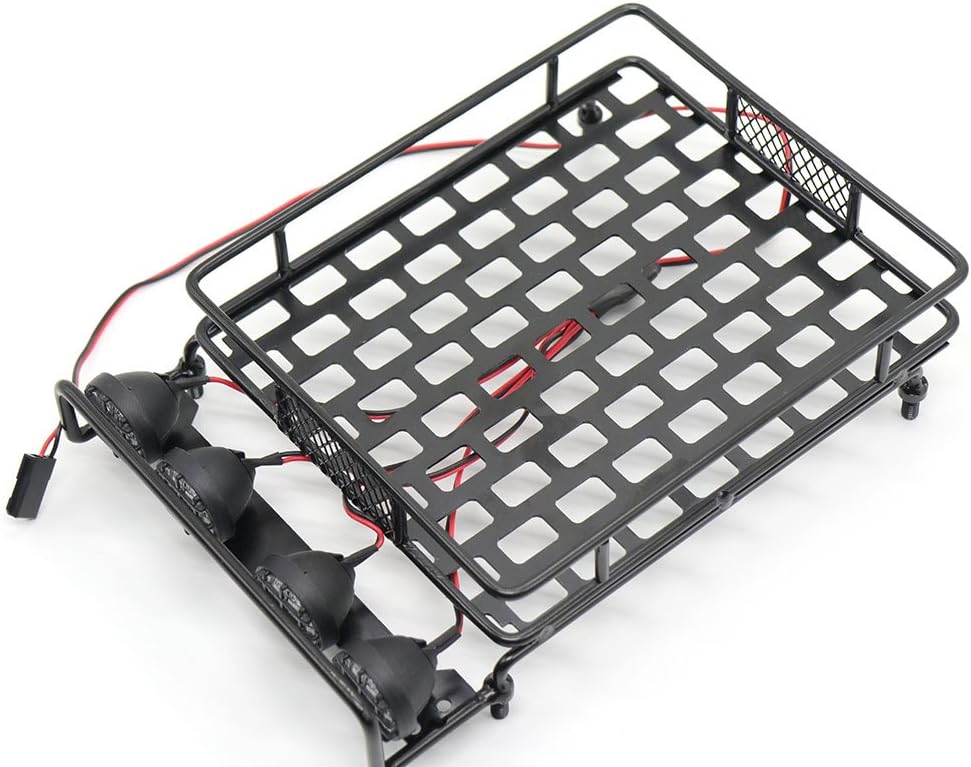
Figure 3: Top-down perspective of the roof rack, showing the integrated wiring for the LED light bar. This view helps in understanding cable routing.
2.2 Mounting the Rack
- Prepare the Vehicle Body: Identify suitable mounting points on your RC vehicle's roof. Depending on your specific model, drilling small holes may be necessary to secure the rack.
- Position the Rack: Place the luggage rack on the roof, aligning it with the chosen mounting points.
- Secure the Rack: Use appropriate screws and hardware (not included, or use existing hardware if compatible) to firmly attach the rack to the vehicle body. Ensure all connections are tight to prevent loosening during operation. Note: Some users have reported issues with the provided small screws stripping; exercise caution during tightening.
2.3 Wiring the LED Lights
The LED light bar is powered by connecting its wiring harness to your RC vehicle's receiver.
- Locate Receiver: Identify an available power port on your RC vehicle's receiver.
- Connect Wiring: Plug the LED light bar's connector into the designated power port on the receiver. Ensure correct polarity (red wire to positive, black wire to negative).
- Cable Management: Route the wiring neatly and securely to prevent interference with moving parts or damage during vehicle operation.
Video 1: Installation demonstration of an RC roof rack with LED lights on an Axial SCX10 1/10 scale RC crawler car. This video illustrates the process of mounting the rack and connecting the LED lights.
3. Operating the LED Light Bar
Once properly connected to the receiver, the LED light bar will illuminate when the RC vehicle's power system is active. There is typically no separate switch for the lights; they operate in conjunction with the vehicle's main power.

Figure 4: The RC roof luggage rack with its four LED lights illuminated, demonstrating their brightness and functionality.
4. Maintenance
To ensure the longevity and optimal performance of your WishRing RC Roof Luggage Rack and LED Light Bar, follow these maintenance guidelines:
- Cleaning: Regularly clean the aluminum alloy rack and LED light lenses with a soft, damp cloth. Avoid abrasive cleaners or solvents that could damage the finish or plastic components.
- Inspection: Periodically check all mounting screws and wiring connections for tightness and signs of wear. Re-tighten any loose screws and inspect wires for fraying or damage.
- Storage: When not in use, store the RC vehicle in a clean, dry environment to protect the rack and electronics from dust and moisture.
5. Troubleshooting
If you encounter issues with your RC Roof Luggage Rack or LED Light Bar, refer to the following common troubleshooting steps:
- LED Lights Not Illuminating:
- Verify that the wiring harness is securely connected to the RC receiver's power port.
- Check the polarity of the connection (red to positive, black to negative).
- Ensure the RC vehicle's power system is turned on and functioning correctly.
- Inspect the wiring for any visible breaks or damage.
- Loose Rack:
- Check all mounting screws and re-tighten them.
- If screws are stripping, consider using slightly larger screws or applying thread locker for a more secure fit.
6. Specifications
| Feature | Detail |
|---|---|
| Model Number | 515 |
| Brand | WishRing |
| Material | Aluminum Alloy (Rack), Metal (Overall), Light Emitting Diode (Lights) |
| Color | Black |
| Product Dimensions | 132 mm (Length) x 102 mm (Width) x 25 mm (Height) (Approx. 5.2"L x 4.02"W x 0.98"H) |
| Item Weight | Approx. 7 ounces (198 grams) |
| Light Source | 4 White LED Lights |
| Power Source | Receiver (from RC vehicle) |
| Compatibility | 1/10th, 1/8th, 1/16th RC Rock Crawler Rally (e.g., CC01, CR01, D90, AXIAL SCX10) |
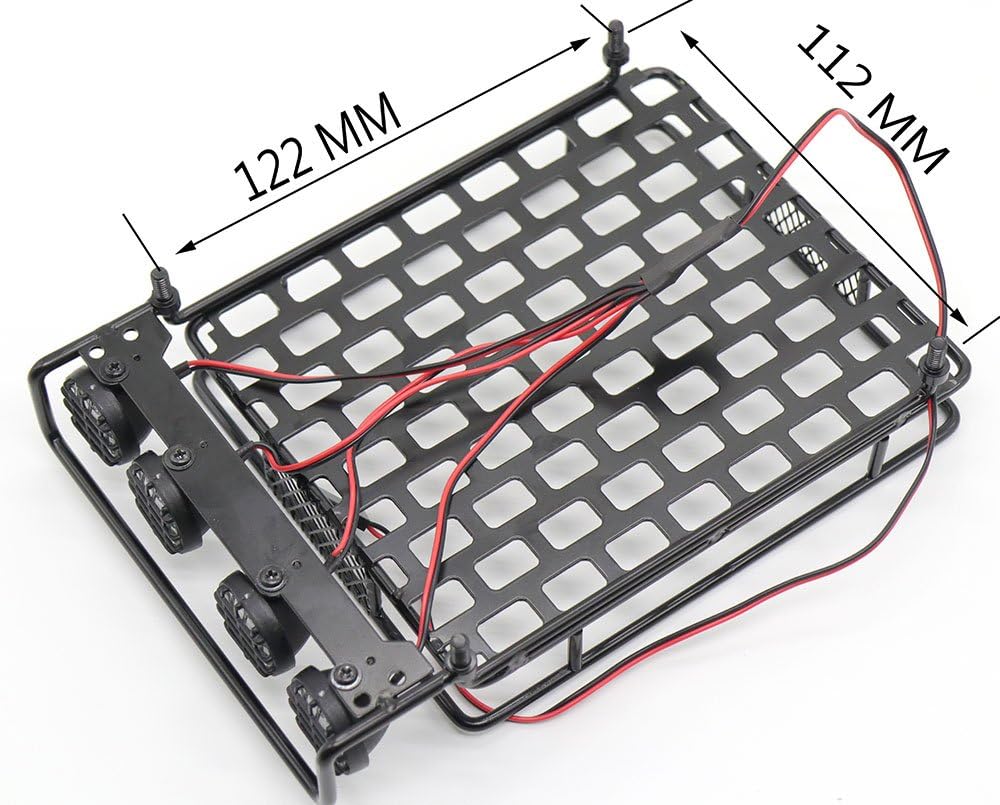
Figure 5: Diagram illustrating the key dimensions of the RC Roof Luggage Rack. Note: Dimensions shown in this image may vary slightly from the product specifications listed above.
7. Warranty Information
Specific warranty details for the WishRing RC 1:10 Roof Luggage Rack with LED Light Bar are not provided in the product information. Please refer to your purchase documentation or contact the seller directly for any warranty-related inquiries.
8. Support
For technical assistance, troubleshooting beyond this manual, or inquiries regarding parts and service, please contact the seller or manufacturer directly through the platform where the product was purchased. Provide your order number and product model (515) for efficient support.