
1. Introduction
The Digital Energy Automatic Electronic Coin Sorter and Counter is designed to efficiently sort and count U.S. coins, including quarters, dimes, nickels, and pennies, into individual tubes. It features a digital LCD display that automatically tracks savings, providing a clear overview of your coin collection. This device is made from durable, clear plastic material, allowing visibility of the coins inside.
2. Package Contents
Please verify that all items are present in your package:
- 1 x Automatic Electronic Coin Sorter and Counter Unit
- 1 x Twist-Off Lid with Digital Display
- 4 x Individual Coin Sorting Tubes (for Quarters, Dimes, Nickels, Pennies)
- Starter Coin Wrappers (5 each for quarters, dimes, nickels, and pennies)
- 1 x Small Screwdriver (for battery compartment)
3. Setup
- Battery Installation: The coin sorter requires 2 AAA batteries (not included). Use the provided small screwdriver to open the battery compartment located on the underside of the digital lid. Insert the batteries, ensuring correct polarity, then close the compartment securely.
- Attach Lid: Securely twist the digital lid onto the clear plastic coin bank.
- Coin Tubes: Ensure the four individual coin sorting tubes are correctly seated within the main unit. These tubes are designed to separate quarters, dimes, nickels, and pennies.

Image: Top view of the coin sorter's digital lid, displaying the current total amount.
4. Operating Instructions
- Inserting Coins: Drop U.S. coins one at a time into the slot on the digital lid. The sorter will automatically identify the coin denomination and direct it into the correct tube. The digital display will update with the value of each coin inserted and the running total.
- Adding Paper Bills: To add paper bills to your total, simply drop them into the main compartment of the bank. Then, press and hold the 'SET' button on the digital lid until the display starts blinking. Use the '+' or '-' buttons to manually adjust the total amount to include the value of the paper bills. Press 'SET' again to confirm.
- Retrieving Coins: To retrieve coins, twist off the digital lid. The individual tubes can be removed to access the sorted coins. Use the provided coin wrappers to roll your coins for bank deposits.
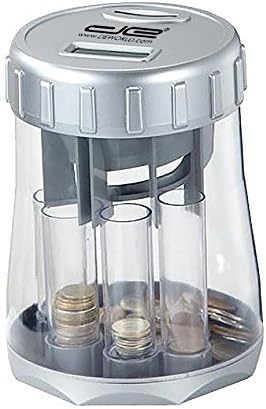
Image: The coin sorter showing the clear tubes filled with sorted coins.
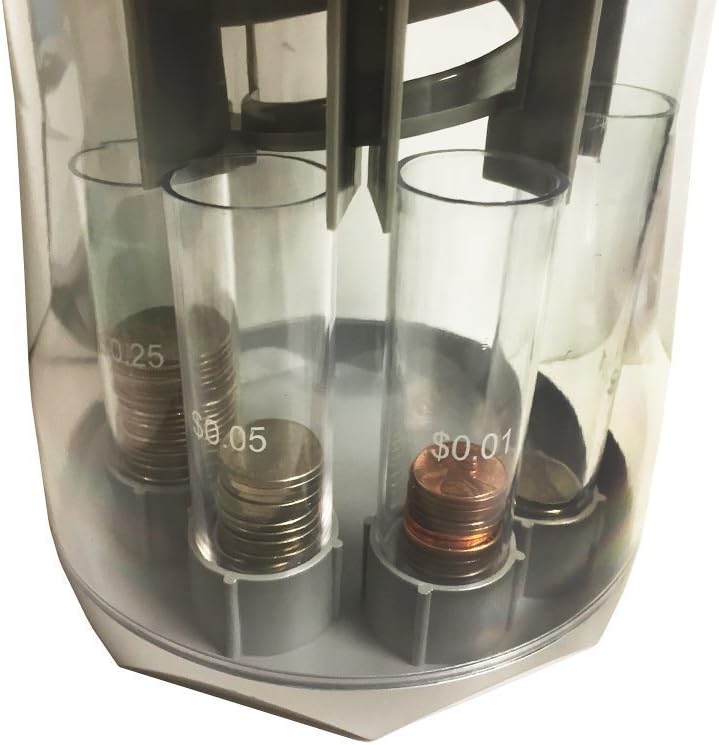
Image: A close-up view of the individual coin tubes, clearly showing the sorted denominations.
Instructional Videos
Video: Demonstrates the features of the Digital Energy Automatic Electronic Coin Sorter, including how it keeps track of savings and its clear design.
Video: Shows the Digital Energy Automatic Electronic Coin Sorter in action, highlighting how the total amount is displayed on the digital screen as coins are inserted.
5. Maintenance
- Cleaning: Wipe the exterior of the coin sorter with a soft, dry cloth. Do not use abrasive cleaners or immerse the unit in water.
- Battery Replacement: If the digital display becomes dim or unresponsive, replace the AAA batteries in the lid.
- Coin Jams: If coins become jammed, carefully remove the lid and clear any obstructions from the sorting mechanism or tubes.
6. Troubleshooting
- Display Not Working: Check battery installation and replace batteries if necessary. Ensure the lid is securely twisted onto the bank.
- Coins Not Sorting Correctly: Ensure coins are inserted one at a time. Check for any foreign objects or debris obstructing the sorting mechanism or tubes.
- Inaccurate Count: If the count seems incorrect after adding paper bills, use the manual adjustment feature as described in the Operating Instructions.
7. Specifications
| Feature | Detail |
|---|---|
| Product Dimensions | 6 x 6 x 9 inches |
| Item Weight | 14.1 ounces |
| Manufacturer | Digital Energy |
| Model Number | DECOINSORTERCLEAR |
| Power Source | 2 x AAA Batteries (not included) |
| Material | Durable Clear Plastic |
8. Warranty and Support
For warranty information or technical support, please refer to the contact details provided on the product packaging or visit the official Digital Energy website. Keep your purchase receipt for warranty claims.


