
1. Introduction
This manual provides essential information for the proper installation, operation, and maintenance of your First Alert BRK SC-9120B Hardwired Combination Smoke and Carbon Monoxide Alarm. This device is designed to detect both smoke and carbon monoxide, providing early warning of potential dangers. Please read these instructions thoroughly before installation and retain this manual for future reference.
2. Safety Information
- Important: This alarm requires a continuous 120V AC power supply and a 9V battery for backup.
- Do not paint the alarm. Paint can clog the sensing chambers and prevent the unit from operating correctly.
- Test the alarm weekly to ensure proper function.
- Never ignore an alarm. Investigate the cause immediately.
- Proper placement is crucial for effective detection. Refer to local codes and NFPA 72 (National Fire Alarm and Signaling Code) for guidance.
3. Features
- Dual Sensor Technology: Ionization sensor for smoke detection and electrochemical sensor for carbon monoxide (CO) detection.
- Hardwired with Battery Backup: Connects to your home's electrical system with a 9-volt battery for continuous operation during power outages.
- Interconnectivity: Can be linked with other compatible BRK or First Alert hardwired alarms for synchronized alarming throughout your residence.
- Latching Alarm Indicator: Identifies the initiating alarm unit even after the alarm condition has subsided.
- Single Test/Silence Button: Allows for easy testing of the alarm's functions and silencing of nuisance alarms.
- Indicator Lights: Provide visual cues for power, smoke, and carbon monoxide alarm status.
- Easy Installation: Features universal mounting brackets and tamper-resistant locking brackets.
4. Package Contents
- First Alert BRK SC-9120B Combination Smoke and Carbon Monoxide Alarm Unit(s)
- Mounting Bracket
- Wiring Harness
- User Manual
5. Setup and Installation
5.1 Pre-Installation
- Power Requirements: Ensure a 120V AC, 60 Hz power source is available.
- Location: Install alarms on every level of your home, inside each bedroom, and outside each sleeping area. Avoid placing near vents, windows, or in dead air spaces.
- Interconnectivity: If installing multiple units, ensure all are compatible for interconnectivity.
5.2 Mounting and Wiring
- Turn off power: Before beginning installation, turn off the power to the circuit at the main service panel.
- Attach Mounting Bracket: Secure the universal mounting bracket to the electrical box using the provided screws.
- Connect Wiring Harness: Connect the alarm's wiring harness to your home's electrical wiring (black to black, white to white, red to red for interconnectivity). Ensure all connections are secure.
- Install Battery: Insert a fresh 9-volt battery into the battery compartment. Ensure correct polarity.
- Attach Alarm Unit: Align the alarm unit with the mounting bracket and twist clockwise until it locks into place. The tamper-resistant locking brackets can be engaged if desired.
- Restore Power: Turn the power back on at the main service panel.
5.3 Initial Test
After installation and restoring power, press and hold the Test/Silence button for a few seconds until the alarm sounds. This confirms the unit is receiving power and the alarm mechanism is functional. If the alarm chirps for approximately 5 minutes after installation, press the test button to reset and synchronize the unit.
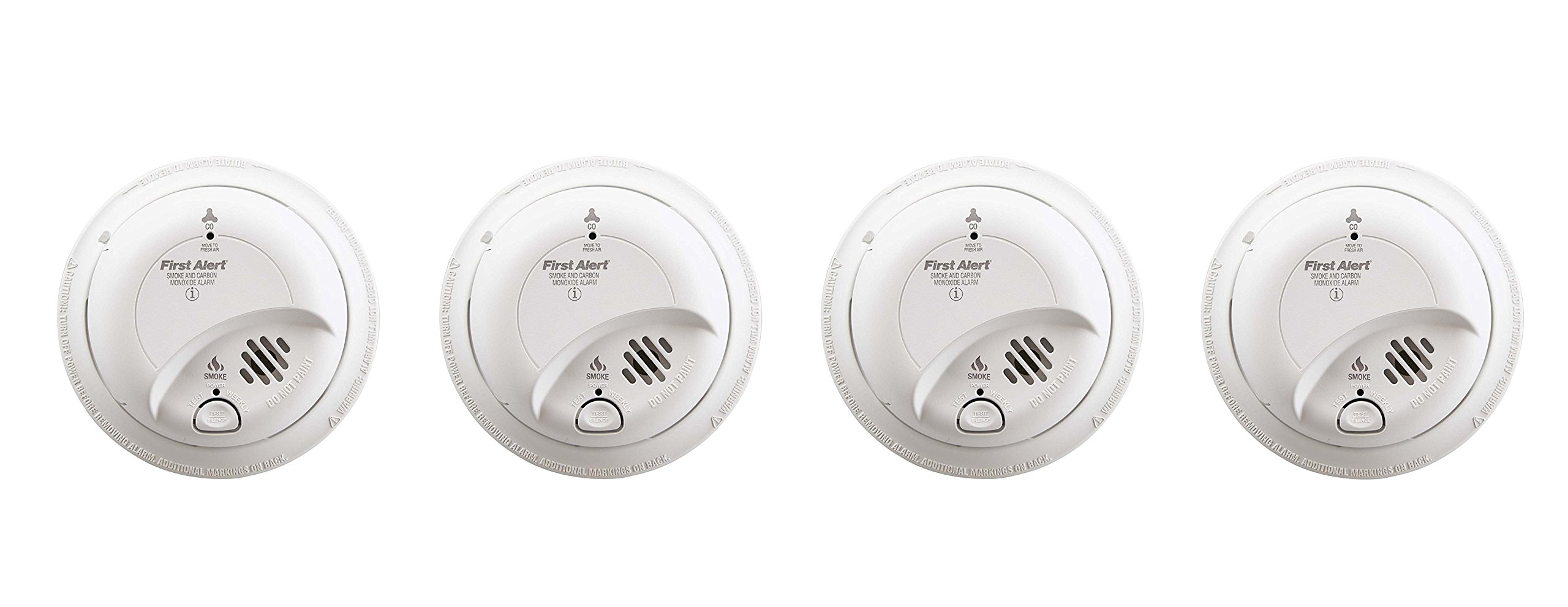
Image: First Alert BRK SC-9120B Hardwired Smoke and Carbon Monoxide Alarm. This image shows the front view of the alarm unit, typically white or off-white, with a central test/silence button and indicator lights.
6. Operating Instructions
6.1 Normal Operation
Under normal conditions, the power indicator light (usually green) will glow continuously, indicating that the unit is receiving AC power. The alarm will remain silent unless smoke or carbon monoxide is detected, or the test button is pressed.
6.2 Alarm Conditions
- Smoke Alarm: The alarm will sound a loud, continuous horn pattern (three beeps, pause, three beeps). The smoke indicator light (usually red) will flash rapidly.
- Carbon Monoxide (CO) Alarm: The alarm will sound a distinct four-beep pattern, pause, then repeat. The CO indicator light (usually red) will flash rapidly.
- Interconnected Alarms: If interconnected, all compatible alarms will sound when one detects a hazard. The initiating unit's indicator light will flash, while others will remain steady.
6.3 Silence Feature
To silence a nuisance alarm (e.g., from cooking smoke), press the Test/Silence button. The alarm will temporarily silence for several minutes. If the smoke or CO concentration is still present after the silence period, the alarm will reactivate.
6.4 Testing the Alarm
Test your alarm weekly by pressing and holding the Test/Silence button until the alarm sounds. This verifies the electronic circuitry, horn, and battery are working. The alarm should emit both smoke and CO alarm patterns during the test.
7. Maintenance
7.1 Regular Cleaning
Clean your alarm at least once a month. Use a soft brush or vacuum cleaner attachment to remove dust and debris from the alarm's vents and openings. Do not use cleaning solvents or spray directly onto the unit.
7.2 Battery Replacement
The 9-volt backup battery should be replaced at least once a year, or immediately when the alarm emits a regular 'chirp' sound (approximately once per minute), indicating a low battery. To replace the battery, twist the alarm counter-clockwise to remove it from the mounting bracket, open the battery compartment, replace the old battery with a new 9-volt battery, and reattach the unit.
7.3 End of Life
Smoke and carbon monoxide alarms have a limited lifespan. This unit should be replaced approximately 7-10 years after its manufacture date. Refer to the date printed on the back of the alarm for replacement information.
8. Troubleshooting
| Problem | Possible Cause | Solution |
|---|---|---|
| Alarm chirps once every minute | Low battery backup | Replace the 9-volt battery. |
| Alarm sounds intermittently or falsely | Dust/debris, high humidity, cooking fumes, improper placement | Clean the alarm. Relocate if consistently triggered by non-hazardous sources. Use silence feature for nuisance alarms. |
| Alarm does not sound during test | No AC power, dead battery, faulty unit | Check circuit breaker. Replace battery. If still no sound, replace the unit. |
| Alarm chirps after installation | Unit needs to synchronize/reset | Press the Test/Silence button to reset the unit. |
If troubleshooting steps do not resolve the issue, contact customer support.
9. Specifications
- Model: SC-9120B
- Power Source: 120V AC, 60 Hz with 9V Battery Backup
- Sensor Type: Ionization (Smoke), Electrochemical (Carbon Monoxide)
- Item Weight: Approximately 2.97 pounds (for 4 units)
- Package Dimensions: Approximately 10.24 x 6.85 x 6.14 inches (for 4 units)
- UPC: 716123256193
10. Warranty and Support
First Alert products are designed for reliability and performance. For specific warranty details, please refer to the documentation included with your purchase or visit the official First Alert website. If you require technical assistance or have questions regarding your SC-9120B alarm, please contact First Alert customer support.
Contact Information: Refer to the First Alert official website or product packaging for the most current customer support contact details.


