
1. Introduction
This manual provides essential information for the safe and proper operation of your Exost Pixie R/C Vehicle. Please read all instructions carefully before use and retain this manual for future reference.
The Exost Pixie is a 1:12 scale remote-controlled vehicle designed for full-function control, allowing movement in all directions. It operates on a 27 MHz frequency.

Image 1.1: The Exost Pixie R/C Vehicle and its remote control.
2. Package Contents
Ensure all items are present in the package:
- 1 x Exost Pixie R/C Vehicle
- 1 x Remote Control
- 1 x Instruction Manual (this document)

Image 2.1: The Exost Pixie R/C Vehicle as packaged.
3. Setup and Battery Installation
The Exost Pixie R/C Vehicle requires 7 AA batteries for operation. 4 AA batteries are for the vehicle, and 3 AA batteries are for the remote control. All required batteries are included.
3.1. Vehicle Battery Installation
- Locate the battery compartment on the underside of the vehicle.
- Using a screwdriver, open the battery compartment cover.
- Insert 4 AA batteries, ensuring correct polarity (+/-).
- Replace the battery compartment cover and secure it with the screw.
3.2. Remote Control Battery Installation
- Locate the battery compartment on the back of the remote control.
- Using a screwdriver, open the battery compartment cover.
- Insert 3 AA batteries, ensuring correct polarity (+/-).
- Replace the battery compartment cover and secure it with the screw.
Important: Always use new batteries of the same type. Do not mix old and new batteries, or different types of batteries. Remove batteries if the product will not be used for an extended period.
4. Operating Instructions
4.1. Powering On
- Turn on the vehicle by sliding the ON/OFF switch located on its underside to the "ON" position.
- Turn on the remote control by sliding its ON/OFF switch to the "ON" position.
- The vehicle and remote control will automatically pair.
4.2. Controls
The remote control features two primary controls:
- Left Joystick: Controls forward and backward movement.
- Right Joystick: Controls left and right steering.

Image 4.1: Operating the Exost Pixie R/C Vehicle with the remote control.
4.3. Driving Tips
- Operate the vehicle on flat, dry surfaces for optimal performance.
- Avoid driving in water, mud, or sand to prevent damage to internal components.
- Maintain a clear line of sight between the remote control and the vehicle.
- The vehicle has a maximum speed of approximately 12 kilometers per hour.
Video 4.1: Demonstration of the Exost Pixie R/C Vehicle in action, showcasing its maneuverability.
5. Maintenance
- Clean the vehicle with a soft, dry cloth after each use. Do not use water or chemical cleaners.
- Regularly check the battery compartments for corrosion.
- Store the vehicle and remote control in a cool, dry place away from direct sunlight when not in use.
- Remove batteries from both the vehicle and remote control if storing for extended periods to prevent leakage.
6. Troubleshooting
| Problem | Possible Cause | Solution |
|---|---|---|
| Vehicle does not move. |
|
|
| Poor control or short range. |
|
|
7. Specifications
- Model: Exost Pixie R/C Vehicle (Model 20227)
- Scale: 1:12
- Frequency: 27 MHz
- Power Source: Battery Powered
- Vehicle Batteries: 4 x AA (included)
- Remote Control Batteries: 3 x AA (included)
- Maximum Speed: Approximately 12 km/h
- Product Dimensions: 30 x 13 x 17 cm (L x W x H)
- Product Weight: 480 g
- Material: Plastic
- Recommended Age: 5 - 100 years
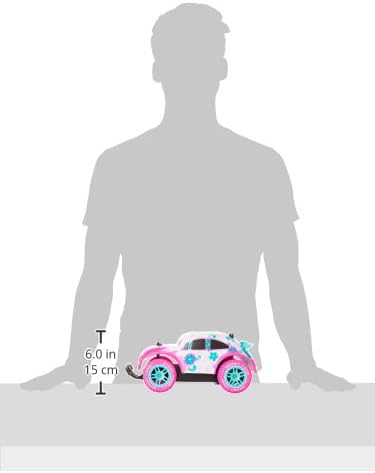
Image 7.1: Approximate dimensions of the Exost Pixie R/C Vehicle.
8. Warranty and Support
This product is sold without a manufacturer's warranty. For any issues or inquiries, please contact your retailer or the manufacturer, Imports Dragon.
Manufacturer Contact Information: Boisbriand, QC J7H 1T9, CA