
1. Product Overview
The Fujitsu Split HW Inverter Air Conditioner is designed to provide efficient cooling for areas up to 20m². This model incorporates advanced Inverter technology, which significantly reduces energy consumption while maintaining a stable and comfortable room temperature. Its quiet operation ensures minimal disturbance, making it suitable for various environments.
Key features include the use of R410a ecological refrigerant, a high energy efficiency rating (Procel A), and a presence sensor for intelligent energy saving. The unit also features Blue Fin protection for enhanced durability of the outdoor unit's heat exchanger fins.

Figure 1: Fujitsu Split HW Inverter Air Conditioner, showing the indoor unit, outdoor unit, and remote control.
2. Installation and Setup
Proper installation is crucial for the optimal performance and longevity of your air conditioner. It is highly recommended that installation be performed by a qualified and certified professional technician.
2.1 Pre-Installation Checks
- Power Supply: Ensure the installation site has a stable 220V single-phase power supply, as required by this model.
- Location: Select a location for the indoor unit that allows for unrestricted airflow and even distribution of cooled air. The outdoor unit should be placed in a well-ventilated area, away from direct sunlight or obstructions.
- Drainage: Verify that proper drainage can be established for condensate water from the indoor unit.
- Tubing: The flexible tubing length and elevation difference allow for greater adaptability in installation. Consult the professional installer for specific requirements.
2.2 Indoor Unit Placement
The indoor unit (evaporator) should be mounted securely on a wall, ensuring it is level. Avoid placing it above heat sources or in areas with high humidity.
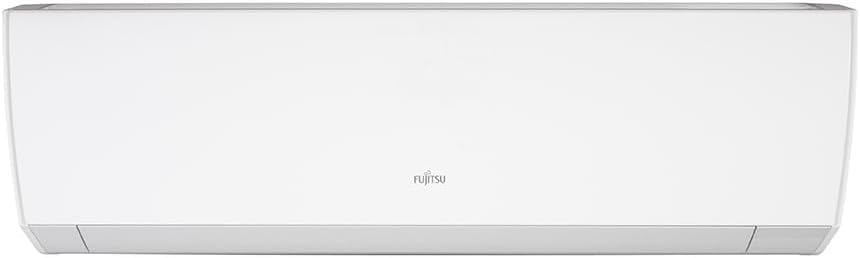
Figure 2: Front view of the indoor unit.

Figure 3: Angled view of the indoor unit, showing its sleek design.
2.3 Outdoor Unit Placement
The outdoor unit (condenser) should be installed on a stable surface, ensuring adequate clearance for airflow around it. The Blue Fin protection on the heat exchanger fins helps prevent corrosion, extending the unit's lifespan.

Figure 4: The outdoor unit (condenser) of the Fujitsu Split HW Inverter Air Conditioner.
3. Operating Instructions
Your Fujitsu Inverter Air Conditioner is designed for user-friendly operation, offering efficient cooling and smart features.
3.1 Remote Control Functions
All primary functions are controlled via the wireless remote control. Ensure the remote has fresh batteries and is pointed towards the indoor unit when transmitting commands.

Figure 5: Wireless remote control for the Fujitsu Air Conditioner.
- Power On/Off: Press the O/I button to turn the unit on or off.
- Mode Selection: Use the MODE button to cycle through available modes (Cool, Fan). This model is "Cool Only".
- Temperature Adjustment: Use the TEMP & and TEMP ∨ buttons to set your desired temperature.
- Fan Speed: Adjust the fan speed using the FAN button.
- Swing Function: Activate the SWING function for automatic louver movement, distributing air evenly.
- Timer: Set the TIMER for automatic on/off operations.
- Economy Mode: Engage ECONOMY mode to further reduce energy consumption.
- Powerful Mode: Use POWERFUL mode for rapid cooling.
3.2 Inverter Technology Benefits
The Inverter technology allows the compressor to operate continuously at varying speeds, rather than cycling on and off. This results in:
- Up to 60% reduction in electricity consumption compared to conventional models.
- Stable room temperature with minimal fluctuations.
- Faster achievement of desired temperature (up to 30% quicker).
- Significantly quieter operation due to reduced compressor vibration.
3.3 Presence Sensor
The integrated presence sensor detects human movement in the room. If no presence is detected for a certain period, the unit automatically adjusts its operation to reduce energy consumption, providing intelligent energy savings.
4. Maintenance
Regular maintenance ensures the efficiency and extends the lifespan of your air conditioner. Always turn off the power supply to the unit before performing any maintenance.
4.1 Air Filter Cleaning
Clean the air filters regularly (typically every two weeks, or more often depending on usage and air quality). Dirty filters can reduce cooling efficiency and airflow.
- Open the front panel of the indoor unit.
- Remove the air filters.
- Wash the filters with lukewarm water and a mild detergent.
- Rinse thoroughly and allow them to dry completely in a shaded area before reinserting.
4.2 Outdoor Unit Care
Keep the area around the outdoor unit clear of obstructions, leaves, and debris to ensure proper airflow. The unit's Blue Fin protection helps resist corrosion on the heat exchanger fins, but periodic inspection and gentle cleaning by a professional are still recommended.
4.3 Professional Servicing
It is advisable to have your air conditioner professionally serviced at least once a year. A professional technician can check refrigerant levels, clean coils, inspect electrical connections, and ensure all components are functioning correctly.
5. Troubleshooting
Before contacting customer support, please refer to the following common issues and their potential solutions.
| Problem | Possible Cause | Solution |
|---|---|---|
| Unit does not turn on. | No power supply; remote control batteries depleted. | Check circuit breaker; replace remote control batteries. |
| Insufficient cooling. | Dirty air filters; blocked outdoor unit; wrong mode selected; room too large. | Clean air filters; clear obstructions from outdoor unit; ensure COOL mode is selected; verify room size is within unit capacity. |
| Unusual noise from unit. | Loose parts; foreign objects; refrigerant flow noise (normal). | If noise is loud or persistent, contact a professional technician. Minor gurgling sounds are normal. |
| Water leakage from indoor unit. | Clogged drain pipe; improper installation. | Contact a professional technician for inspection and repair. |
If the problem persists after attempting these solutions, please contact Fujitsu customer support or a certified service technician.
6. Product Specifications
| Feature | Detail |
|---|---|
| Brand | Fujitsu |
| Model (Indoor Unit) | ASBG12JMCA-BR |
| Model (Outdoor Unit) | AOBG12JMCA |
| Cooling Capacity | 12,000 BTUs |
| Function | Cool Only |
| Voltage | 220V (Single-phase) |
| Special Features | Inverter Compressor, Presence Sensor, Blue Fin Protection, IPAM Control |
| Refrigerant | R410a (Ecological Gas) |
| Energy Efficiency Rating | A (Procel Seal, INMETRO) |
| Indoor Unit Dimensions (L x H x P) | 840mm x 268mm x 203mm (approx. 33.1 x 10.6 x 8 inches) |
| Product Dimensions (as listed) | 88 x 34 x 27 cm (approx. 34.6 x 13.4 x 10.6 inches) |
| Available for purchase since | November 9, 2017 |

Figure 6: Indoor unit dimensions (Length, Height, Depth).
7. Warranty and Support
For detailed information regarding your product's warranty, please refer to the warranty card included with your purchase or visit the official Fujitsu website. In case of technical issues, service requests, or inquiries, please contact Fujitsu customer support.
Ensure you have your model number (ASBG12JMCA-BR) and purchase date available when contacting support.


