
1. Introduction
This manual provides essential information for the safe and effective use of your Boxlood Motion Sensor Light Bulbs (Model QP6012SA). Please read these instructions thoroughly before installation and operation. Keep this manual for future reference.

Two Boxlood motion sensor LED light bulbs, 12W (100W equivalent), 6000K Cool White, shown with their product packaging.
2. Product Overview and Features
The Boxlood Motion Sensor Light Bulb is an advanced LED lighting solution designed for convenience and energy efficiency. It integrates both PIR (Passive Infrared) motion sensing and a photocell dusk-to-dawn sensor to automate lighting based on movement and ambient light conditions.
Key Features:
- PIR Motion Sensor: Detects heat waves from moving objects within its sensing range, automatically turning the bulb on.
- Dusk-to-Dawn Sensor: A built-in photocell ensures the bulb only activates when movement is detected at night (below approximately 15 Lux) and automatically turns off at dawn (above approximately 40 Lux). It will not activate during daylight hours, even with motion.
- Automatic Off: After motion ceases, the bulb will remain on for 30-60 seconds before automatically turning off.
- Energy Efficient: 12W LED provides brightness equivalent to a 100-watt incandescent bulb, consuming less power.
- Cool White Light: 6000K color temperature for bright, clear illumination.
- Standard Base: A19 bulb shape with a standard E26 medium screw base for easy installation.
- Wide Application: Suitable for indoor and outdoor use in areas such as front doors, porches, garages, basements, and hallways.
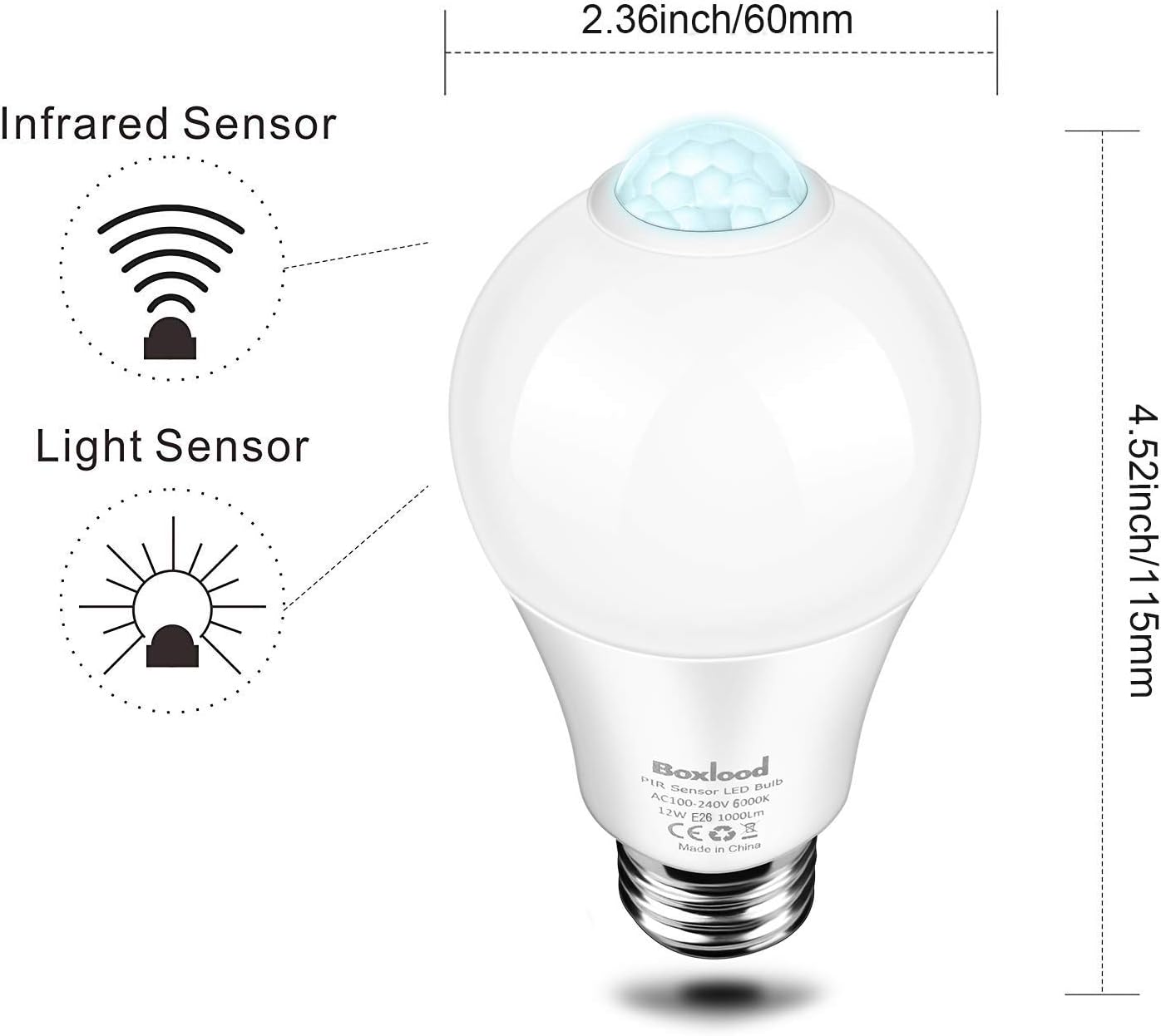
Diagram showing the dimensions of the Boxlood A19 E26 motion sensor light bulb: 2.36 inches (60mm) width and 4.52 inches (115mm) height, highlighting the infrared and light sensors.
3. Safety Information
Please observe the following safety precautions to prevent injury or damage to the product:
- Always turn off the power supply before installing or replacing the bulb.
- Do not use the bulb in fully enclosed fixtures, as this can trap heat and interfere with sensor operation. The motion sensor must be exposed.
- Keep the bulb away from strong winds or heat sources, which can cause false triggers or damage.
- Ensure the bulb is securely screwed into a standard E26 socket.
- Do not disassemble or modify the bulb.
- This bulb is designed for AC110-130V input voltage. Ensure your power supply matches this requirement.
4. Installation
Follow these steps for proper installation:
- Power Off: Ensure the power to the light fixture is turned off at the switch or circuit breaker before installation.
- Screw In: Carefully screw the Boxlood Motion Sensor Light Bulb into a standard E26 light socket. Do not overtighten.
- Positioning: For optimal performance, install the bulb downward, ensuring the motion sensor (the clear dome on top) is completely exposed and faces the area where motion detection is desired. Avoid fixtures that enclose the sensor.
- Power On: Restore power to the light fixture. The bulb may turn on briefly for 30 seconds during its initial power-up, then turn off.

Shows that the bulb's sensor head should face the intended sensing area for optimal performance. Examples include pendant lights and wall sconces where the sensor is unobstructed.

Demonstrates that the LED bulb should be installed downward with the sensor top completely exposed. Enclosed fixtures or those where the sensor is obstructed are shown as incorrect installations.
5. Operation
The Boxlood Motion Sensor Light Bulb operates automatically based on ambient light and motion detection:
- Daytime Operation: During daylight hours (above approximately 40 Lux), the bulb will remain off, even if motion is detected. This is due to the integrated photocell sensor.
- Nighttime Activation: When ambient light falls below approximately 15 Lux (dusk), the bulb becomes active. If motion is detected within its 15-20ft range and 120-degree detection angle, the bulb will automatically turn on.
- Motion Detection: The PIR sensor detects movement by sensing heat waves. The bulb will stay illuminated as long as continuous motion is detected.
- Automatic Deactivation: Approximately 30-60 seconds after the last detected motion, the bulb will automatically turn off.

Illustrates the bulb's operation: stays off during daytime, turns on at night with motion, stays on while motion is detected, and turns off 30-45 seconds after motion ceases.

Image illustrating the bulb's dusk-to-dawn feature, showing it automatically lighting up at night when motion is detected and turning off during the day.

Depicts the security benefit of the motion sensor light, showing a person approaching a dark door (danger) versus a well-lit door (safety) due to the bulb activating.
6. Maintenance
The Boxlood Motion Sensor Light Bulb requires minimal maintenance:
- Cleaning: Ensure the bulb's sensor dome is kept clean and free from dust or obstructions. Use a soft, dry cloth for cleaning. Do not use liquid cleaners.
- Replacement: When the bulb reaches the end of its lifespan, turn off the power, allow the bulb to cool, and replace it with a new one.
7. Troubleshooting
If you encounter issues with your motion sensor light bulb, refer to the following common problems and solutions:
| Problem | Possible Cause | Solution |
|---|---|---|
| Bulb does not turn on at night with motion. |
|
|
| Bulb stays on constantly. |
|
|
| Bulb turns on during the day. |
|
|
| Bulb flickers or dims. |
|
|
8. Specifications
Detailed technical specifications for the Boxlood Motion Sensor Light Bulb Model QP6012SA:
- Model Number: QP6012SA
- Light Type: LED
- Wattage: 12 Watts
- Incandescent Equivalent: 100 Watts
- Brightness: 1000 Lumens
- Color Temperature: 6000K Cool White
- Bulb Shape Size: A19
- Bulb Base: E26
- Voltage: AC110-130V
- CRI (Color Rendering Index): >80
- Detection Angle: 120 degrees
- Detection Range: 15-20 feet
- Material: Aluminum, Plastic
- Product Dimensions: 2.36"W x 4.53"H (60mm x 115mm)
- Item Weight: Approximately 5.3 ounces (0.33 pounds)
- Indoor/Outdoor Usage: Yes
- Special Features: PIR Motion Sensor, Dusk to Dawn Photocell, Instant On, Mercury Free, FCC Listed

Collage of images showing suitable locations for the motion sensor light bulbs, including balconies, garages, basements, hallways, and porches.
9. Warranty and Support
Your Boxlood Motion Sensor Light Bulb (Model QP6012SA) comes with a 2-year warranty from the date of purchase, covering manufacturing defects. Please retain your proof of purchase for warranty claims.
For technical support, warranty inquiries, or any questions not addressed in this manual, please contact Boxlood customer service through the retailer where the product was purchased. Provide your model number and purchase date for faster assistance.