
1. Introduction
The Inkbird 4-Probe WiFi Wireless Meat Thermometer (Model INT-14-BW-US2) is designed to provide precise temperature monitoring for various cooking methods, including BBQ, grilling, smoking, oven use, and rotisserie. This device offers versatile connectivity options (WiFi, Bluetooth, and local operation) and features durable, waterproof probes to ensure perfectly cooked food every time.
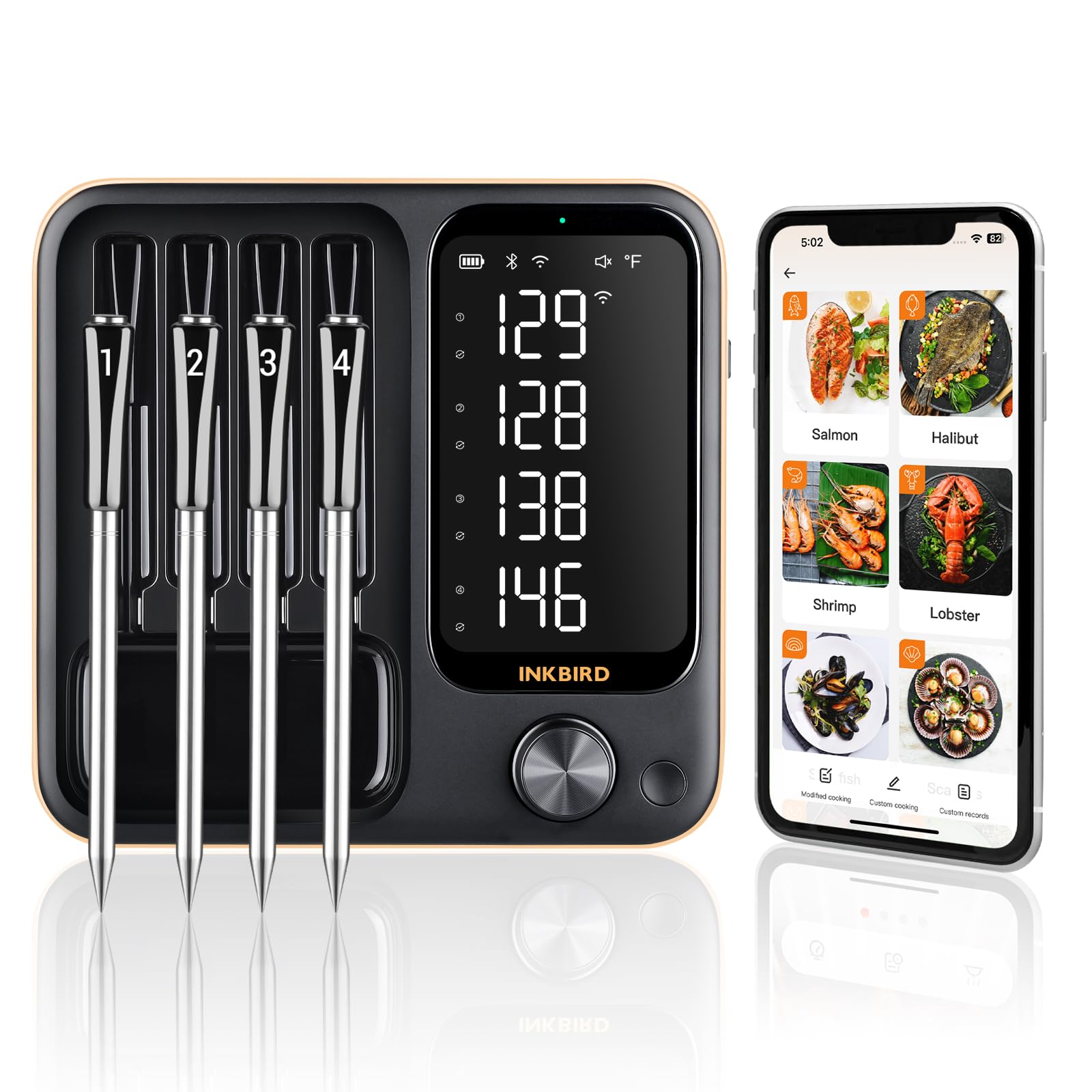
2. What's in the Box
Upon unboxing your Inkbird INT-14-BW-US2, you should find the following components:
- 1 x Thermometer Base Unit
- 4 x Food-Grade Stainless Steel Probes with Zirconia Ceramic Handles
- 1 x Charging Cable (USB-C)
- 1 x User Manual
3. Product Features
- Three-Mode Operation: The INT-14-BW-US2 supports 2.4GHz WiFi, Bluetooth 5.4, and local offline operation for flexible monitoring.
- 4 Wireless Probes: Monitor up to four different foods or sections of a single large cut simultaneously. Probes feature zirconia ceramic handles for durability and are IPX8 waterproof.
- Dual Sensors per Probe: Each probe includes two sensors to measure both internal food temperature (14°F to 212°F) and ambient cooking environment temperature (32°F to 572°F).
- High Accuracy: Each probe offers a measurement accuracy of ±1.8°F. Calibration is available if temperature readings are off.
- Long Battery Life: Probes fully charge in 25 minutes and provide up to 25 hours of continuous use. The main unit also has extended battery life.
- Smart APP Integration: The INKBIRD app offers 26 USDA-recommended meat menus, custom temperature settings, count-up/down timers, and temperature alarms.
- Offline Data Storage: The device stores 30 minutes of offline temperature data, which can sync with the app upon wireless connection.
- Magnetic Base: The main unit features a strong magnet for convenient attachment to grills or other metal surfaces.
- 360° Readable LCD: A high-definition LCD screen on the base allows clear viewing of all probe temperatures.


4. Setup
4.1 Initial Charging
Before first use, ensure both the thermometer base unit and all four probes are fully charged. Place the probes into their designated slots on the base unit. Connect the provided USB-C charging cable to the base unit and a suitable power source. The probes will charge automatically when inserted into the powered base.

4.2 App Download and Connection
Download the "INKBIRD" app from your smartphone's app store (Google Play for Android or App Store for iOS). Follow the in-app instructions to pair your device. The thermometer supports WiFi and Bluetooth 5.4 connectivity. For WiFi mode, ensure your router supports 2.4GHz. For Bluetooth, ensure your device is within range.

5. Operating Instructions
5.1 Inserting Probes
Carefully insert the probes into the thickest part of the meat, avoiding bones. Ensure the probe is inserted deep enough, past the safe cooking line, for accurate internal temperature readings. For ambient temperature, position the probe to measure the air temperature within your cooking environment, away from direct heat sources.

5.2 Monitoring Temperatures
You can monitor temperatures directly on the thermometer's LCD screen or through the INKBIRD app. The app provides real-time data, trend charts, and allows you to set target temperatures and alarms. For local mode, ensure the base unit is near your cooking appliance.

5.3 Setting Alarms and Timers
Within the INKBIRD app, select your desired meat type from the 26 preset USDA menus or set a custom target temperature. You can also set a count-up or count-down timer. The app will provide pre-alarms and final alarms when your target temperature is reached, ensuring optimal doneness.

6. Calibration
If you notice discrepancies in temperature readings, you can calibrate the probes. The device supports calibration of ±12°F. Refer to the app's settings for specific calibration procedures. It is recommended to calibrate if the temperature is consistently off to ensure accurate readings.

7. Maintenance and Care
7.1 Cleaning
The probes are IPX8 waterproof and dishwasher safe, allowing for easy cleaning after use. The main unit is not waterproof and should be wiped clean with a damp cloth. Avoid submerging the main unit in water.

7.2 Storage
Store the probes in their designated slots on the base unit. The magnetic back of the base unit allows for convenient storage on metal surfaces, such as a refrigerator or grill side table, keeping it accessible and organized.

8. Troubleshooting
- Connection Issues (WiFi/Bluetooth):
- Ensure the thermometer is powered on and within range of your smartphone (for Bluetooth) or WiFi router (for WiFi).
- Verify your WiFi network is 2.4GHz.
- Restart the thermometer and your smartphone.
- If using the app, ensure location services are enabled for the app (some devices require this for connectivity).
- Inaccurate Temperature Readings:
- Ensure probes are inserted correctly into the thickest part of the meat, avoiding bones.
- Check if probes are clean and free from residue.
- Perform a calibration as described in Section 6.
- Ensure probes are within 19.68ft of the base unit for a stable connection.
- Probes Not Charging:
- Ensure the base unit is connected to a power source and turned on.
- Verify probes are correctly seated in their charging slots.
- Check the charging cable for damage.
9. Specifications
| Feature | Detail |
|---|---|
| Brand | Inkbird |
| Model Name | INT-14-BW-US2 |
| Connectivity Technology | WiFi (2.4GHz), Bluetooth (5.4) |
| Special Feature | IPX8 Waterproof Probes, Magnetic Base, 360° Readable LCD |
| Color | Black |
| Number of Probes | 4 |
| Internal Temperature Range | 14°F to 212°F (-10°C to 100°C) |
| Ambient Temperature Range | 32°F to 572°F (0°C to 300°C) |
| Accuracy | ±1.8°F (±1°C) |
| Response Time | 1 second |
| Probe Battery Life | Up to 25 hours (after 25 min charge) |
| Power Source | Battery Powered (1 AAA battery required for main unit, rechargeable probes) |
| Included Components | 1*Thermometer, 4*Probes, 1*Charging Cable, 1*User Manual |


