
1. Introduction
Thank you for choosing the Bosch GBH 2-28D Rotary Hammer Drill. This manual provides essential information for the safe and effective operation, maintenance, and troubleshooting of your tool. Please read this manual thoroughly before using the tool and keep it for future reference.
The Bosch GBH 2-28D is a powerful 850W rotary hammer designed for heavy-duty drilling and chiseling tasks in concrete, masonry, wood, and metal. It features an SDS-plus chuck for quick accessory changes, a robust construction for extended tool life, and a safety clutch for user protection.
2. Safety Instructions
2.1 General Power Tool Safety Warnings
- Read all safety warnings, instructions, illustrations, and specifications provided with this power tool. Failure to follow all instructions may result in electric shock, fire, and/or serious injury.
- Keep your work area clean and well lit. Cluttered or dark areas invite accidents.
- Do not operate power tools in explosive atmospheres, such as in the presence of flammable liquids, gases, or dust. Power tools create sparks which may ignite the dust or fumes.
- Keep children and bystanders away while operating a power tool. Distractions can cause you to lose control.
- Ensure the plug matches the outlet. Never modify the plug. Do not use any adapter plugs with earthed (grounded) power tools.
- Avoid body contact with earthed or grounded surfaces, such as pipes, radiators, ranges, and refrigerators. There is an increased risk of electric shock if your body is earthed or grounded.
- Wear eye protection. Always wear safety glasses. Use a dust mask, non-skid safety shoes, hard hat, or hearing protection for appropriate conditions.
- Prevent unintentional starting. Ensure the switch is in the off-position before connecting to power source, picking up or carrying the tool.
- Do not overreach. Keep proper footing and balance at all times. This enables better control of the power tool in unexpected situations.
- Maintain power tools. Check for misalignment or binding of moving parts, breakage of parts, and any other condition that may affect the power tool's operation.
2.2 Rotary Hammer Specific Safety Warnings
- Wear ear protectors when impact drilling. Exposure to noise can cause hearing loss.
- Use auxiliary handles supplied with the tool. Loss of control can result in personal injury.
- Hold power tool by insulated gripping surfaces, when performing an operation where the cutting accessory may contact hidden wiring or its own cord. Contact with a 'live' wire will also make exposed metal parts of the power tool 'live' and shock the operator.
- Always secure the workpiece. A workpiece clamped with clamping devices or in a vice is held more securely than by hand.
- Never drill into walls, ceilings, or floors before checking for hidden electrical cables, gas pipes, or water pipes. Use a suitable detector.
3. Package Contents
Carefully unpack your Bosch GBH 2-28D Rotary Hammer Drill and check that all items are present and undamaged. If any parts are missing or damaged, please contact your dealer.
- 1 x Bosch GBH 2-28D Rotary Hammer Drill
- 1 x Instruction Manual (this document)
- 1 x Depth Stop
- 1 x Auxiliary Handle
- 1 x Carrying Case

Figure 1: The Bosch GBH 2-28D Rotary Hammer Drill neatly packed in its robust blue carrying case, alongside its auxiliary handle and depth stop.
4. Product Overview
Familiarize yourself with the components of your rotary hammer drill before operation.

Figure 2: Side view of the Bosch GBH 2-28D Rotary Hammer Drill, showing the main body, SDS-plus chuck, auxiliary handle, and depth stop.
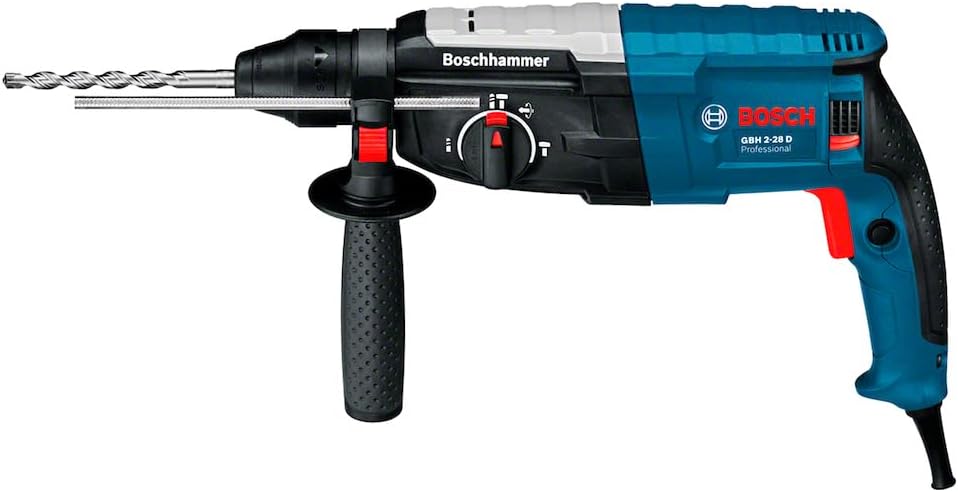
Figure 3: The Bosch GBH 2-28D Rotary Hammer Drill with an SDS-plus drill bit securely inserted into the chuck, ready for operation.

Figure 4: A close-up view of the ergonomic auxiliary handle, designed for comfortable and secure grip during operation.
5. Setup
5.1 Attaching the Auxiliary Handle
- Loosen the auxiliary handle by turning it counter-clockwise.
- Slide the auxiliary handle over the chuck onto the clamping collar of the tool.
- Adjust the handle to the desired position for optimal grip and control.
- Tighten the auxiliary handle by turning it clockwise until it is securely fastened.
5.2 Setting the Depth Stop
- Insert the depth stop into the designated hole on the auxiliary handle.
- Press the button on the auxiliary handle to release the depth stop.
- Adjust the depth stop to the desired drilling depth. The distance from the tip of the drill bit to the end of the depth stop indicates the drilling depth.
- Release the button to lock the depth stop in place.
5.3 Inserting and Removing SDS-plus Accessories
The SDS-plus chuck allows for quick and tool-free accessory changes.
- Inserting: Clean the shank of the accessory and apply a thin layer of grease. Insert the accessory into the chuck with a slight twisting motion until it locks into place. Pull on the accessory to ensure it is securely seated.
- Removing: Pull back the locking sleeve of the chuck and remove the accessory.
6. Operating Modes
6.1 Mode Selector Switch
The mode selector switch allows you to choose between different operating modes:
- Drilling (Rotation Only): For drilling in wood, metal, ceramics, and plastic. The hammer mechanism is disengaged.
- Hammer Drilling (Rotation with Impact): For drilling in concrete, masonry, and stone. Both rotation and impact action are engaged.
- Chiseling (Impact Only): For light chiseling work, such as removing tiles or breaking small sections of concrete. Rotation is disengaged.
- Vario-Lock (Chisel Positioning): This setting allows you to adjust the angle of the chisel for optimal working position. Once the desired angle is set, switch back to the chiseling mode to lock it.
Caution: Only change the operating mode when the tool is switched off to prevent damage to the gearbox.
6.2 Power On/Off and Speed Control
- Switching On: Press the On/Off switch. The tool's speed is variable; the further you press the switch, the higher the speed.
- Switching Off: Release the On/Off switch.
- Continuous Operation: For continuous operation, press the On/Off switch and then press the lock-on button. To switch off, press the On/Off switch again.
7. Operation
7.1 General Operation Guidelines
- Always hold the tool firmly with both hands using the main handle and the auxiliary handle.
- Apply moderate pressure. Excessive pressure will not speed up the drilling process and can damage the tool or accessory.
- For hammer drilling, allow the tool to do the work. The impact mechanism is designed to break up material efficiently.
- When drilling through materials, ensure there are no hidden obstacles like pipes or electrical wires.
- Regularly check the drill bit or chisel for wear. A dull accessory will reduce performance and increase strain on the tool.

Figure 5: An operator using the Bosch GBH 2-28D Rotary Hammer Drill to create a hole in a concrete wall, demonstrating typical usage.

Figure 6: An individual performing overhead drilling into a concrete ceiling with the Bosch GBH 2-28D, wearing appropriate safety glasses, ear protection, and a hard hat.
8. Maintenance
Regular maintenance ensures optimal performance and extends the lifespan of your tool.
8.1 Cleaning
- Always unplug the tool before cleaning.
- Keep the ventilation slots clean to prevent motor overheating. Use a soft brush or compressed air.
- Clean the tool casing with a damp cloth. Do not use solvents or abrasive cleaners.
- Regularly clean the SDS-plus chuck to remove dust and debris. Apply a thin layer of grease to the chuck mechanism periodically.
8.2 Carbon Brushes
The motor is equipped with carbon brushes. When the carbon brushes are worn, the tool may stop working or show reduced performance. Carbon brushes should be replaced by a qualified service technician to ensure proper function and safety.
8.3 Storage
Store the tool in a dry, secure place, out of reach of children. Use the original carrying case for protection during storage and transport.
9. Troubleshooting
Before contacting customer service, try to resolve common issues using the table below.
| Problem | Possible Cause | Solution |
|---|---|---|
| Tool does not start | No power supply; Faulty switch; Worn carbon brushes | Check power outlet and plug; Contact service for switch or brush replacement. |
| Reduced drilling/chiseling performance | Dull or incorrect accessory; Worn carbon brushes; Overheating | Replace accessory; Allow tool to cool down; Contact service for brush replacement. |
| Excessive vibration | Bent or damaged accessory; Loose auxiliary handle; Internal fault | Replace accessory; Tighten auxiliary handle; Contact service. |
| Smoke or unusual smell | Overload; Motor fault; Short circuit | Immediately switch off and unplug the tool. Do not use. Contact service. |
10. Specifications
10.1 Technical Data
| Feature | Value |
|---|---|
| Brand | Bosch |
| Model | GBH 2-28D |
| Part Number | 06112673D0-000 |
| Power Input | 850 W |
| Impact Energy (EPTA) | 3.2 J |
| Voltage | 127 Volts |
| Weight | 4.62 kg |
| Chuck Type | SDS-plus |
| Power Source | Corded Electric |
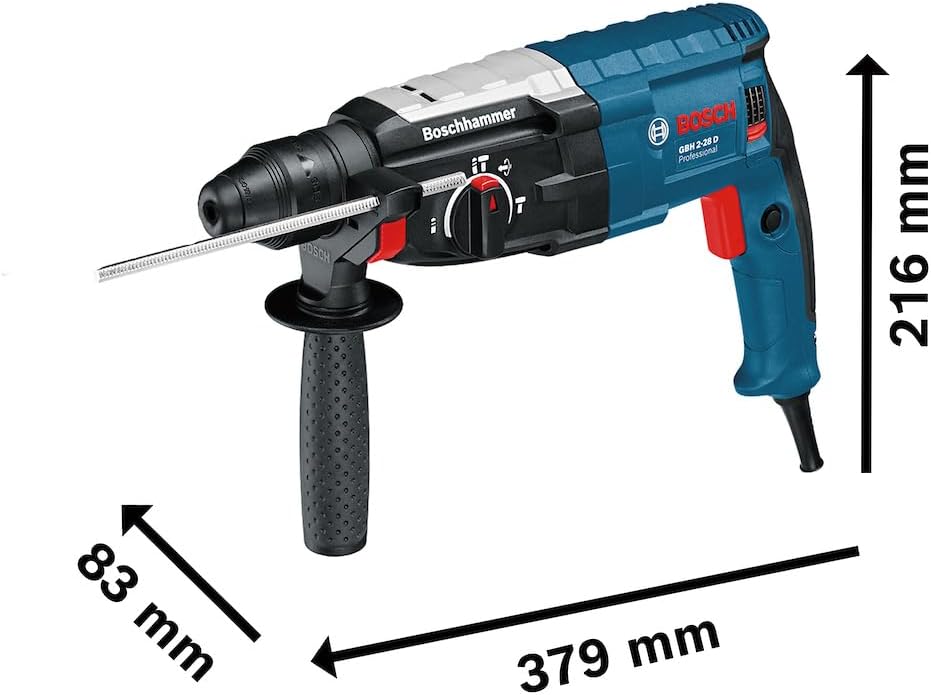
Figure 7: Dimensional drawing of the Bosch GBH 2-28D, indicating its length (379 mm), height (216 mm), and width (83 mm).
11. Warranty and Support
11.1 Warranty Information
Your Bosch GBH 2-28D Rotary Hammer Drill comes with a standard 24-month warranty from the date of purchase. This warranty covers defects in material and workmanship. Please retain your proof of purchase for warranty claims.
Bosch may offer extended warranty programs upon product registration. Please visit the official Bosch website or use the BeConnected app for details on how to register your tool and potentially extend your warranty period.

Figure 8: Bosch warranty graphic indicating the possibility of up to 3 years of warranty, subject to registration and specific product lines.
11.2 Customer Support
For technical assistance, service, or spare parts, please contact your local authorized Bosch service center or visit the official Bosch website. You can also download the Bosch BeConnected app for product information, registration, and support.

Figure 9: The Bosch BeConnected app, offering a universe of advantages including warranty registration, loyalty programs, and access to service information.


