
AVBcable XL2
NTI XL2 Audio and Acoustic Analyzer User Manual
Model: XL2 | Brand: AVBcable
1. Introduction
The NTI XL2 Audio and Acoustic Analyzer is a versatile instrument designed for precise audio and acoustic measurements. Its remarkable advantage lies in its flexible user interface, allowing for personalized measurement screens and comprehensive functionalities. The XL2 supports both advanced users, who can access all menus and settings, and basic users, for whom fixed operator interfaces with pre-defined settings ensure accurate measurements.

Figure 1: Front view of the NTI XL2 Audio and Acoustic Analyzer, showcasing its display and control buttons.
2. Setup
Before operating your NTI XL2 Analyzer, ensure proper setup to guarantee optimal performance and accurate measurements.
- Unpacking: Carefully remove the XL2 Analyzer and all accessories from its packaging. Verify that all components listed in the packing list are present.
- Power Supply: Connect the appropriate power adapter to the XL2 Analyzer and a suitable power outlet. Ensure the device is fully charged or connected to a stable power source for extended use.
- Initial Boot-up: Press and hold the power button until the display illuminates. The device will boot up with pre-defined instrument configurations, ready for immediate use.
- Accessory Connection: Connect any necessary external microphones, cables, or other accessories to the appropriate ports on the XL2 Analyzer as required for your specific measurement task.
3. Operating Instructions
The XL2 Analyzer offers a user-friendly interface with customizable options for various measurement scenarios.
3.1. Basic Operation
- Navigation: Use the directional pad and 'OK' button to navigate through menus and confirm selections.
- Measurement Modes: Select the desired measurement mode (e.g., Live Sound, Broadcast, Home Cinema, Environmental Noise) from the main menu. The XL2 is optimized for applications such as Live Sound, Broadcast, AVI-Installation, Home Cinema, and Environmental Noise.
- Parameter Adjustment: Adjust measurement parameters such as frequency range, weighting, and integration time using the on-screen controls.
- Data Logging: Initiate data logging to record measurement results over time. Refer to the on-screen prompts for saving and exporting data.
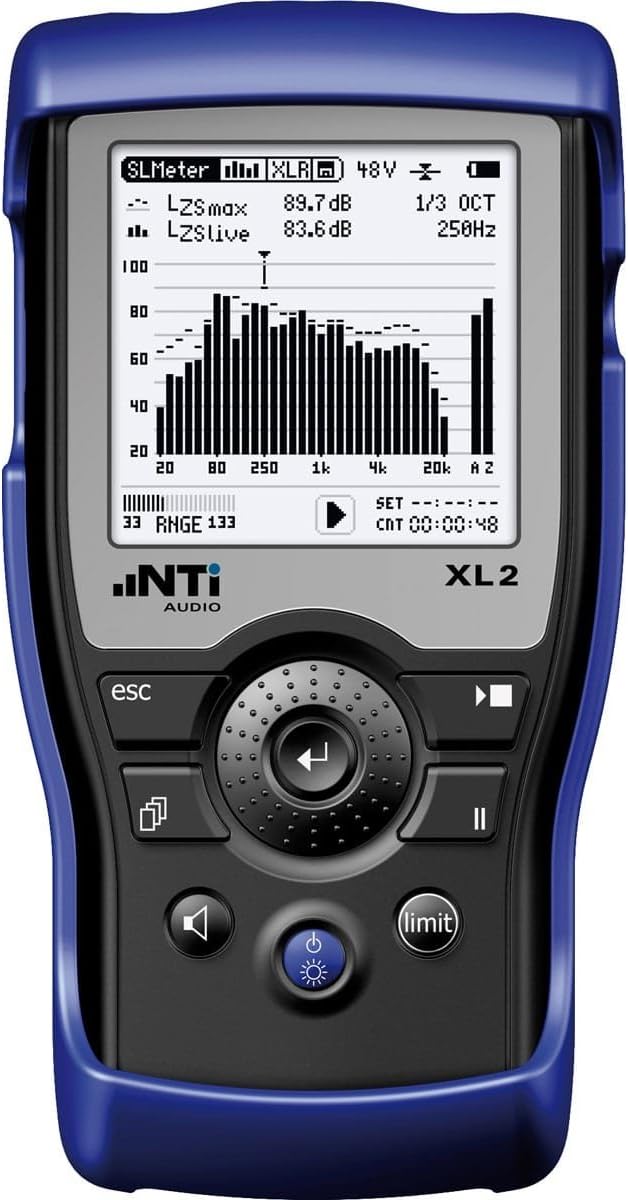
Figure 2: Angled view of the NTI XL2 Analyzer, highlighting the display with measurement data and the ergonomic button layout.
3.2. Advanced Features
For advanced users, the XL2 provides access to comprehensive menus and settings, allowing for highly customized measurement configurations. These configurations can be stored for future use, streamlining complex measurement tasks.
- Custom Profiles: Create and save custom measurement profiles tailored to specific applications or user preferences.
- Calibration: Perform system calibration as needed to ensure measurement accuracy. Consult the on-screen instructions for the calibration process.
- Firmware Updates: Periodically check for and install firmware updates to enhance functionality and improve performance.
4. Maintenance
Proper maintenance ensures the longevity and accuracy of your NTI XL2 Analyzer.
- Cleaning: Use a soft, dry cloth to clean the exterior of the device. For stubborn marks, a slightly damp cloth with mild soap can be used, ensuring no liquid enters the ports or openings. Do not use abrasive cleaners or solvents.
- Storage: Store the XL2 Analyzer in a cool, dry place, away from direct sunlight and extreme temperatures. Use the provided carrying case (if applicable) for protection during transport and storage.
- Battery Care: If the device has a rechargeable battery, avoid fully discharging it frequently. For long-term storage, charge the battery to approximately 50% to prolong its lifespan.
5. Troubleshooting
This section addresses common issues you might encounter with your NTI XL2 Analyzer.
| Problem | Possible Cause | Solution |
|---|---|---|
| Device does not power on. | Low battery or power adapter issue. | Connect to power adapter and allow to charge. Verify power outlet functionality. |
| Inaccurate measurement readings. | Improper calibration or incorrect settings. | Perform system calibration. Check and adjust measurement parameters according to the application. |
| Display is unresponsive. | Software glitch or temporary freeze. | Perform a soft reset by holding the power button for 10 seconds. If issue persists, contact support. |
If you encounter issues not listed here, or if the suggested solutions do not resolve the problem, please contact customer support.
6. Specifications
Key technical specifications for the NTI XL2 Audio and Acoustic Analyzer:
- Item Weight: 3 pounds
- Manufacturer: NTI Americas
- ASIN: B076X42Y2C
- Date First Available: October 27, 2017
For detailed technical specifications, please refer to the official product datasheet available on the manufacturer's website.
7. Warranty and Support
The NTI XL2 Audio and Acoustic Analyzer is manufactured to high-quality standards. For specific warranty terms and conditions, please refer to the documentation provided with your purchase or visit the official NTI Americas website.
For technical support, service, or inquiries regarding your XL2 Analyzer, please contact AVBcable or NTI Americas directly. Contact information can typically be found on their official websites or in your product packaging.
Online Resources:
- For product information and updates: AVBcable Store on Amazon
- For manufacturer support: Search for "NTI Americas" online.
Related documentsXL2


Ask a question about this manual
Ask about setup, troubleshooting, compatibility, parts, safety, or missing instructions. Manuals+ will review the question and use this page’s manual context to help answer it.