
1. Introduction
Thank you for purchasing the CELLSTAR CSD-690FHR Drive Recorder. This device is designed to record both the front view and the interior of your vehicle, providing crucial evidence in case of an incident. It features advanced functions such as Night Vision, HDR (High Dynamic Range), a microSD maintenance-free system, parking surveillance, and compatibility with radar intercommunication. Please read this manual thoroughly before use to ensure proper installation and operation.
2. Safety Information
To prevent injury to yourself and others, or damage to the device, observe the following safety precautions:
- Do not install the device where it obstructs the driver's view or interferes with airbag deployment.
- Ensure all cables are securely connected and do not interfere with vehicle controls.
- Avoid operating the device while driving. Adjust settings only when the vehicle is safely parked.
- Do not expose the device to extreme temperatures, direct sunlight for prolonged periods, or excessive moisture.
- Use only the specified power cable and accessories provided by CELLSTAR.
- Keep the device out of reach of children.
3. Package Contents
Verify that all items listed below are included in your package:
- CELLSTAR CSD-690FHR Drive Recorder Unit
- Mounting Bracket
- Cigarette Lighter Power Cable
- microSD Card (pre-installed or included separately)
- Cable Clips
- Instruction Manual

Image 3.1: Contents of the CSD-690FHR package, showing the drive recorder, power cable, mounting accessories, and a microSD card with adapter.
4. Product Overview
Familiarize yourself with the main unit and its components.

Image 4.1: Front view of the CSD-690FHR unit, highlighting the front camera, interior camera, and control panel.

Image 4.2: The CSD-690FHR unit demonstrating its compact size, fitting comfortably in a hand.
4.1. Main Unit Features
- Front Camera Lens: Records the road ahead.
- Interior Camera Lens: Records the vehicle's interior, equipped with infrared LEDs for night vision.
- Display Screen: Shows live view, recorded footage, and menu options.
- Control Buttons: Navigate menus, start/stop recording, and access functions.
- microSD Card Slot: For storage of recorded video files.
- Power Input: Connects to the vehicle's power supply.
Video 4.1: A 19-second video showcasing the CELLSTAR CSD-690FHR drive recorder from various angles, demonstrating its design and compact form factor.
5. Setup and Installation
Proper installation is crucial for optimal performance and safety.
5.1. Choosing an Installation Location
- Select a location on the windshield or dashboard that does not obstruct the driver's view.
- Ensure the front camera has a clear view of the road and the interior camera has a clear view of the cabin.
- Avoid areas that interfere with airbags or other safety features.

Image 5.1: Recommended windshield mounting position for the CSD-690FHR, ensuring a clear view and minimal obstruction.

Image 5.2: Alternative dashboard mounting position for the CSD-690FHR.
5.2. Mounting the Device
- Clean the chosen mounting surface thoroughly to ensure strong adhesion.
- Attach the mounting bracket to the drive recorder unit.
- Remove the protective film from the adhesive pad on the bracket.
- Firmly press the bracket onto the chosen surface for at least 30 seconds.
5.3. Connecting Power
- Connect the cigarette lighter power cable to the power input port on the drive recorder.
- Route the cable neatly along the vehicle's trim to avoid obstruction. Use the provided cable clips if necessary.
- Insert the cigarette lighter plug into your vehicle's 12V/24V power outlet.
5.4. Inserting the microSD Card
The microSD card is essential for recording. Ensure it is inserted correctly before use.
- Locate the microSD card slot on the device.
- Insert the microSD card with the gold contacts facing the correct direction (refer to the diagram on the device).
- Push the card gently until it clicks into place. To remove, push it again until it springs out.
6. Operating Instructions
This section details the primary functions of your CSD-690FHR drive recorder.
6.1. Automatic Recording
The device automatically starts recording when the vehicle's ignition is turned on and stops when the ignition is turned off. Both front and interior cameras will record simultaneously.
6.2. Night Vision
The CSD-690FHR features Night Vision technology, enhancing recording clarity in low-light conditions, such as at night or in tunnels. The interior camera utilizes infrared LEDs for clear cabin recording in darkness.

Image 6.1: Night Vision comparison, illustrating improved visibility in dark conditions.
6.3. HDR (High Dynamic Range)
HDR technology corrects overexposed bright areas and underexposed dark areas in recordings, ensuring balanced and clear video quality even in challenging lighting conditions, such as when entering or exiting tunnels, or facing strong sunlight.

Image 6.2: HDR comparison, showing enhanced detail in both bright and dark areas of the recording.
6.4. microSD Maintenance-Free Function
The CSD-690FHR utilizes a unique file system that minimizes fragmentation on the microSD card, reducing the need for frequent manual formatting. This feature helps maintain stable recording performance and extends the lifespan of the microSD card.
- While maintenance-free, periodic checks of the microSD card are still recommended.
- If changing recording quality settings or using a new microSD card, formatting may be required.
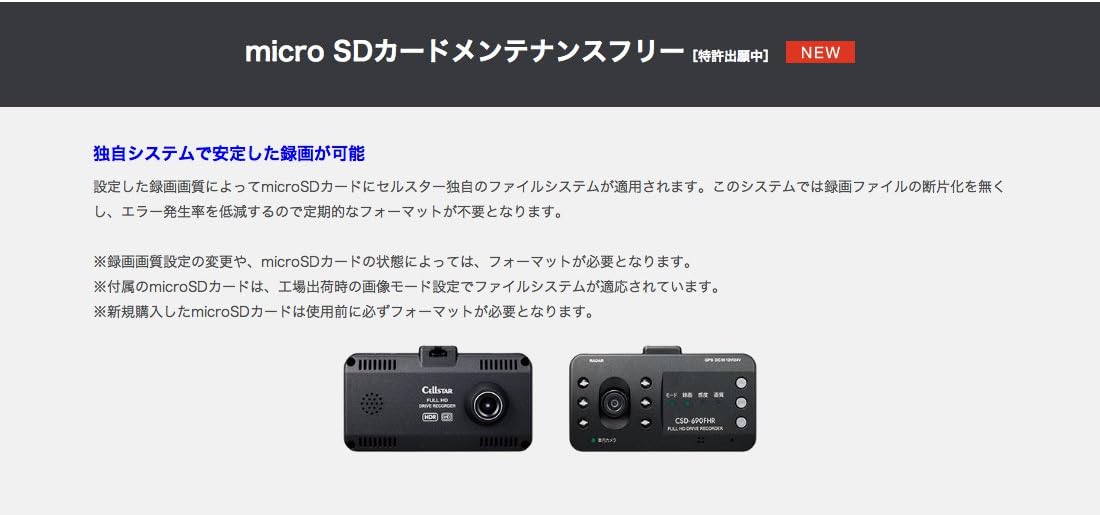
Image 6.3: Explanation of the microSD maintenance-free system.
6.5. Parking Surveillance Mode
When the vehicle is parked and the ignition is off, the device can enter Parking Surveillance Mode. In this mode, it detects impacts or motion and automatically records events, providing security for your parked vehicle. An optional constant power supply cable may be required for continuous parking surveillance.
6.6. Safety Driving Support Functions
When connected to a compatible radar detector (sold separately), the CSD-690FHR can provide various safety driving support functions:
- Forward Vehicle Departure Warning: Alerts you when the vehicle in front starts moving.
- Lane Departure Warning: Alerts you if the vehicle drifts out of its lane.
- Inter-Vehicle Distance Warning: Alerts you if the distance to the vehicle ahead becomes too short (e.g., less than 30m).
Note: These functions require connection to a compatible radar detector.

Image 6.4: Overview of safety driving support features.
6.7. Radar Intercommunication
The CSD-690FHR can communicate with compatible CELLSTAR radar detectors using a single cable. This allows for integrated operation, where the radar detector can control the drive recorder's functions and display its video feed.
- The radar detector can display the drive recorder's live view or recorded footage.
- Power and GPS data can be shared between devices.
- Optional intercommunication cables (GDO-06, GDO-07, GDO-16) are required.
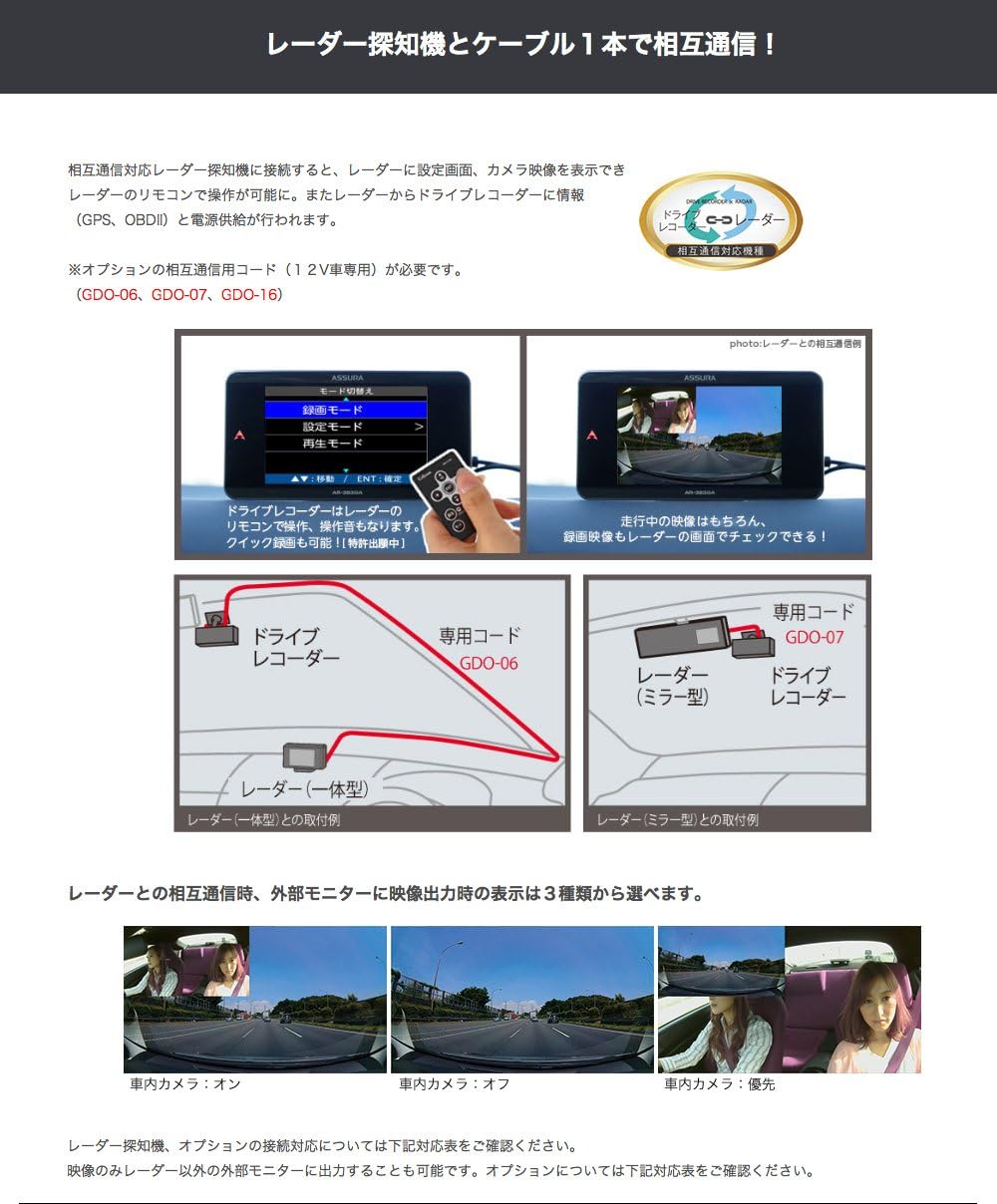
Image 6.5: Radar intercommunication setup and display options.
7. Maintenance
7.1. Cleaning the Device
- Wipe the device body with a soft, dry cloth.
- For the camera lenses, use a lens cleaning cloth to gently remove dust or smudges. Do not use abrasive cleaners or solvents.
7.2. microSD Card Care
Although the device features a maintenance-free function, it is good practice to:
- Periodically back up important video files to a computer.
- Replace the microSD card if you notice any degradation in recording quality or frequent errors.
8. Troubleshooting
If you encounter issues with your CSD-690FHR, refer to the following common problems and solutions:
| Problem | Possible Cause | Solution |
|---|---|---|
| Device does not power on. | No power supply; loose connection. | Check power cable connection to the device and cigarette lighter socket. Ensure vehicle ignition is on. |
| Recording not starting. | microSD card full or not inserted; card error. | Check microSD card insertion. If full, format the card (after backing up important files). Try a different microSD card. |
| Poor video quality. | Dirty lens; incorrect settings. | Clean camera lenses. Check recording resolution settings in the menu. Ensure HDR and Night Vision are enabled if needed. |
| Safety driving functions not working. | Not connected to radar detector; radar detector not compatible. | Ensure proper connection to a compatible CELLSTAR radar detector. Check radar detector's manual for settings. |
If the problem persists after trying these solutions, please contact CELLSTAR customer support.
9. Specifications
Key technical specifications for the CELLSTAR CSD-690FHR drive recorder:
| Feature | Detail |
|---|---|
| Brand | CELLSTAR |
| Model Name | CSD-690FHR |
| Item Weight | 0.08 kg |
| Display Type | LCD |
| Compatible Devices | Camera |
| Power Input | DC 12V/24V |
| Recording Channels | Front and Interior |
| Special Features | Night Vision, HDR, microSD Maintenance-Free, Parking Surveillance, Radar Intercommunication Support |
10. Warranty and Support
10.1. Warranty Information
The CELLSTAR CSD-690FHR Drive Recorder comes with a 3-year manufacturer's warranty from the date of purchase. This warranty covers defects in materials and workmanship under normal use. Please retain your proof of purchase for warranty claims.
The warranty does not cover damage caused by improper installation, misuse, accidents, unauthorized repairs, or natural disasters.
10.2. Customer Support
For technical assistance, troubleshooting beyond this manual, or warranty inquiries, please contact CELLSTAR customer support through their official website or the contact information provided with your product packaging.
Before contacting support, please have your product model number (CSD-690FHR) and proof of purchase ready.