
Introduction
This manual provides detailed instructions for the Walfront Bluetooth Audio Receiver Board 4.1. This versatile module integrates Bluetooth audio reception, USB decoding playback, and MicroSD card decoding playback, making it suitable for various audio applications such as car audio upgrades, home stereo systems, and DIY projects. Please read this manual thoroughly before use to ensure proper installation and operation.
Product Features
- Multiple Audio Input Modes: Supports Bluetooth 4.1 reception, USB decoding playback, and MicroSD (T-F) card decoding playback.
- Wide Format Compatibility: Plays MP3, WMA, WAV, FLAC, and APE (FAST encoding format) audio files.
- Sound Effects: Built-in equalizer with Class, Jazz, Rock, Bass, and Normal sound modes (effective in USB/MicroSD playback).
- User-Friendly Controls: On-board buttons for mode switching, track navigation, volume control, and EQ settings.
- Compact Design: Small form factor (50mm x 40mm) for easy integration into various setups.
- Power Supply: Operates on DC 5V.
Package Contents
- 1 x Walfront Bluetooth Audio Receiver Board 4.1
- Note: Additional cables or accessories are not included unless specified.
Product Overview
Familiarize yourself with the various components and interfaces of the audio receiver board.

Image 1: Top-down view of the Walfront Bluetooth Audio Receiver Board 4.1, showing the MicroUSB power input, 3.5mm audio output, control buttons, MicroSD card slot, and USB-A port.

Image 2: Top-down view of the board with key dimensions indicated: 50mm length and 40mm width.
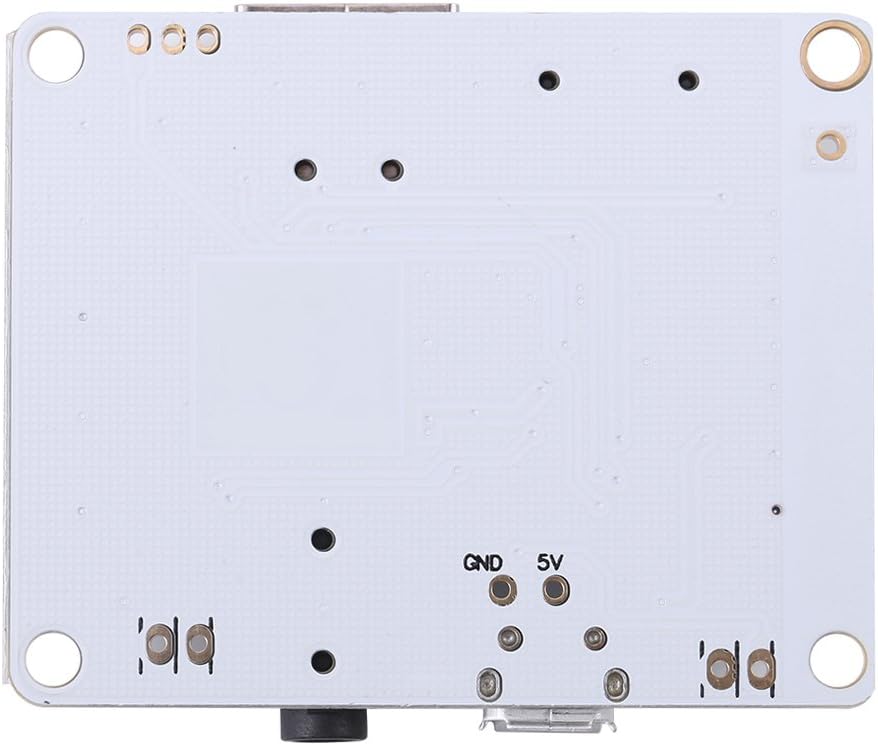
Image 3: Bottom view of the Walfront Bluetooth Audio Receiver Board, showing solder points for GND and 5V power input.

Image 4: Detailed close-up of the control buttons (MODE, PLAY, NEXT, BACK, EQ), 3.5mm audio jack, and USB-A port.
Key Components:
- MicroUSB Port: For 5V DC power input.
- 3.5mm Audio Jack: Stereo audio output.
- MicroSD Card Slot: For playing audio files from a MicroSD card.
- USB-A Port: For playing audio files from a USB flash drive.
- Control Buttons:
- MODE: Switches between Bluetooth, USB, and MicroSD input modes.
- PLAY/PAUSE: Toggles playback.
- NEXT: Short press for next track; long press to increase volume.
- BACK: Short press for previous track; long press to decrease volume.
- EQ: Cycles through sound equalizer presets (Class, Jazz, Rock, Bass, Normal).
- M_ANT: Bluetooth antenna.
- MUTE: Mute output.
- MIC: Microphone input (if applicable, though not explicitly stated for this model).
- 5V/GND Solder Points: Alternative power input.
Setup Instructions
- Power Connection:
Connect a 5V DC power supply to the MicroUSB port on the board. Alternatively, you can solder a 5V DC power source to the designated 5V and GND solder points on the board. Ensure correct polarity to prevent damage.
- Audio Output Connection:
Connect the 3.5mm audio output jack to your amplifier, active speakers, or headphones using a standard 3.5mm audio cable.
- Input Source Preparation:
- For MicroSD Card Playback: Insert a MicroSD card containing supported audio files (MP3, WMA, WAV, FLAC, APE) into the MicroSD card slot.
- For USB Playback: Insert a USB flash drive containing supported audio files into the USB-A port.
Important: Always ensure the power supply is stable and within the specified 5V DC range. Incorrect voltage can damage the module.
Operating Instructions
1. Power On/Off
The module powers on automatically when connected to a 5V DC power source. There is no dedicated power button.
2. Mode Selection
Press the MODE button to cycle through the available input modes:
- Bluetooth Reception Mode
- USB Decoding Playback Mode
- MicroSD Card Decoding Playback Mode
3. Bluetooth Reception Mode
- Switch the module to Bluetooth mode using the MODE button.
- The module will enter pairing mode, indicated by an audible prompt or LED indicator (if present).
- On your Bluetooth-enabled device (e.g., smartphone, tablet), search for available Bluetooth devices.
- Select the device named "Bluetooth Audio" or similar (specific name may vary) to pair.
- Once paired, you can play audio from your device, and it will be output through the module.
4. USB/MicroSD Card Playback Mode
- Insert a USB flash drive or MicroSD card containing supported audio files into the respective slot.
- Switch the module to USB or MicroSD mode using the MODE button. The module will automatically begin playing audio files.
- Playback Control:
- Short press PLAY/PAUSE to pause or resume playback.
- Short press NEXT for the next track.
- Short press BACK for the previous track.
5. Volume Control
- Long press NEXT to increase the volume.
- Long press BACK to decrease the volume.
6. Sound Effects (EQ)
Press the EQ button to cycle through different sound equalizer presets. These effects are only active during USB or MicroSD card playback.
- Class
- Jazz
- Rock
- Bass
- Normal
Specifications
| Feature | Detail |
|---|---|
| Power Supply | DC 5V |
| Supported Audio Formats | MP3, WMA, WAV, FLAC, APE (FAST encoding format) |
| Audio Output Mode | Surround (4.1 channel configuration) |
| Connectivity Technology | Bluetooth, Wireless |
| Controller Type | Touch (on-board buttons) |
| Special Features | Bluetooth Receiver, USB Decode Playback, MicroSD Card Decode Playback |
| Compatible Devices | Speakers, Amplifiers, Headphones |
| Dimensions (L x W) | 50mm x 40mm (1.97"D x 1.57"W) |
| Weight | 11g (0.024lb / 0.352 ounces) |
Troubleshooting
| Problem | Possible Cause / Solution |
|---|---|
| No power / Module not turning on. |
|
| No audio output. |
|
| Cannot pair via Bluetooth. |
|
| USB/MicroSD playback not working. |
|
Maintenance
- Keep the module dry and away from moisture.
- Avoid exposing the module to extreme temperatures.
- Clean the surface with a soft, dry cloth. Do not use harsh chemicals or solvents.
- Handle the board carefully to avoid damaging components or solder joints.
Safety Information
- This product is an electronic component and should be handled with care.
- Ensure proper ventilation when operating, especially if enclosed.
- Do not attempt to disassemble or modify the module beyond the intended connections. This may void any potential warranty and cause damage.
- Keep out of reach of children.
- Dispose of electronic waste responsibly according to local regulations.
Warranty and Support
For warranty information or technical support, please refer to the retailer or manufacturer's official website. Keep your purchase receipt for any warranty claims.
Manufacturer: Walfront