
Sharper Image TV Wireless Headphones
Sharper Image TV Wireless Headphones
Instruction Manual
Introduction
Thank you for purchasing the Sharper Image TV Wireless Headphones. These headphones are designed to provide a high-quality, private listening experience for your television, compatible with virtually all TV models, including modern Smart TVs.
Enjoy reliable UHF stereo audio without the need for Wi-Fi or Bluetooth, offering an impressive wireless range of up to 160 feet for unobstructed listening. The comfortable over-ear design features adjustable volume control directly on the headphones, and a single charge provides up to 20 hours of playtime.

Figure 1: Sharper Image TV Wireless Headphones with charging base.
Setup Guide
1. Unboxing and Components
Carefully remove all components from the packaging. Ensure you have the following items:
- Sharper Image TV Wireless Headphones (1 pair)
- Wireless Transmitter/Charging Base (1 unit)
- AC Power Adapter (1 unit)
- Audio Connection Cables (3.5mm audio cable, RCA audio cable, Digital Optical TOSLINK cable)

Figure 2: The headphones and charging base, available in black and silver.
2. Connecting the Transmitter Base to your TV
The wireless transmitter base connects to your TV's audio output. Choose the appropriate connection method based on your TV's available ports:
- 3.5mm Headphone Jack: If your TV has a 3.5mm headphone output, connect one end of the 3.5mm audio cable to the TV's headphone jack and the other end to the "AUDIO IN" port on the transmitter base.
- RCA Audio Jacks (Red/White): For TVs with RCA audio output (typically red and white ports labeled "AUDIO OUT"), connect the RCA audio cable to these ports on your TV and the corresponding "AUDIO IN" ports on the transmitter base.
- Digital Optical Output (TOSLINK): For Smart TVs or newer models with a digital optical audio output, connect the TOSLINK cable from your TV's "OPTICAL OUT" port to the "DIGITAL AUDIO IN" port on the transmitter base. Ensure your TV's audio settings are configured to output audio via the optical port.
Once the audio connection is made, plug the AC power adapter into the "DC IN" port on the transmitter base and then into a standard wall outlet.

Figure 3: The black headphones on the charging stand, illustrating the compact design.
3. Charging the Headphones
Place the headphones onto the charging posts of the transmitter base. Ensure the charging contacts on the headphones align with the pins on the base. A charging indicator light on the headphones or base will illuminate to confirm charging is active. Allow approximately 3-4 hours for a full charge, which provides up to 20 hours of listening time.
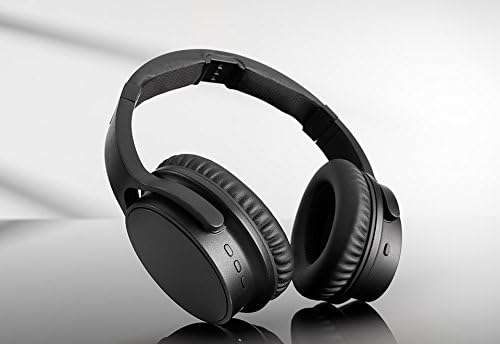
Figure 4: The silver headphones on the charging stand, showing the charging indicator area.
Operating Instructions
1. Powering On/Off
To power on the headphones, press and hold the Power button located on the right earcup until the indicator light illuminates. To power off, press and hold the Power button again until the light turns off.

Figure 5: Detail of the power button and Sharper Image logo on the earcup.
2. Adjusting Volume
The headphones feature independent volume controls. Use the Volume Up (+) and Volume Down (-) buttons on the left earcup to adjust the listening volume to your preference.
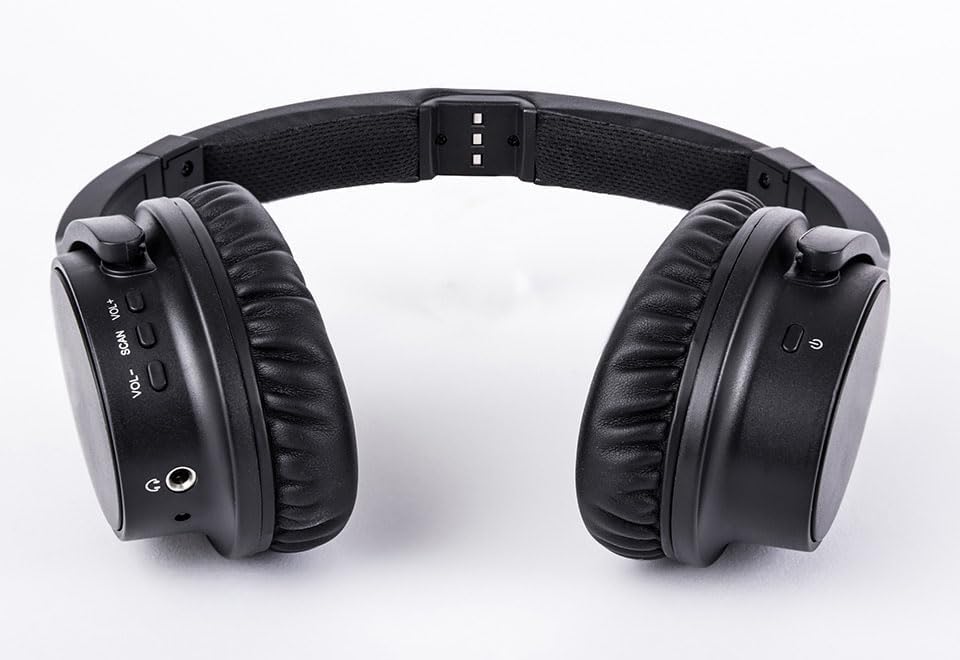
Figure 6: View of the headphone controls, including volume and scan buttons.
3. Wireless Range and Performance
The headphones operate using UHF RF technology, providing a strong and clear signal up to 160 feet from the transmitter base. For optimal performance, ensure there are no major obstructions (like thick walls or large metal objects) between the headphones and the transmitter. If audio quality degrades, try moving closer to the transmitter or adjusting its position.

Figure 7: Enjoying TV privately with Sharper Image Wireless Headphones.
Video 1: Official product overview of the Sharper Image TV Wireless Headphones, demonstrating ease of setup and use.
Maintenance
- Cleaning: Use a soft, dry cloth to clean the headphones and transmitter base. Do not use liquid cleaners or aerosols.
- Storage: When not in use, store the headphones on the charging base to keep them charged and ready for use. Store in a cool, dry place away from direct sunlight and extreme temperatures.
- Battery Care: To prolong battery life, avoid fully discharging the headphones frequently. Recharge them regularly.
Troubleshooting
| Problem | Possible Cause | Solution |
|---|---|---|
| No audio from headphones. | Headphones not powered on or not charged. Transmitter not powered on or not connected to TV. Incorrect audio input selected on TV. | Ensure headphones are charged and powered on. Verify transmitter is plugged in and connected to TV's audio output. Check TV audio settings to ensure output is directed to the connected port. |
| Static or poor audio quality. | Interference or too far from transmitter. Low battery on headphones. | Move closer to the transmitter or reposition it to avoid interference. Recharge the headphones fully. |
| Headphones not charging. | Headphones not properly seated on base. Power adapter not connected or faulty. | Ensure headphones are correctly placed on the charging posts, aligning contacts. Check power adapter connection to base and wall outlet. |
Specifications
- Model Name: TV Wireless Headphones
- Connectivity Technology: Wireless (RF)
- Wireless Range: Up to 160 ft
- Headphones Jack: 3.5 mm Jack (for wired connection option)
- Control Type: Volume Control, Remote
- Battery Life: Up to 20 Hours
- Frequency Range: 20Hz-20kHz
- Ear Placement: Over Ear
- Form Factor: Over Ear
- Noise Control: Passive Noise Cancellation
- Color: Black
- Item Weight: 1.62 pounds
- Manufacturer: Sharper Image
- UPC: 858195007522
Warranty and Support
Sharper Image products are designed with quality and performance in mind. This product typically comes with a 30-day return policy from the date of purchase. For specific warranty details, product support, or to inquire about replacement parts, please refer to the official Sharper Image website or contact their customer service directly.
Online Support: Visit the Sharper Image Store on Amazon for product information and support resources.
First Available: October 26, 2017
Related documentsTV Wireless Headphones


Ask a question about this manual
Ask about setup, troubleshooting, compatibility, parts, safety, or missing instructions. Manuals+ will review the question and use this page’s manual context to help answer it.