
1. Introduction
This manual provides essential information for the proper installation and maintenance of your Pro Breeze PB-P01 Air Purifier Replacement Filter. This genuine Pro Breeze filter is designed specifically for the PB-P01 Air Purifier (CADR 218) to ensure optimal air purification performance.
The multi-layer filter system incorporates a 4-stage filtration process, including a Pre-filter, True HEPA filter, Cold Catalyst filter, and Activated Carbon filter, designed to capture up to 99.7% of airborne particles.
2. Filter Installation
Follow these steps to correctly install the replacement filter into your Pro Breeze PB-P01 Air Purifier:
- Ensure the Pro Breeze PB-P01 Air Purifier is turned off and unplugged from the power outlet before proceeding.
- Locate and gently remove the front panel of the air purifier. Refer to your air purifier's main instruction manual for specific panel removal instructions if needed.
- Carefully remove the old filter from the air purifier. Dispose of the used filter responsibly.
- Unpack the new Pro Breeze PB-P01 Replacement Filter.
- Insert the new filter into the air purifier. Ensure the blue side of the filter is facing outwards, towards the front panel.
- Replace the front panel of the air purifier, ensuring it is securely fastened.
- Plug the air purifier back into the power outlet and turn it on.

Image 1: Pro Breeze PB-P01 Replacement Filter. This image shows the filter from a side angle, highlighting its multi-layered structure with a prominent blue layer.
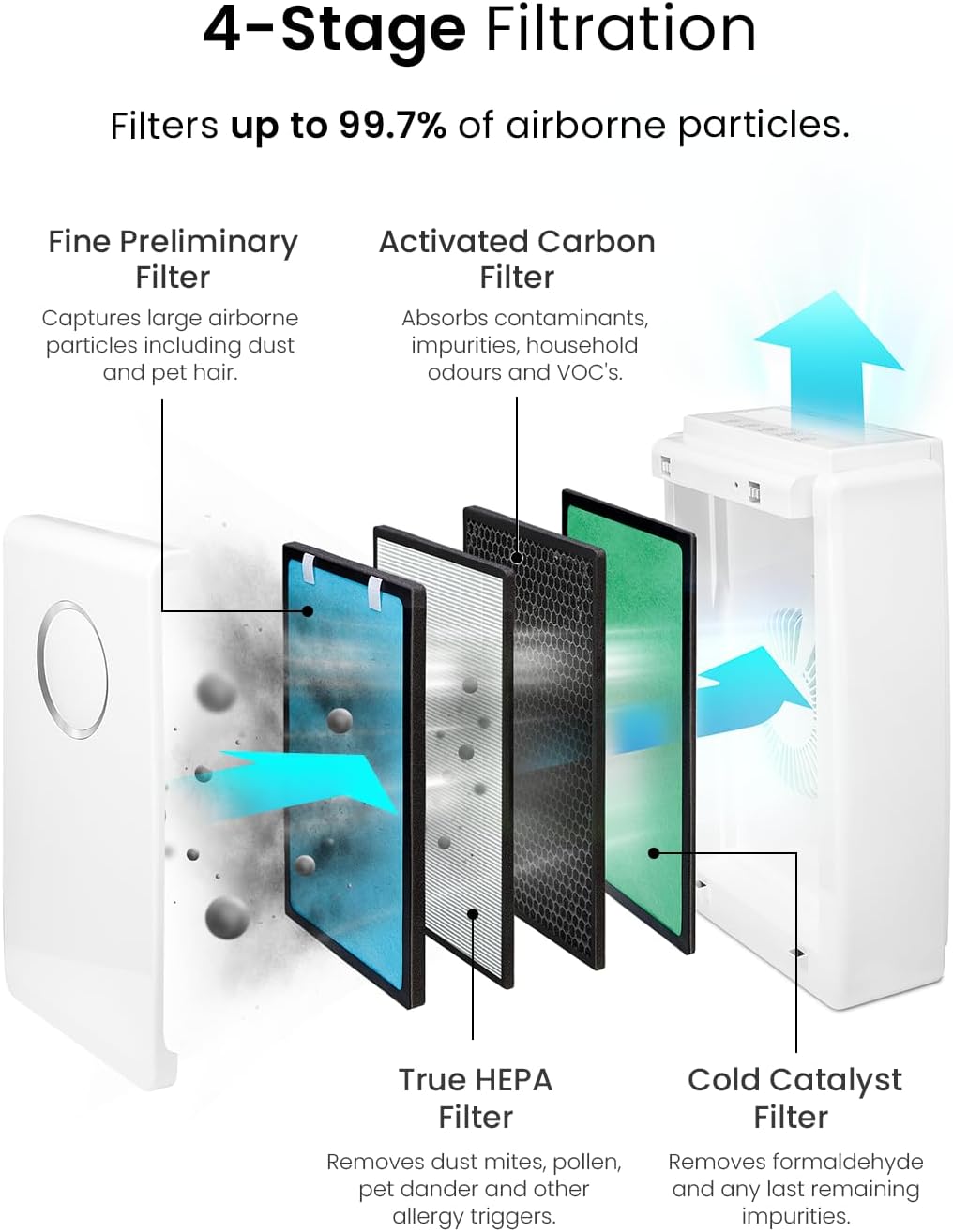
Image 2: Diagram illustrating the 4-stage filtration process. It shows air entering the purifier and passing through the Fine Preliminary Filter, Activated Carbon Filter, True HEPA Filter, and Cold Catalyst Filter.
3. Operating Instructions (Filter-Related)
Once the new filter is installed, your Pro Breeze PB-P01 Air Purifier is ready for operation. The filter works automatically as part of the air purifier's system. For detailed operating instructions regarding fan speeds, modes, and timer settings, please refer to the main instruction manual provided with your Pro Breeze PB-P01 Air Purifier.
The filter's multi-layer design ensures comprehensive air purification:
- Fine Preliminary Filter: Captures large airborne particles such as dust and pet hair.
- Activated Carbon Filter: Absorbs contaminants, impurities, household odors, and volatile organic compounds (VOCs).
- True HEPA Filter: Removes dust mites, pollen, pet dander, and other allergy triggers, filtering particles as small as 0.3 microns.
- Cold Catalyst Filter: Removes formaldehyde and other remaining impurities.

Image 3: Close-up illustration of the premium filter technology, showing various microscopic particles being trapped by the filter material.
4. Filter Maintenance and Replacement
Regular filter replacement is crucial for maintaining the efficiency and effectiveness of your Pro Breeze PB-P01 Air Purifier. The filter cannot be washed or cleaned and must be replaced when its lifespan expires.
4.1. Replacement Schedule
Pro Breeze recommends replacing the filter every 5000 hours of operation. The air purifier may have an indicator light or a timer to notify you when a filter change is due. Consult your air purifier's manual for details on resetting the filter indicator.
4.2. Replacement Procedure
The filter replacement procedure is identical to the installation steps outlined in Section 2. Filter Installation. Always ensure the air purifier is unplugged before attempting to replace the filter.
5. Troubleshooting (Filter-Related)
If you encounter issues after replacing your filter, consider the following common troubleshooting steps:
- Air Purifier Not Turning On: Ensure the front panel is securely closed. Many air purifiers have a safety switch that prevents operation if the panel is not properly latched.
- Reduced Airflow or Odor: Verify that the new filter is installed with the correct orientation (blue side facing outwards). If the issue persists, the filter might be defective, or the air purifier itself may require servicing.
- Filter Indicator Light Remains On: After replacing the filter, you may need to manually reset the filter life indicator on your air purifier. Refer to your air purifier's manual for specific instructions on how to reset this indicator.
- Unusual Noise: Check that the filter is seated correctly and not obstructing any internal components.
For issues not related to the filter or if troubleshooting steps do not resolve the problem, please contact Pro Breeze customer support or refer to your air purifier's main instruction manual.
6. Product Specifications
| Feature | Specification |
|---|---|
| Brand | Pro Breeze |
| Model Number | PB-P01 |
| Compatible Air Purifier | Pro Breeze PB-P01 (CADR 218) |
| Filter Type | Multi-layer (Pre-filter, True HEPA, Cold Catalyst, Activated Carbon) |
| Filtration Efficiency | Up to 99.7% of airborne particles |
| Recommended Replacement | Every 5000 hours |
| Material | Activated Carbon, HEPA media |
| Package Dimensions | 43 x 26.9 x 4.8 cm |
| Package Weight | 0.83 kg |
| GTIN (Global Trade Identification Number) | 08438639002010 |
7. Warranty and Support
For information regarding the warranty of your Pro Breeze PB-P01 Replacement Filter or for technical support, please refer to the warranty card included with your purchase or visit the official Pro Breeze website. You can also contact Pro Breeze customer service directly for assistance with product inquiries or troubleshooting.