
1. Introduction
This manual provides instructions for the LuckyStar MC377LL/A Universal Replacement Remote Control. This remote is designed to operate various Apple devices, including Apple TV (2nd, 3rd, 4th generation, and 4K models), Mac computers, Music Systems, iPhone, iPad, and iPod devices. It serves as a direct replacement for the original Apple MC377LL/A remote.

Image: The LuckyStar MC377LL/A remote (left) compared to older white and silver Apple remotes (right), illustrating its function as a substitute.
2. Setup
2.1 Battery Installation
The LuckyStar MC377LL/A remote control requires two AAA batteries for operation. Batteries are not included with the remote.
- Locate the battery compartment on the back of the remote control.
- Open the battery compartment cover.
- Insert two fresh AAA batteries, ensuring the positive (+) and negative (-) terminals align correctly with the markings inside the compartment.
- Close the battery compartment cover securely.

Image: Step-by-step guide showing how to open the battery compartment and insert two AAA batteries, aligning them according to the polarity markings.

Image: Illustration of the remote control alongside two AAA batteries, indicating the power requirement.
2.2 Initial Pairing / Linking (for Apple TV)
In most cases, the remote control will work immediately after battery installation without additional programming. However, if the remote does not respond to your Apple TV, you may need to link it.
- Ensure your Apple TV is powered on.
- Point the remote control towards your Apple TV.
- Press and hold both the Menu button and the Left navigation button simultaneously for approximately 6 seconds.
- Release the buttons once the Apple TV indicates that the remote has been linked.
3. Operating the Remote Control
The LuckyStar MC377LL/A remote control provides intuitive navigation and control for compatible Apple devices.
3.1 Button Functions
- Circular Navigation Pad: Use the top, bottom, left, and right edges to navigate menus and select items. The center button acts as a selection/confirm button.
- Menu Button: Returns to the previous menu or the main menu, depending on the context.
- Play/Pause Button: Controls media playback (play, pause).

Image: The remote control with a visual list of compatible devices, including Apple TV generations (1, 2, 3, 4K), iPod, and iPhone.
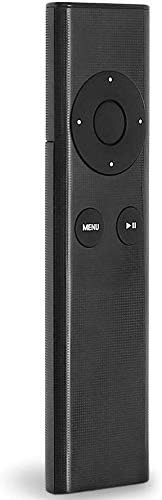
Image: A side profile of the LuckyStar remote control, highlighting its slim design.
4. Maintenance
4.1 Battery Replacement
When the remote control's performance degrades or it stops responding, replace the AAA batteries. Refer to Section 2.1 for detailed battery installation instructions. Always use fresh batteries and dispose of old batteries responsibly.
4.2 Cleaning
To clean the remote control, use a soft, dry cloth. Do not use liquid cleaners, aerosols, or abrasive materials, as these can damage the remote's surface or internal components.
5. Troubleshooting
- Remote is not responding:
- Check if the batteries are correctly installed with the correct polarity.
- Replace the batteries with fresh AAA batteries.
- Ensure there are no obstructions between the remote control and the device's IR receiver.
- If using with Apple TV, attempt to re-link the remote by holding the Menu and Left buttons for 6 seconds (refer to Section 2.2).
- Buttons feel unresponsive or sticky:
- Clean the remote control as described in Section 4.2.
- Ensure the buttons are not physically stuck.
- Slow response time:
- Ensure the remote has fresh batteries.
- Reduce the distance between the remote and the device.
- Ensure there are no strong light sources or other infrared devices interfering with the signal.
6. Specifications
| Feature | Detail |
|---|---|
| Model Number | LSMC377LL/A |
| Product Dimensions | Approximately 5.9 inches (length) |
| Item Weight | 6.7 ounces |
| Batteries Required | 2 x AAA batteries (not included) |
| Compatible Devices | Apple TV (A1427, A1469, A1378, A1294, MD199LL/A, MC572LL/A, MC377LL/A, MM4T2AM/A, MM4T2ZM/A), Mac Music System, iPhone, iPad, iPod |
| Special Feature | Universal Replacement |
| Color | Black |

Image: A visual representation of the remote control's dimensions, indicating a length of 5.9 inches.
7. Warranty and Support
For any issues or inquiries regarding your LuckyStar MC377LL/A Universal Replacement Remote Control, please contact Lucky Star customer support.
You can typically reach customer support through the platform where the product was purchased (e.g., Amazon message system). The manufacturer aims to respond to inquiries within 24 hours.
Please retain your proof of purchase for warranty claims, if applicable. Specific warranty details may vary and are usually provided at the point of sale or on the manufacturer's official website.