
1. Introduction
This manual provides essential information for the installation and operation of your Kufatec DAB/DAB+ Fistune Antenna Module Retrofit Kit. This kit is designed to integrate original DAB/DAB+ antenna modules into Audi A1 8X Sportback vehicles, enabling digital radio reception. Please read these instructions carefully before beginning installation to ensure proper function and safety.
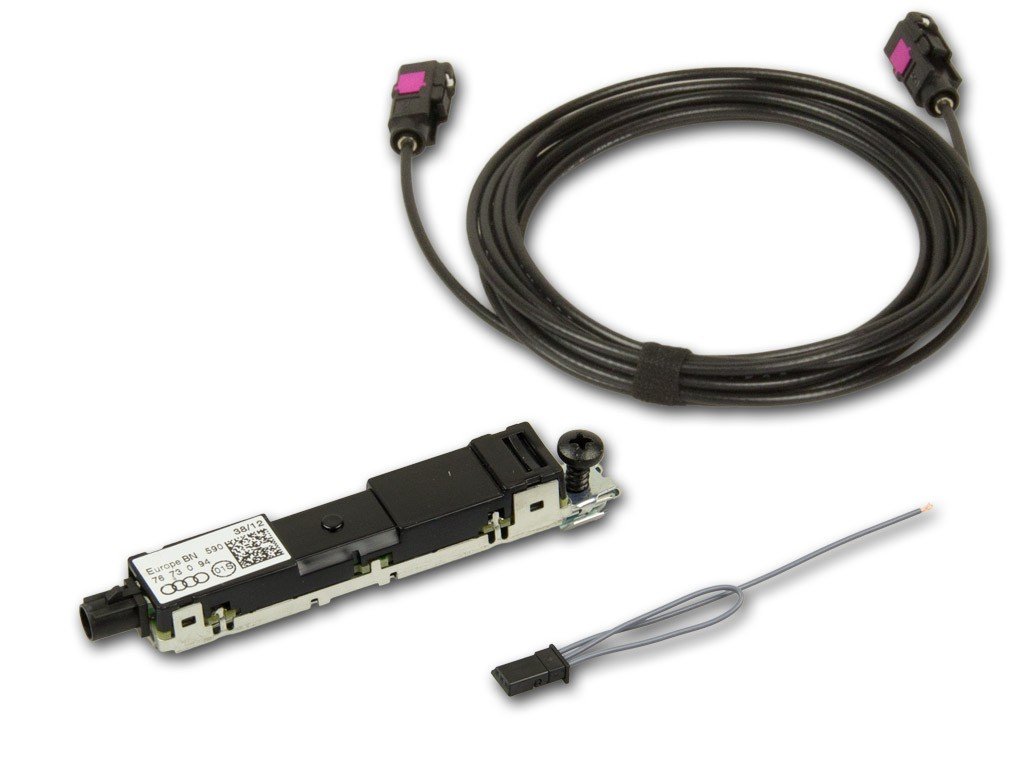
Image 1: Overview of the Kufatec DAB/DAB+ Fistune Antenna Module Retrofit Kit components, including the antenna module and cable set.
2. Safety Information
- Professional Installation Recommended: Due to the complexity of automotive electrical systems, installation by a qualified technician is strongly recommended.
- Disconnect Battery: Always disconnect the vehicle's battery before beginning any electrical work to prevent short circuits and damage.
- Vehicle Compatibility: Ensure this kit is compatible with your specific Audi A1 8X Sportback model. Refer to the specifications section.
- Cable Routing: Route all cables carefully to avoid interference with moving parts, sharp edges, or heat sources. Secure cables to prevent rattling or damage.
- Test Functionality: After installation, thoroughly test all vehicle functions, especially those related to the installed components, before driving.
3. Package Contents
Please verify that all components are present before beginning installation:
- 1x Fistune Antenna Module
- 1x Cable Set for connection
4. Setup (Installation)
This section outlines the general steps for installing the Kufatec DAB/DAB+ Fistune Antenna Module Retrofit Kit. Specific vehicle disassembly and reassembly procedures are beyond the scope of this general manual and should be referenced from an Audi service manual or performed by a professional.
- Preparation: Park the vehicle on a level surface, engage the parking brake, and disconnect the negative terminal of the vehicle battery.
- Access Vehicle Components: Carefully remove necessary trim panels and components to gain access to the vehicle's existing DAB tuner/radio box and the location for the new antenna module.
- Install Antenna Module: Mount the Fistune Antenna Module in a suitable, secure location, typically near the existing antenna system or as specified by vehicle-specific instructions.
- Connect Cable Set:
- Connect one end of the provided cable set to the Fistune Antenna Module.
- Route the cable set to the vehicle's DAB tuner or radio box.
- Connect the other end of the cable set to the appropriate input on the DAB tuner/radio box. Ensure all connections are secure and correctly polarized.
- Cable Management: Secure all cables using cable ties to prevent movement, chafing, or interference.
- Reassembly: Reinstall all removed trim panels and components in reverse order.
- Reconnect Battery: Reconnect the negative terminal of the vehicle battery.
- Initial Test: Turn on the vehicle's ignition and test the DAB/DAB+ functionality.
5. Operating
Once the Kufatec DAB/DAB+ Fistune Antenna Module Retrofit Kit is successfully installed, the operation of the DAB/DAB+ radio will be integrated into your Audi A1 8X Sportback's existing infotainment system. Refer to your vehicle's owner's manual for specific instructions on how to access and control DAB/DAB+ radio functions.
- Accessing DAB/DAB+: Select the DAB/DAB+ source from your vehicle's radio or media menu.
- Station Scan: Perform a station scan to find available digital radio stations in your area. This is usually an option within the DAB menu.
- Station Selection: Browse and select stations using your vehicle's standard radio controls.
- Information Display: The infotainment system will display station information, song titles, and other data broadcast by DAB/DAB+ stations.
6. Maintenance
The Kufatec DAB/DAB+ Fistune Antenna Module Retrofit Kit is designed for long-term, maintenance-free operation. No regular user maintenance is required for the module itself.
- Keep Connections Secure: Periodically, or if experiencing issues, ensure all cable connections remain secure.
- Cleanliness: Keep the area around the antenna module free from excessive dust or moisture.
- Software Updates: Any software updates for the DAB tuner or infotainment system would be part of your vehicle's regular service and not directly related to the antenna module.
7. Troubleshooting
If you encounter issues with your DAB/DAB+ reception after installing the kit, consider the following troubleshooting steps:
- No DAB/DAB+ Signal:
- Ensure the DAB/DAB+ source is selected on your vehicle's infotainment system.
- Perform a new station scan.
- Check all cable connections between the antenna module, cable set, and DAB tuner/radio box for looseness or damage.
- Verify that the vehicle is in an area with DAB/DAB+ coverage.
- Poor Reception / Intermittent Signal:
- Check for any obstructions near the antenna module.
- Ensure the antenna module is securely mounted and not vibrating.
- Verify that the cable routing avoids sources of electrical interference.
- System Not Recognized:
- Double-check all electrical connections.
- Ensure the vehicle battery was disconnected and reconnected properly.
- If the issue persists, professional diagnosis may be required.
8. Specifications
| Feature | Detail |
|---|---|
| Brand | Kufatec |
| Model Number | 39820-1 |
| Compatibility | Audi A1 8X Sportback |
| Antenna Type | DAB/DAB+ (Satellite listed in source, but functions as DAB/DAB+ antenna) |
9. Warranty Information
This Kufatec product is covered by the manufacturer's standard warranty. Please refer to the warranty documentation provided with your purchase or visit the official Kufatec website for detailed terms and conditions. Keep your proof of purchase for warranty claims.
10. Customer Support
For technical assistance, installation queries, or warranty support, please contact Kufatec customer service through their official website or the retailer from whom you purchased the product. Have your model number (39820-1) and proof of purchase ready when contacting support.