
Introduction
This manual provides comprehensive instructions for the Yale 05578000-2 Compact Biometric Safe. Please read this manual carefully before installation and operation to ensure proper use and to maximize the safe's security features. Keep this manual for future reference.
Safety Information
- Do not store the emergency override keys inside the safe. Keep them in a secure location outside the safe.
- Keep the safe away from moisture, extreme temperatures, and direct sunlight.
- Ensure the safe is securely mounted to a wall or floor to prevent unauthorized removal.
- Replace batteries promptly when the low battery indicator appears to avoid being locked out.
- Do not attempt to disassemble or modify the safe. This will void the warranty and may compromise security.
Package Contents
Verify that all items are present in the package:
- Yale 05578000-2 Compact Biometric Safe
- Emergency Override Keys (2x)
- AA Alkaline Batteries (4x)
- Mounting Hardware (screws, anchors)
- Instruction Manual
Setup
1. Battery Installation
The safe requires 4 AA alkaline batteries for operation. These are included in the package.
- Open the safe door using one of the emergency override keys. The keyhole is typically concealed behind a small cover on the front panel.
- Locate the battery compartment on the inside of the safe door.
- Insert the 4 AA batteries, ensuring correct polarity (+ and - terminals match the markings).
- Close the battery compartment cover. The safe should emit a beep, and the display will activate.
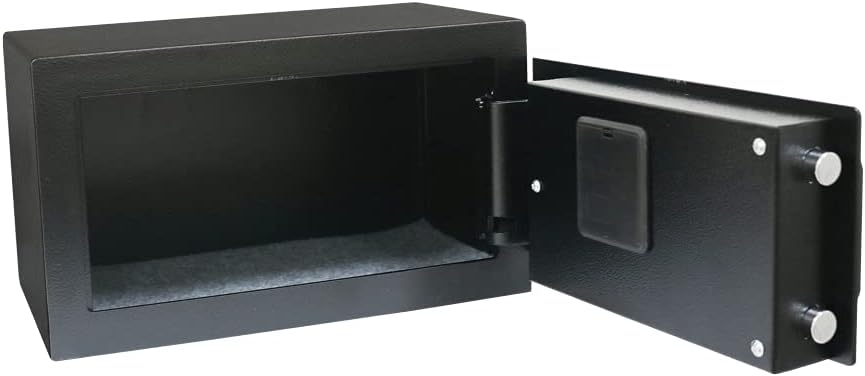
Interior view of the Yale 05578000-2 Compact Biometric Safe, illustrating the storage capacity and the internal structure of the door where the battery compartment is located.
2. Initial Fingerprint Registration
The safe supports up to 100 fingerprint registrations. It is recommended to register multiple fingers for convenience and as a backup.
- With the safe door open, press the internal reset button. This button is usually a small red or black button located near the battery compartment or hinge on the inside of the door.
- The display will show an indicator like "ENROLL" or "ADD FINGER".
- Place the pad of your finger firmly and flatly on the fingerprint scanner. Hold it for a moment until the safe beeps.
- Lift your finger and repeat step 3 two more times, slightly adjusting the angle of your finger each time to capture a broader scan.
- Upon successful registration, the safe will beep multiple times, and the display will confirm.
- To register additional fingerprints, repeat steps 1-5 for each new finger or user.

Detailed view of the safe's control panel, highlighting the fingerprint sensor for biometric access and the numeric keypad.
3. Mounting the Safe
For enhanced security and to prevent theft, it is highly recommended to securely mount the safe to a wall or floor using the provided hardware.
- Choose a suitable, discreet location. Ensure there are no electrical wires or water pipes behind the mounting surface if drilling into a wall.
- With the safe door open, mark the drilling points through the pre-drilled holes located on the back or bottom of the safe.
- Drill pilot holes into the wall or floor using an appropriate drill bit size for the anchors.
- Align the safe with the drilled holes and secure it firmly using the provided screws and anchors.
- Test the mounting to ensure the safe is stable and cannot be easily removed.
Operating
1. Opening with Fingerprint
To open the safe using a registered fingerprint:
- Place a registered finger firmly and flatly on the fingerprint scanner.
- The safe will beep once, and the display will show "OPEN" or similar, indicating successful verification.
- The door will unlock automatically. Turn the handle (if present) and open the door.
- To lock the safe, simply close the door. The locking bolts will engage automatically.

An overview of the Yale 05578000-2 Compact Biometric Safe, showcasing its black finish and the electronic lock mechanism with fingerprint reader and keypad.
2. Opening with Emergency Key
In case of battery failure, electronic malfunction, or if you cannot access the safe via fingerprint, use the emergency override key:
- Locate the emergency keyhole, usually hidden behind a small removable cover on the front panel of the safe.
- Insert one of the emergency override keys into the keyhole.
- Turn the key clockwise (or counter-clockwise, depending on the model) to unlock the safe.
- Turn the handle (if present) and open the door.
- Remember to remove the key after opening and store it in a secure location.
Maintenance
1. Battery Replacement
When the low battery indicator appears on the display (e.g., "LOW BATT"), replace all four AA batteries promptly. Using depleted batteries can lead to operational issues.
- Open the safe using a registered fingerprint or the emergency key.
- Locate the battery compartment on the inside of the door.
- Remove the old batteries and dispose of them responsibly.
- Insert four new AA alkaline batteries, ensuring correct polarity.
- Close the battery compartment cover.
2. Cleaning
To maintain the appearance and functionality of your safe:
- Clean the safe's exterior with a soft, slightly damp cloth.
- Do not use abrasive cleaners, solvents, or harsh chemicals, as these can damage the finish or electronic components.
- Keep the fingerprint scanner clean and free of dust, dirt, or moisture to ensure optimal performance.
Troubleshooting
- Safe does not open with fingerprint:
Ensure your finger is clean and dry. Try placing your finger firmly and flatly on the scanner. Re-register your fingerprint if issues persist. Check if the batteries are low and replace them if necessary. - No power or display:
Check that the batteries are inserted with correct polarity. Replace all batteries with new AA alkaline batteries. - Emergency key does not work:
Ensure the key is fully inserted into the keyhole and turned completely. Do not force the key. If the key is bent or damaged, contact customer support. - Safe beeps continuously:
This may indicate a low battery warning or an error. Check the display for specific error codes or messages. Replace batteries if indicated.
Specifications
| Feature | Detail |
|---|---|
| Brand | Yale |
| Model | 05578000-2 |
| Material | Alloy Steel |
| Color | Black |
| Dimensions (L x W x H) | 20 cm x 35 cm x 20 cm |
| Weight | 8.8 kg |
| Power Source | 4 AA Alkaline Batteries (included) |
| Special Features | Biometric Fingerprint Access, Emergency Key Access |
| Fingerprint Capacity | Up to 100 registrations |
Warranty and Support
For detailed warranty information, terms, and conditions, please refer to the warranty card or documentation included with your purchase. Keep your proof of purchase (receipt or invoice) as it will be required for any warranty claims.
For technical support, troubleshooting assistance, or to inquire about replacement parts, please visit the official Yale website or contact their customer service department using the contact information provided in your product packaging.


