1. Important Safety Instructions
Please read this manual carefully before using the appliance. Keep it for future reference.
- Always disconnect the vacuum cleaner from the power supply before cleaning or performing any maintenance.
- Do not use the appliance to pick up water or wet substances.
- Do not pick up burning or smoking objects, such as cigarettes, matches, or hot ashes.
- Do not use without the dust bag and filters in place.
- This appliance is not intended for use by persons (including children) with reduced physical, sensory or mental capabilities, or lack of experience and knowledge, unless they have been given supervision or instruction concerning use of the appliance by a person responsible for their safety.
- Children should be supervised to ensure that they do not play with the appliance.
- If the supply cord is damaged, it must be replaced by the manufacturer, its service agent or similarly qualified persons in order to avoid a hazard.
2. Product Overview
The Hoover Telios Extra TX50PET is a powerful and quiet bagged canister vacuum cleaner designed for efficient cleaning across various floor types, including specialized tools for pet hair and delicate surfaces.

Figure 2.1: Front-side view of the Hoover Telios Extra TX50PET vacuum cleaner, showcasing its compact design and hose connection.
Key Features:
- Powerful 550W Motor: Provides strong suction for thorough cleaning.
- Ultra Quiet Operation: Operates at only 64 dBA for a less disruptive cleaning experience.
- Large 3.5L Dust Bag Capacity: Reduces the frequency of bag changes.
- Washable EPA10 Filter: Ensures efficient air filtration and is easy to maintain.
- Integrated Accessories: Three accessories are conveniently stored under the vacuum's hood.
Included Components:
- Combined hard floor and carpet brush
- Furniture brush
- Universal brush
- Crevice tool (on-board)
- Mini turbo brush for pet hair
- Parquet brush
- Carpet/rug brush

Figure 2.2: The Hoover Telios Extra TX50PET with its top compartment open, revealing the integrated accessories for convenient storage.
3. Setup and Assembly
3.1 Attaching the Hose and Extension Tube
- Insert the flexible hose into the suction inlet on the main unit until it clicks securely into place.
- Connect the telescopic extension tube to the hose handle.
- Attach your desired floor nozzle (e.g., combined brush, parquet brush) to the end of the telescopic tube.

Figure 3.1: The Hoover Telios Extra TX50PET vacuum cleaner fully assembled with the hose, telescopic tube, and floor nozzle attached, ready for use.
3.2 Inserting the Dust Bag
- Open the dust bag compartment cover.
- Ensure a new dust bag is correctly seated in the holder.
- Close the compartment cover firmly until it locks.
4. Operating Instructions
4.1 Powering On/Off
- Plug the power cord into a suitable electrical outlet.
- Press the On/Off button located on the main unit to start or stop the vacuum cleaner.
4.2 Adjusting Suction Power
The vacuum cleaner features a variator to adjust suction power according to your cleaning needs.
- Slide the power control switch on the main unit to increase or decrease suction.
- Use lower suction for delicate fabrics and higher suction for hard floors and heavily soiled carpets.

Figure 4.1: Close-up view of the Hoover Telios Extra TX50PET control panel, showing the power adjustment slider and On/Off button.
4.3 Using Specialized Brushes
- Parquet Brush: Designed with natural bristles and felt wheels to protect and clean delicate hard floors.
- Mini Turbo Brush: Highly effective for removing pet hair and lint from upholstery, cushions, and carpets.
- Carpet/Rug Brush: Optimized for deep cleaning of carpets and rugs.

Figure 4.2: Detail of the specialized parquet brush, featuring natural bristles and felt wheels for gentle cleaning of delicate floors.

Figure 4.3: The mini turbo brush, specifically designed for efficient removal of pet hair from various surfaces.

Figure 4.4: The carpet/rug brush, engineered for effective cleaning of textile floor coverings.
5. Maintenance
5.1 Replacing the Dust Bag
The dust bag indicator will signal when the bag is full and needs replacement. Always use genuine Hoover replacement bags.
- Unplug the vacuum cleaner from the power outlet.
- Open the dust bag compartment.
- Carefully remove the full dust bag and dispose of it.
- Insert a new 3.5L dust bag, ensuring it is correctly positioned.
- Close the compartment cover securely.
5.2 Cleaning the EPA10 Filter
The EPA10 filter is washable and should be cleaned regularly to maintain optimal suction and air filtration.
- Unplug the vacuum cleaner.
- Locate and remove the EPA10 filter, typically found near the motor or exhaust.
- Rinse the filter under cold running water until the water runs clear. Do not use detergents.
- Allow the filter to air dry completely for at least 24 hours before reinserting it. Do not use heat to dry.
- Reinsert the dry filter into its compartment.
5.3 Cleaning Brushes and Nozzles
- Regularly check brushes and nozzles for tangled hair, threads, or debris.
- Use scissors to cut away tangled hair from brush rolls.
- Wipe down nozzles with a damp cloth if necessary.
6. Troubleshooting
If you encounter issues with your vacuum cleaner, refer to the following common troubleshooting steps.
| Problem | Possible Cause | Solution |
|---|---|---|
| No power | Not plugged in; power outlet fault; thermal cut-out activated. | Check plug and outlet; allow appliance to cool for 30 minutes if thermal cut-out activated. |
| Loss of suction | Full dust bag; clogged filter; blocked hose/nozzle. | Replace dust bag; clean/wash filter; check and clear blockages. |
| Unusual noise | Blockage in hose/nozzle; foreign object in brush. | Inspect and clear any blockages; remove foreign objects. |
7. Specifications
| Feature | Detail |
|---|---|
| Brand | Hoover |
| Model Number | Telios Extra TX50PET |
| Power | 550 Watts |
| Noise Level | 64 Decibels |
| Dust Bag Capacity | 3.5 Litres |
| Filter Type | Washable EPA10 |
| Dimensions (L x W x H) | 44.3 x 30 x 23.7 cm |
| Weight | 4.71 Kilograms |
| Voltage | 220V |
| Included Components | Combined hard floor and carpet brush, furniture brush, universal brush, crevice tool (on-board), mini turbo brush for pet hair, parquet brush, carpet/rug brush. |
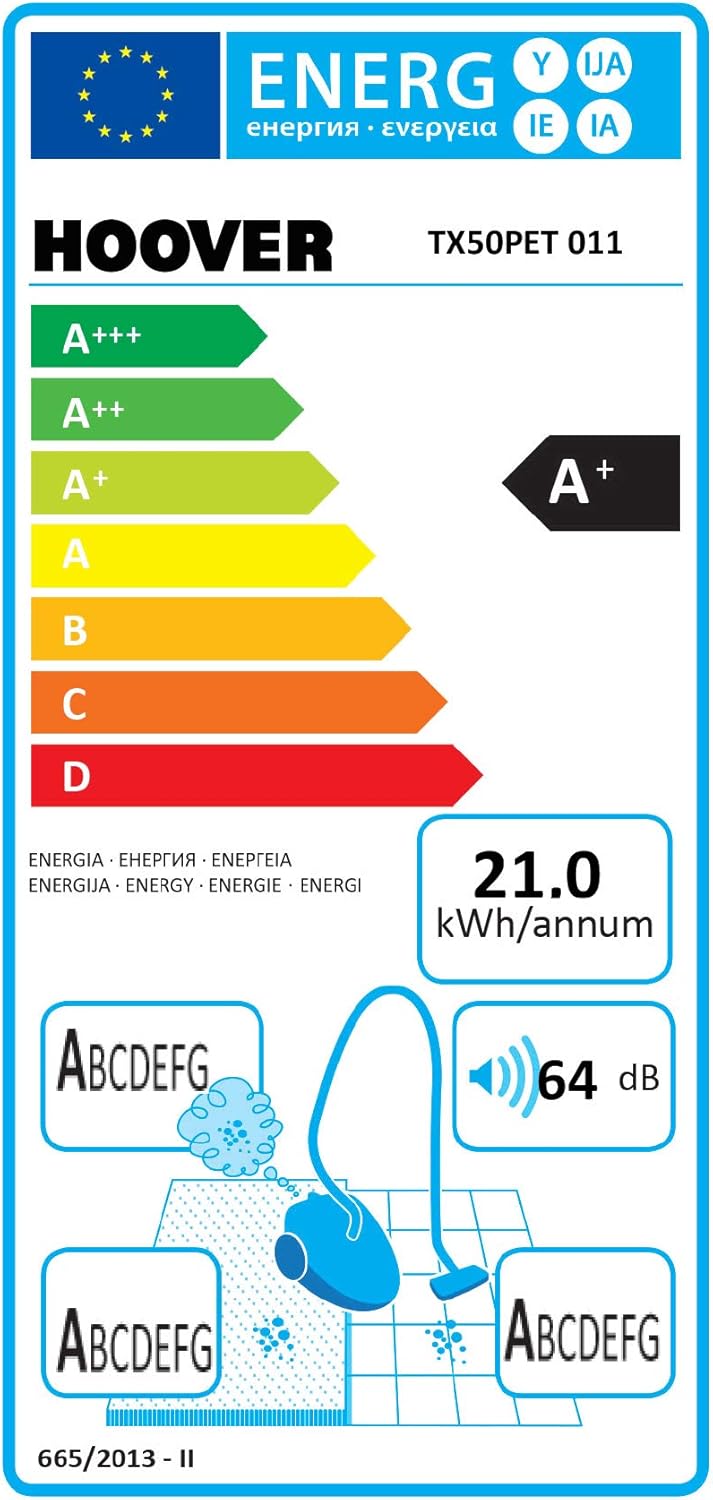
Figure 7.1: Energy label for the Hoover Telios Extra TX50PET, indicating its energy efficiency and noise level of 64 dB.
8. Warranty and Support
For warranty information, please refer to the documentation provided at the time of purchase or contact your retailer. For technical support or spare parts, please contact Hoover customer service or visit their official website.
- Hoover Official Website: www.hoover.com
- Customer Service: Refer to your regional Hoover contact details.


