
Rybozen MP1
Rybozen MP1 Wireless TV Headphones Instruction Manual
Model: MP1
Introduction
This manual provides detailed instructions for the Rybozen MP1 Wireless TV Headphones. This device offers five primary functions: wireless TV headphone use, online chat, FM radio, room monitoring, and wired headphone use. Please read this manual thoroughly before operating the product to ensure correct usage and optimal performance.
Package Contents
Verify that all items listed below are present in your package:
- Rybozen Wireless Headphones
- Wireless Transmitter/Charging Dock
- Audio Connection Cable (3.5mm to RCA)
- 3.5mm Audio Cable
- User Manual (this document)

Image: Rybozen MP1 Wireless TV Headphones, including the headset, transmitter, and connection cables, shown with its retail packaging.
Product Overview
Headphone Controls
- ON/OFF Switch: Powers the headphones on or off.
- SCAN Button: Used to search for available FM radio frequencies or to enter TV mode.
- RESET Button: Used in conjunction with the SCAN button to enter TV mode.
- Volume Control: Adjusts the listening volume.

Image: Close-up view of the right earcup, showing the ON/OFF switch, SCAN button, and RESET button.
Transmitter/Charging Dock
The transmitter serves as the wireless signal source and a charging dock for the headphones. It features audio input ports for connecting to various devices.

Image: The Rybozen MP1 headphones resting on their transmitter stand, with connection cables visible at the base.
Comfort Features
The headphones are designed with an adjustable, soft-padded headband and over-ear earpads for extended comfort during use.

Image: Front view of the Rybozen MP1 headphones, illustrating the adjustable headband mechanism for a customized fit.
Setup
1. Powering the Transmitter
Connect the transmitter to a power source using the provided power adapter (if included) or USB cable. Ensure the power indicator light on the transmitter illuminates.
2. Powering the Headphones
Insert 2 AAA batteries (not included) into the headphone battery compartment. Slide the ON/OFF switch to the 'ON' position.
3. Connecting to Audio Sources
The transmitter can connect to various audio output devices. Refer to the diagram below for visual guidance.
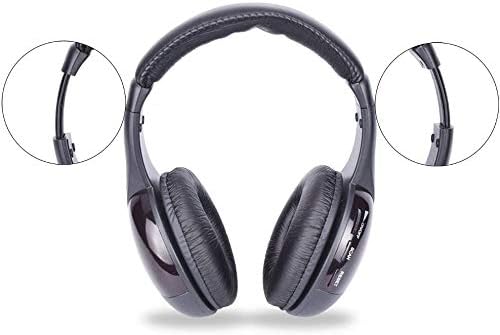
Image: A diagram illustrating four different connection scenarios for the Rybozen MP1 headphones: 1) TV audio out, 2) PC audio out with microphone, 3) Wireless TV listening, and 4) Wired MP3 player connection.
3.1. Connecting to a TV (Wireless Mode - Diagram 1)
Connect the provided 3.5mm to RCA audio cable from your TV's audio output (RCA L/R jacks, typically red and white) to the corresponding input on the transmitter. Ensure your TV's audio output is enabled.
3.2. Connecting to a PC (Wireless Chat/Audio - Diagram 2)
Connect the 3.5mm audio cable from your PC's audio output jack to the transmitter's audio input. For online chat functionality, connect the microphone cable from the transmitter to your PC's microphone input jack.
3.3. Connecting to an MP3 Player or Audio Device (Wired Mode - Diagram 4)
For wired listening, connect the 3.5mm audio cable directly from your MP3 player's headphone socket to the 3.5mm audio input on the headphones. The transmitter is not required for wired mode.
Operating Instructions
1. Wireless TV Mode (Diagram 3)
After connecting the transmitter to your TV's audio output:
- Ensure the headphones are powered on.
- Press and hold the RESET button on the headphones.
- While holding RESET, simultaneously press the SCAN button.
- Release both buttons. The headphones will attempt to connect to the transmitter and receive TV audio.
- Adjust the volume using the control on the headphones.
Note: If you experience static or the headphones are playing radio instead of TV audio, repeat the RESET and SCAN procedure.
2. FM Radio Mode
To listen to FM radio:
- Ensure the headphones are powered on and not connected to the transmitter in TV mode.
- Press the SCAN button briefly. The headphones will scan for available FM radio stations.
- Press SCAN again to move to the next available station.
- Adjust the volume as needed.
3. Wired Headphone Mode
To use the headphones in wired mode:
- Connect the 3.5mm audio cable directly from your audio source (e.g., MP3 player, smartphone) to the 3.5mm audio input jack on the headphones.
- The headphones do not require power in wired mode.
- Adjust volume from your audio source.
4. Wireless Monitoring Function
The transmitter can be used to monitor sounds from another room:
- Place the transmitter in the room you wish to monitor.
- Ensure the transmitter is powered on.
- Wear the headphones and ensure they are powered on and in wireless mode (not FM radio or wired).
- The headphones will receive audio transmitted by the emitter.
5. Online Chat Function
When connected to a PC as described in the setup section:
- Ensure the microphone cable is connected from the transmitter to your PC's microphone input.
- Select the connected microphone as your input device in your PC's sound settings or chat application.
- Use the headphones for listening and the transmitter's microphone for speaking during online communication.
Troubleshooting
| Problem | Possible Cause | Solution |
|---|---|---|
| No sound from headphones in TV mode. | Headphones not in TV mode; incorrect connection; low batteries; TV audio output not enabled. | Perform the RESET + SCAN procedure. Check all cable connections. Ensure TV audio output is active. Replace headphone batteries. |
| Excessive static or interference. | Weak signal; interference from other devices; headphones not properly tuned. | Ensure transmitter and headphones are within range. Move away from other electronic devices. Re-perform RESET + SCAN. |
| Headphones only play FM radio. | Headphones are in FM radio mode. | Perform the RESET + SCAN procedure to switch to TV mode. |
| Microphone not working for online chat. | Incorrect PC audio settings; cable not connected. | Ensure microphone cable is securely connected to PC's mic input. Check PC sound settings to select the correct input device. |
| Headphones uncomfortable. | Improper fit. | Adjust the headband for a better fit. Ensure earpads fully cover ears. |
Specifications
| Feature | Detail |
|---|---|
| Model Name | MP1 |
| Connectivity Technology | Wireless |
| Wireless Communication | 2.4GHz |
| Compatible Devices | Televisions, PCs, Game Players, DVD Players, VCD Players, Audio Devices, MP3 Players, CD Players (via RCA, 3.5mm, Optical Ports with adapter) |
| Cable Feature | Without Cable (Wireless), With Cable (Wired) |
| Item Weight | 9.6 ounces (approx. 272g) |
| Control Method | Buttons (ON/OFF, Scan, Reset), Volume Dial |
| Earpiece Shape | Over Ear |
| Headphones Jack | 3.5 mm Jack |
| Product Dimensions | 8.2 x 6.5 x 3.2 inches (approx. 20.8 x 16.5 x 8.1 cm) |
Maintenance
- Clean the headphones and transmitter with a soft, dry cloth. Do not use abrasive cleaners or solvents.
- Avoid exposing the device to extreme temperatures, humidity, or direct sunlight.
- Store the headphones on the transmitter dock or in a safe place when not in use to prevent damage.
- If not using the headphones for an extended period, remove the batteries to prevent leakage.
Warranty and Support
For warranty information or technical support, please refer to the documentation provided at the time of purchase or contact Rybozen customer service through their official website. Keep your purchase receipt as proof of purchase.
Ask a question about this manual
Ask about setup, troubleshooting, compatibility, parts, safety, or missing instructions. Manuals+ will review the question and use this page’s manual context to help answer it.