
Introduction
This manual provides comprehensive instructions for the installation, operation, and maintenance of the Lithonia Lighting WSX PDT D WH Sensor Switch. The WSX D wall switch integrates 0-10V dimming, passive dual technology occupancy sensing, and automatic dimming photocontrol capabilities into a single device. It is designed for spaces requiring multiple energy-saving strategies.
Key Features
- Compatible with 0-10V dimming luminaries.
- 100% passive detection for reliable operation.
- Small motion detection capability up to 20 feet.
- Programmable via the Sensor Switch VLP app or traditional push-button methods.
- Dual Technology (PDT) utilizing both Passive Infrared (PIR) and Microphonics detection for enhanced accuracy.
Setup and Installation
Important Safety Information: Installation should be performed by a qualified electrician in accordance with all national and local electrical codes. Always turn off power at the circuit breaker before beginning any electrical work.
Wiring Diagram and Connections
The WSX PDT D WH switch operates on 120 Volts and uses screw terminals for connections. Ensure all connections are secure and properly insulated.

Figure 1: Front view of the WSX PDT D WH switch, showing the sensor lens, ON/OFF button, and dimming controls. Wires are visible for connection.
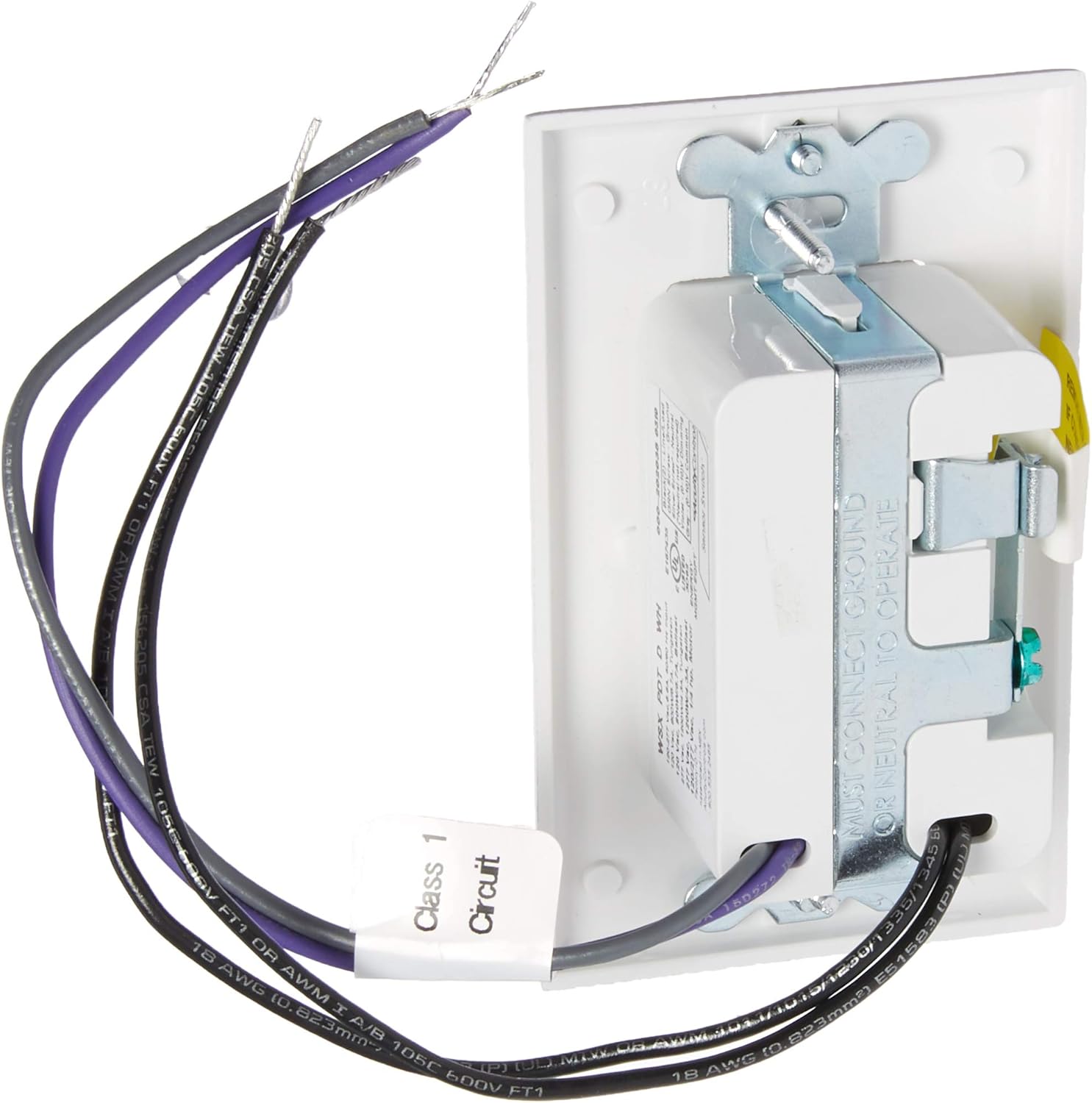
Figure 2: Rear view of the WSX PDT D WH switch, illustrating the screw terminals and internal components. Labels indicate wiring requirements, including a note to connect ground or neutral for operation.
Refer to the detailed wiring instructions provided with the product packaging for specific terminal assignments (e.g., Line, Load, Neutral, Ground, 0-10V Dimming wires). The device requires a 1-way circuit connection.
Operating Instructions
The WSX PDT D WH switch offers both automatic motion-activated control and manual override capabilities.
Manual Control
- ON/OFF Button: Press the large ON/OFF button to manually toggle the connected lights on or off.
- Dimming Control: Use the up (▲) and down (▼) arrow buttons to adjust the brightness level of 0-10V dimmable luminaries.
Automatic Operation (Motion Sensing)
The sensor automatically detects occupancy using Passive Dual Technology (PIR and Microphonics) to turn lights on and off, and adjusts dimming based on ambient light conditions (photocontrols). The detection range for small motion is up to 20 feet.
Programming
The switch can be programmed to customize settings such as time delay, sensitivity, and photocell levels. Programming can be done using:
- Traditional Push-Button Programming: Refer to the detailed programming guide included with your product for specific button sequences and indicator light patterns.
- Sensor Switch VLP Mobile App: For advanced programming and easier configuration, download the Sensor Switch VLP mobile application (availability may vary). Follow the app's instructions for connecting and customizing your device.
Maintenance
The WSX PDT D WH switch requires minimal maintenance. To ensure optimal performance:
- Keep the sensor lens clean and free from dust or obstructions. Use a soft, dry cloth for cleaning. Do not use abrasive cleaners.
- Ensure the area around the sensor is clear of objects that could block its field of view, such as furniture or tall plants.
- Periodically check electrical connections for tightness, especially if the device is subject to vibration.
Troubleshooting
If you experience issues with your WSX PDT D WH switch, refer to the following common problems and solutions:
| Problem | Possible Cause | Solution |
|---|---|---|
| Lights do not turn on/off automatically. | Incorrect sensitivity settings, obstructed sensor, power issue, or wiring error. | Check sensor lens for obstructions. Verify power supply. Review wiring connections. Adjust sensitivity settings via programming. |
| Lights dim or brighten too slowly. | Dimming speed setting, or compatibility issue with luminaries. | Check programming settings for dimming ramp rates. Ensure connected luminaries are compatible with 0-10V dimming. |
| Difficulty with programming. | Misinterpretation of instructions, incorrect button sequence. | Carefully re-read the programming guide. Ensure you are using the correct button presses and observing indicator lights. Consider using the Sensor Switch VLP app if available. |
| Switch is unresponsive or appears faulty. | Internal component failure, severe wiring issue. | Turn off power at the breaker, wait 30 seconds, then restore power. If the issue persists, contact Lithonia Lighting customer support. Do not attempt to repair the device yourself. |
For issues not covered here, or if troubleshooting steps do not resolve the problem, please contact Lithonia Lighting customer support.
Specifications
| Attribute | Detail |
|---|---|
| Model Number | WSX PDT D WH |
| Operation Mode | Automatic |
| Operating Voltage | 120 Volts |
| Contact Type | Normally Open |
| Connector Type | Screw Terminals |
| Item Dimensions (L x W x H) | 1.63 x 1.68 x 2.74 inches |
| Circuit Type | 1-way |
| Actuator Type | Push Button |
| Contact Material | Brass |
| International Protection Rating | IP54 |
| Control Method | App, Push Button |
| Connectivity Protocol | Wi-Fi (for app control) |
| Color | White |
| Item Weight | 5.3 ounces |
| Power Source | Corded Electric |
Warranty and Support
Warranty Information
The Lithonia Lighting WSX PDT D WH Sensor Switch is covered by a 5-Year Limited Warranty. This warranty covers defects in materials and workmanship under normal use. Please retain your proof of purchase for warranty claims.
Customer Support
For technical assistance, warranty claims, or further information regarding your Lithonia Lighting product, please contact Lithonia Lighting customer support. Refer to the product packaging or the official Lithonia Lighting website for current contact details.
Online Resources: You may find additional resources, FAQs, and updated programming guides on the official Lithonia Lighting website.