
1. Introduction
Thank you for choosing the Sensky Motion Activated LED Strip Light Kit. This kit provides efficient and convenient lighting with motion-sensing capabilities, ideal for various indoor applications. Please read this manual carefully before installation and use to ensure proper function and safety.
2. Safety Information
- Ensure the power adapter is connected to a suitable power outlet (DC 12V).
- Do not cut the LED strip at points other than the designated cut lines to avoid damage.
- Avoid exposing the LED strip or motion sensor to water or high humidity, as it is designed for indoor use only.
- Keep out of reach of children.
- Do not attempt to repair or modify the product. Contact customer service for assistance.
3. Package Contents
The Sensky Motion Activated LED Strip Light Kit includes the following components:
- LED Strip (19.7ft / 6m)
- Motion Sensor Switch
- Power Adapter (DC 12V)
- On/Off Switch
- Extension Cables
- Connectors
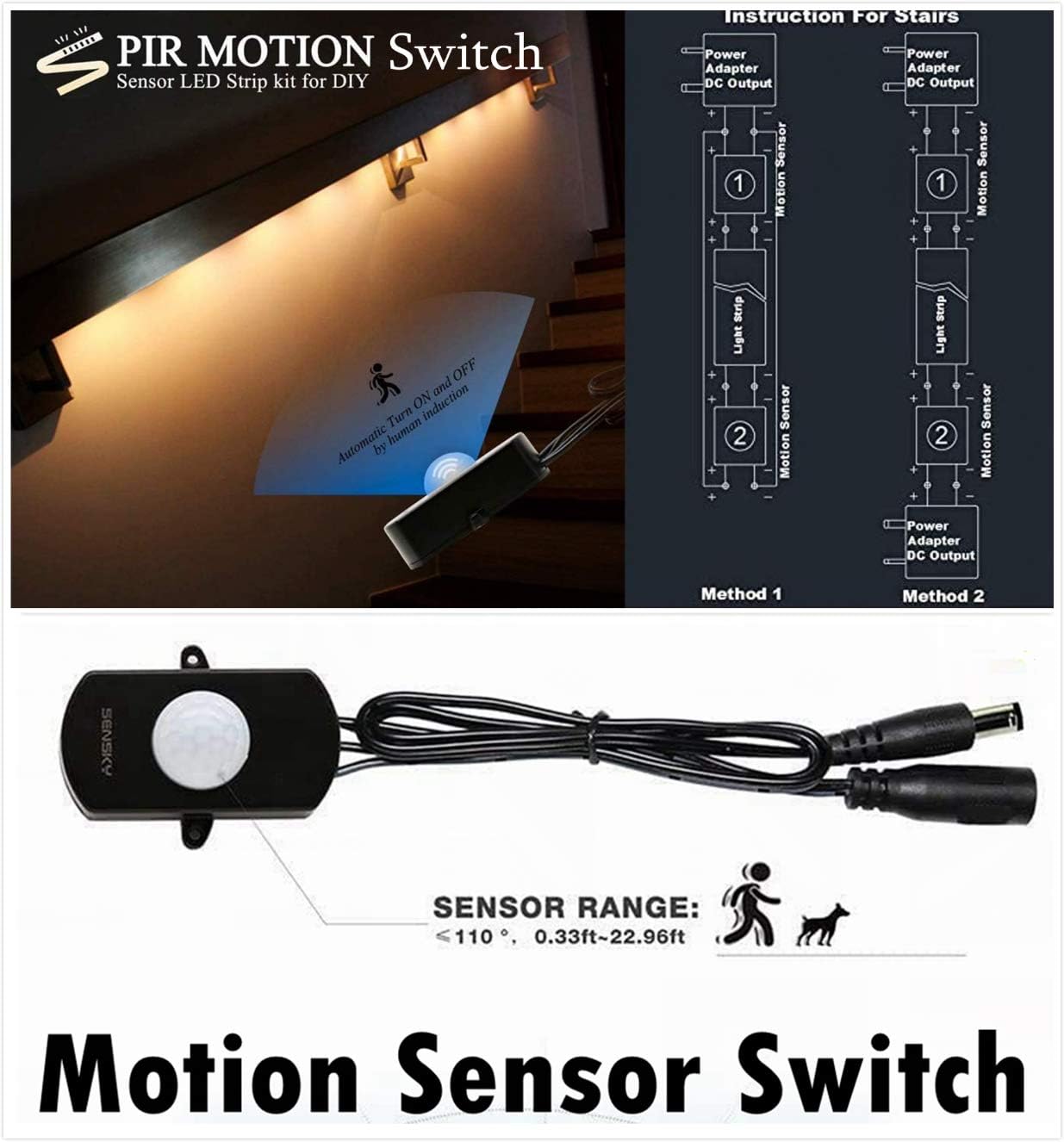
4. Setup and Installation
4.1 Connecting the Components
Follow these steps to connect the LED strip light kit:
- Connect the power adapter to the ON/OFF switch.
- Connect the ON/OFF switch to the motion sensor switch.
- Connect the motion sensor switch to the LED strip.
- Plug the power adapter into a wall outlet.

4.2 Mounting the LED Strip
The LED strip comes with strong double-sided tape for easy installation. Ensure the surface is clean, dry, and free of dust or oil before applying. Peel off the backing tape first, then the double-sided tape, and firmly press the strip onto the desired surface.
4.3 Cutting and Connecting the LED Strip
The LED strip can be cut to your desired length. Look for the designated cut lines, typically marked every 5cm. Do not cut the copper points, as this will break the circuit and prevent the strip from lighting up. If you need to connect cut sections, ensure the positive (+) and negative (-) electrodes on the strip match the corresponding terminals on the connector clasp.

4.4 Motion Sensor Adjustment
The motion sensor switch allows for customization of time delay, LUX value, and sensor distance. To access the adjustment dials, open the back cover of the sensor. Use a small screwdriver to turn the dials:
- Time Delay (2-280s): Clockwise to reduce delay, anti-clockwise to increase.
- LUX Value (10-300lux): Clockwise to reduce light sensor value, anti-clockwise to increase.
- Sensor Distance (10cm-7M): Clockwise to reduce distance, anti-clockwise to increase.

5. Operating Instructions
5.1 Motion Activated Mode
When the motion sensor is enabled and the ON/OFF switch is in the 'ON' position, the LED strip will automatically turn on when motion is detected within its range. The light will remain on for the set time delay and turn off if no further motion is detected. The PIR sensor switch typically works best in dark environments according to its default setting.
5.2 Manual ON/OFF Mode
You can manually control the LED strip using the integrated ON/OFF switch. Ensure the switch is in the 'ON' position for the motion sensor to function. If the ON/OFF switch is in the 'OFF' position, the motion sensor will not activate the lights.
6. Maintenance
- Cleaning: Use a soft, dry cloth to gently wipe the LED strip and sensor. Do not use abrasive cleaners or immerse in water.
- Adhesive: Ensure the adhesive backing remains clean and dry for optimal adhesion. If re-applying, clean the surface thoroughly.
- Storage: When not in use for extended periods, store the kit in a cool, dry place away from direct sunlight.
7. Troubleshooting
- Lights keep turning on and off rapidly: This is often due to a time delay setting that is too short. Adjust the time delay dial on the motion sensor to increase the duration the lights stay on after motion is detected.
- LED strip not lighting up:
- Check all connections to ensure they are secure and correctly aligned (positive to positive, negative to negative).
- Verify that the ON/OFF switch is in the 'ON' position.
- If a section of the strip is not lighting up after cutting, the copper point might be broken. Try cutting at the next designated line and re-connecting.
- Motion sensor not detecting movement:
- Ensure the motion sensor is not obstructed.
- Adjust the sensor distance and LUX sensitivity dials on the motion sensor. The sensor typically works best in darker environments.
8. Specifications
| Feature | Specification |
|---|---|
| Brand | Sensky |
| Model Number | DT002-FBA |
| LED Strip Length | 19.7 feet (6 meters) |
| Light Color | Warm White |
| Color Temperature | 3000 Kelvin |
| Light Source Type | LED (2835 LEDs, 6-7lm/LED) |
| Number of Light Sources | 360 |
| Power Source | Corded Electric |
| Voltage | 12 Volts |
| Wattage | 30 Watts |
| Special Features | Manual On/Off, Motion Sensor (Adjustable Time Delay, LUX, Sensitivity) |
| Indoor/Outdoor Usage | Indoor |
| Material | Plastic |
| Installation Type | Wall Mount |
| Product Dimensions | 0.79 x 0.67 x 0.22 inches |
| Item Weight | 13.4 ounces |
9. Warranty and Support
Your Sensky Motion Activated LED Strip Light Kit comes with a 12-month warranty. For any questions, technical support, or warranty claims, please contact Sensky customer service through the retailer where you purchased the product. Please refer to the included documentation for specific contact details or visit the official Sensky website.