
1. Introduction
The Keliiyo HDMI Splitter 1x4 is designed to duplicate a single HDMI input signal to four identical HDMI output signals. This device allows for simultaneous transmission of video and audio without any loss in quality. It supports a wide range of resolutions, including Full HD 1080P, 3D, and up to 4K@30Hz, making it suitable for various display setups.
2. Safety Information
- Ensure the device is placed in a well-ventilated area to prevent overheating.
- Avoid exposing the splitter to moisture, water, or extreme temperatures.
- Use only the provided AC power adapter to prevent damage to the unit.
- Do not attempt to disassemble or repair the device yourself. Contact qualified personnel for service.
- Keep out of reach of children.
3. Package Contents
Please verify that all items listed below are included in your package:
- 1x Keliiyo HDMI Splitter 1x4
- 1x AC Power Adapter
- 1x User Manual

Figure 3.1: Contents of the Keliiyo HDMI Splitter package, including the splitter unit, user manual, and power adapter.
4. Product Overview
The Keliiyo HDMI Splitter 1x4 features a robust metal casing for durability and efficient heat dissipation. Below is a description of its ports and indicators:
- INPUT: HDMI input port for connecting your source device (e.g., computer, PS4, TV Box).
- OUTPUT 1-4: Four HDMI output ports for connecting display devices (e.g., monitors, TVs, projectors).
- IN LED: Indicates when an input signal is detected.
- 1-4 LEDs: Indicate active output connections.
- PW LED: Power indicator light.
- DC 5V: Power input port for the AC adapter.
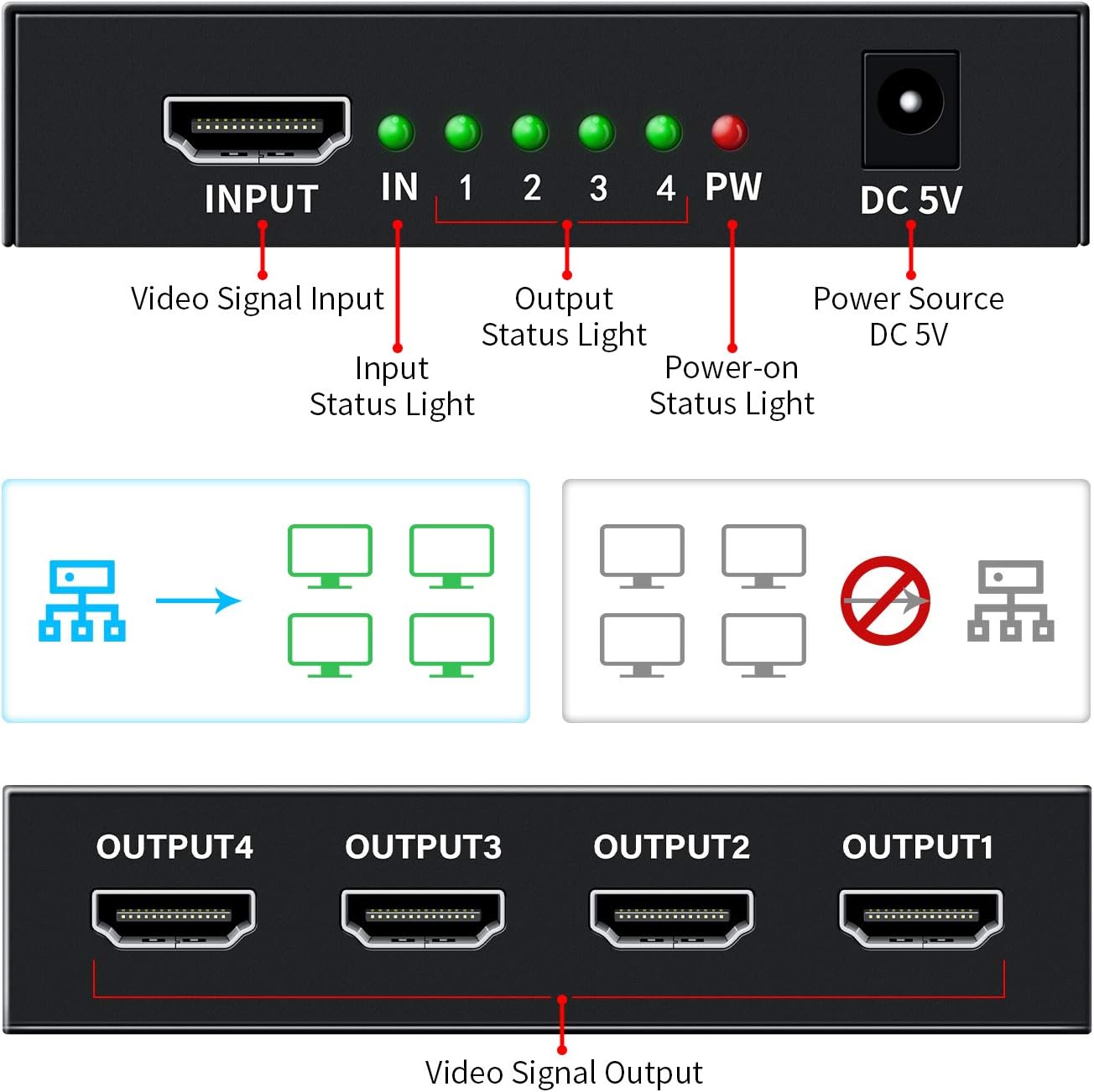
Figure 4.1: Front and rear view of the HDMI Splitter with labeled ports and indicator lights.

Figure 4.2: Examples of compatible input and output devices for the HDMI Splitter.

Figure 4.3: Physical dimensions of the Keliiyo HDMI Splitter.
5. Setup Instructions
Follow these steps to set up your Keliiyo HDMI Splitter:
- Connect Input Device: Connect your HDMI source device (e.g., DVD player, gaming console, laptop) to the 'INPUT' port on the HDMI splitter using a high-quality HDMI cable (not included).
- Connect Output Devices: Connect up to four HDMI display devices (e.g., TVs, monitors, projectors) to the 'OUTPUT 1', 'OUTPUT 2', 'OUTPUT 3', and 'OUTPUT 4' ports on the splitter using HDMI cables.
- Connect Power: Plug the provided 5V AC power adapter into the 'DC 5V' port on the splitter, then plug the adapter into a power outlet. The 'PW' LED will illuminate.
- Power On: Power on your HDMI source device and all connected display devices. The corresponding 'IN' and '1-4' LEDs on the splitter will light up, indicating active connections.
Important Note: For optimal performance and to ensure normal operation, please ensure that all connected output devices are set to the same resolution. If different resolutions are detected, the splitter will output the lowest common resolution to all displays.

Figure 5.1: Illustrates mirroring one screen to four identical screens simultaneously.
Video 5.1: An official Keliiyo video demonstrating the setup process and functionality of the HDMI Splitter, showing how to connect input and output devices and power supply.
6. Operating Instructions
Once the setup is complete and all devices are powered on, the Keliiyo HDMI Splitter will automatically duplicate the input signal to all connected output displays. No additional configuration is typically required.
- The green 'IN' LED indicates that an HDMI source is connected and providing a signal.
- The green '1', '2', '3', '4' LEDs indicate which output ports have active display devices connected and receiving a signal.
- The red 'PW' LED confirms that the device is receiving power.
The splitter is designed for simple plug-and-play operation, allowing you to share your video and audio content across multiple screens effortlessly.
7. Maintenance
To ensure the longevity and optimal performance of your HDMI Splitter, please follow these maintenance guidelines:
- Cleaning: Use a soft, dry cloth to clean the exterior of the device. Do not use liquid cleaners or aerosols.
- Storage: When not in use for extended periods, store the device in a cool, dry place away from direct sunlight and extreme temperatures.
- Handling: Avoid dropping or subjecting the device to strong impacts. Handle cables carefully to prevent damage to the ports.
- Ventilation: Ensure that the ventilation holes on the device are not blocked to allow for proper airflow and prevent overheating.
8. Troubleshooting
If you encounter issues with your Keliiyo HDMI Splitter, refer to the following common problems and solutions:
| Problem | Possible Cause | Solution |
|---|---|---|
| No picture or sound on display(s). | Loose connections, no power, incompatible resolution, faulty cables. |
|
| Flickering or distorted image. | Poor quality HDMI cables, long cable runs, resolution mismatch. |
|
| Image briefly disappears when a new display is turned on. | Splitter adjusting to new display connection. | This is normal behavior as the splitter may need to re-establish the signal handshake. The image should return shortly. |
9. Specifications
| Feature | Detail |
|---|---|
| Model Number | 104 |
| Product Dimensions | 2.44 x 3.77 x 0.86 inches |
| Item Weight | 7.8 ounces |
| Color | Black |
| Connector Type | HDMI |
| Cable Type | HDMI |
| Supported Resolutions | 408i/576i/576p/720p/1080i/1080P, up to 4K@30Hz |
| 3D Support | Yes |
| HDCP Version | V1.4 |
| Max Transmission Distance | Up to 100ft (Input 40ft, Output 60ft with AWG26 HDMI cable) |
| Power Supply | DC 5V (AC Adapter included) |
10. Warranty and Support
For any questions, technical support, or warranty inquiries regarding your Keliiyo HDMI Splitter, please contact Keliiyo customer service. Refer to the contact information provided with your product packaging or visit the official Keliiyo website for assistance.
Please retain your proof of purchase for warranty claims.