
ClassicFlame 23II042FGL
ClassicFlame 23II042FGL 3D Infrared Quartz Fireplace Insert
User Manual
1. Important Safety Information
Read all instructions before using this appliance. Failure to follow these instructions may result in electric shock, fire, or serious personal injury.
- Always plug heaters directly into a wall outlet/receptacle. Never use with an extension cord or relocatable power tap (outlet/power strip).
- This fireplace insert is hot when in use. To avoid burns, do not let bare skin touch hot surfaces. Keep combustible materials, such as furniture, pillows, bedding, papers, clothes, and curtains at least 3 feet (0.9 m) from the front of the heater and keep them away from the sides and rear.
- Extreme caution is necessary when any heater is used by or near children or invalids and whenever the fireplace is left operating and unattended.
- Do not operate any heater with a damaged cord or plug or after the heater malfunctions, has been dropped or damaged in any manner.
- Do not use outdoors.
- To disconnect heater, turn controls to off, then remove plug from outlet.
- Do not insert or allow foreign objects to enter any ventilation or exhaust opening as this may cause an electric shock or fire, or damage the heater.
- To prevent a possible fire, do not block air intakes or exhaust in any manner. Do not use on soft surfaces, like a bed, where openings may become blocked.
- This appliance has hot and arcing or sparking parts inside. Do not use it in areas where gasoline, paint, or flammable vapors or liquids are used or stored.
- Use this heater only as described in this manual. Any other use not recommended by the manufacturer may cause fire, electric shock, or injury to persons.
- Always plug into a properly grounded, fused outlet.
- The Safer Plug™ and Safer Sensor™ technologies are designed to enhance safety by monitoring plug temperature and detecting obstructed airflow.
2. Product Overview
The ClassicFlame 23II042FGL 3D Infrared Quartz Fireplace Insert is designed to provide supplemental zone heating and a realistic flame effect for your home. It features advanced 3D flame technology, infrared quartz heating, and safety features like Safer Plug™ and Safer Sensor™.
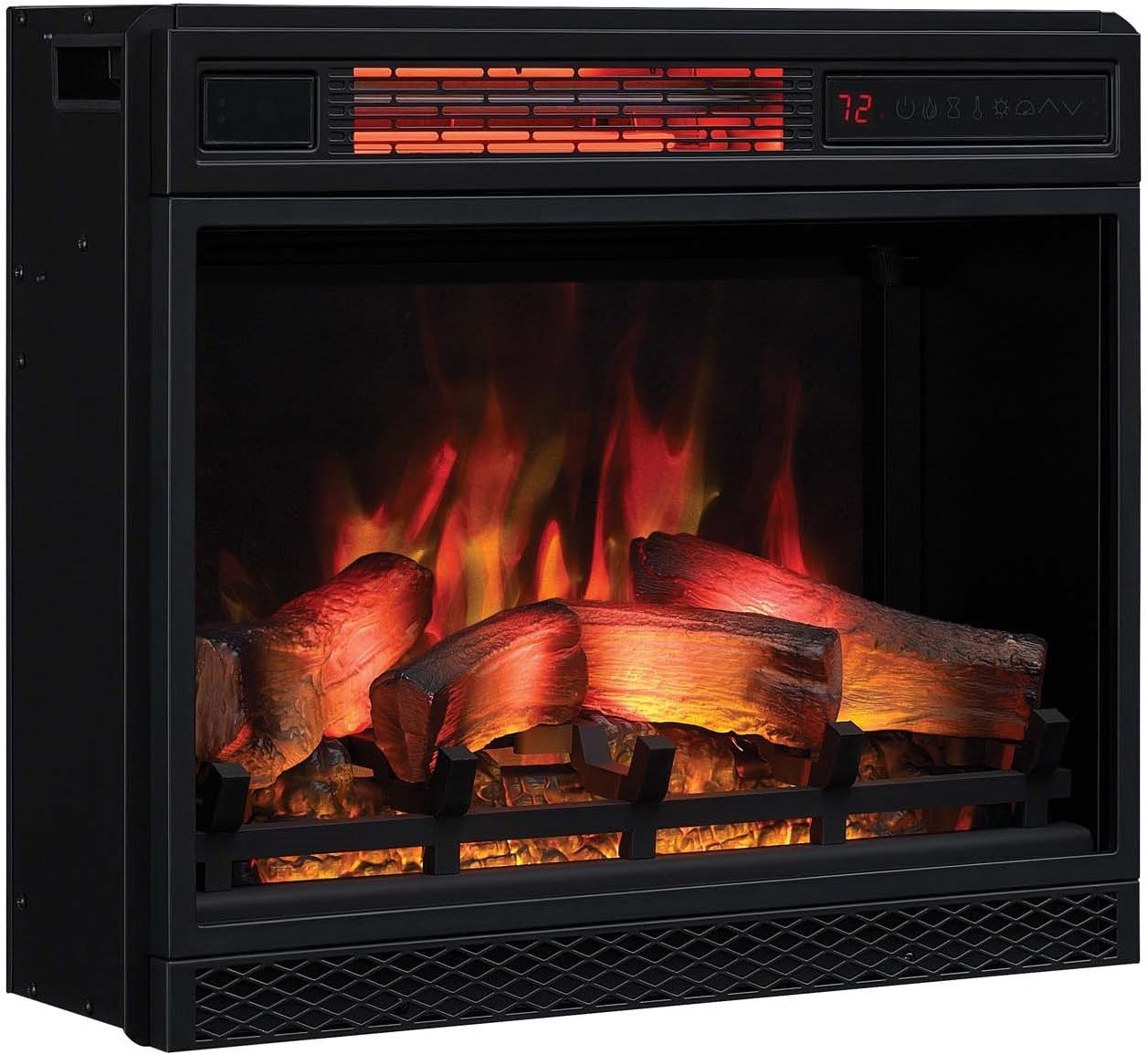
Figure 2.1: Front view of the ClassicFlame 23II042FGL 3D Infrared Quartz Fireplace Insert, showcasing the realistic log set and ember bed with active flame effects.

Figure 2.2: Angled view of the fireplace insert, highlighting its compact design and integrated control panel.

Figure 2.3: Key features of the fireplace insert, including the patented 3D flame effect technology, Safer Plug™ and Safer Sensor™ fire prevention technologies, and the benefits of infrared heating.
Key Features:
- Patent pending 3D flame effect technology with layered flames for realism.
- Five adjustable brightness and speed settings for flame effects.
- Infrared quartz heat maintains natural humidity, providing comfortable warmth.
- 5,200 BTU heater provides supplemental zone heating for up to 1,000 square feet.
- Patent pending Safer Plug™ fire prevention technology monitors plug temperature.
- Patent pending Safer Sensor™ fire prevention technology detects obstructed airflow.
- Flame effect colors include Spectrafire, Sapphire, Amethyst, Campfire, Midnight Fire and auto cycle.
- Can be used with or without heat for year-round enjoyment.
3. Setup and Installation
This ClassicFlame fireplace insert is designed for easy installation into compatible mantels or TV stands. Ensure the chosen location meets the electrical requirements and provides adequate clearance.
3.1 Unpacking
- Carefully remove the fireplace insert from its packaging.
- Retain the packaging for future storage or transport.
- Inspect the unit for any shipping damage. If damage is found, do not operate and contact customer support immediately.
3.2 Placement and Clearance
- Place the fireplace insert on a flat, stable surface.
- Ensure there is at least 3 feet (0.9 m) of clearance from the front of the heater to any combustible materials.
- Do not block air intakes or exhaust vents.
3.3 Electrical Connection
- This unit operates on 120V AC, 60Hz.
- Plug the fireplace insert directly into a properly grounded 3-prong 15 Amp or 20 Amp outlet.
- Do not use extension cords, power strips, or surge protectors.

Figure 3.1: Example of the fireplace insert installed within a mantel in a living room, demonstrating proper placement and aesthetic integration.
4. Operating Instructions
The fireplace insert can be operated using the control panel on the unit or the included remote control.
4.1 Control Panel and Remote Control
The control panel is located on the top right of the unit. The remote control provides full functionality from a distance.
4.2 Power On/Off
- Press the POWER button to turn the unit on or off.
4.3 Adjusting Flame Effects
The 3D flame effect offers various customization options:
- Flame Speed: Use the flame speed button to cycle through five different flame speed settings, from a fast roaring fire to a gentle flicker.
- Flame Brightness: Use the flame brightness button to adjust the intensity of the flames through five settings.
- Flame Color: Cycle through various flame colors including Spectrafire, Sapphire, Amethyst, Campfire, Midnight Fire, and an auto-cycle mode.

Figure 4.1: The fireplace insert displaying a blue flame effect, demonstrating the customizable color options.

Figure 4.2: The fireplace insert displaying a traditional red and orange flame effect, showcasing the realistic appearance.
4.4 Heating Function
- Heater On/Off: Press the HEATER button to activate or deactivate the heating function.
- Temperature Control: Use the temperature up/down buttons to set your desired room temperature. The unit will cycle on and off to maintain the set temperature.
- The flame effects can be used independently of the heating function for year-round ambiance.
4.5 Timer Function
- The timer allows the unit to automatically shut off after a set period. Consult your remote control or unit display for specific timer settings.
5. Maintenance and Care
Regular maintenance ensures the longevity and optimal performance of your fireplace insert.
5.1 Cleaning
- Always unplug the unit before cleaning.
- Wipe the exterior surfaces with a soft, damp cloth. Do not use abrasive cleaners or solvents.
- Clean the air intake and exhaust vents periodically with a vacuum cleaner attachment to prevent dust buildup.
- The glass panel can be cleaned with a soft cloth and glass cleaner. Do not spray cleaner directly onto the unit.
5.2 Light Bulb Replacement
The flame effect uses LED lights, which are designed for long life and typically do not require replacement. If an issue occurs, contact customer support.
5.3 Storage
- When not in use, store the unit in a dry, cool location, preferably in its original packaging.
6. Troubleshooting
If you experience issues with your fireplace insert, refer to the following common problems and solutions:
| Problem | Possible Cause | Solution |
|---|---|---|
| Unit does not turn on. | No power to the unit; power cord not fully plugged in; circuit breaker tripped; Safer Plug™ activated. | Ensure unit is plugged into a working outlet. Check household circuit breaker. Unplug unit for 5 minutes, then plug back in to reset Safer Plug™. |
| No heat, but flames are working. | Heater function is off; thermostat set too low; Safer Sensor™ activated. | Press the HEATER button. Increase the thermostat setting. Check for obstructions around air vents; clear any blockages. |
| Flames are not visible or flickering incorrectly. | Flame brightness set too low; LED lights malfunction. | Adjust flame brightness setting. If issue persists, contact customer support. |
| Remote control not working. | Batteries are dead or incorrectly inserted; remote not aimed at sensor. | Replace batteries. Ensure remote is pointed directly at the unit's sensor. |
If the problem persists after attempting these solutions, please contact customer support.
7. Specifications
| Feature | Detail |
|---|---|
| Model Number | 23II042FGL |
| Product Dimensions (D x W x H) | 8.5"D x 20"W x 23.6"H |
| Power Source | Electric |
| Voltage | 120V |
| Heat Output | 5200 BTU |
| Heating Coverage | Up to 1000 sq ft |
| Material | Metal 77.3%, Plastic 10.5%, Glass 7.2%, Electronic 5% |
| Item Weight | 17.95 Pounds |
| Included Components | Remote control, batteries |
| Manufacturer | Twin Star Home |
| UPC | 611768098590 |

Figure 7.1: Dimensional drawing of the fireplace insert, showing its height (23.6"), width (20"), and depth (8.5").
8. Warranty Information
This ClassicFlame 23II042FGL 3D Infrared Quartz Fireplace Insert comes with a 1-year limited warranty from the date of purchase.
This warranty covers defects in material and workmanship under normal use. It does not cover damage resulting from misuse, abuse, accident, alteration, or improper installation.
For warranty claims or further details, please retain your proof of purchase and contact the manufacturer's customer support.
9. Customer Support
For technical assistance, troubleshooting beyond this manual, or warranty inquiries, please contact ClassicFlame customer support.
Please have your model number (23II042FGL) and proof of purchase ready when contacting support.
You can find contact information on the manufacturer's official website or through your retailer.
Related documents23II042FGL


Ask a question about this manual
Ask about setup, troubleshooting, compatibility, parts, safety, or missing instructions. Manuals+ will review the question and use this page’s manual context to help answer it.