
Introduction
This manual provides comprehensive instructions for the safe and efficient operation, setup, and maintenance of your MGI Zip X1 Electric Golf Cart. Please read this manual thoroughly before using the product to ensure optimal performance and longevity.
Key Features
- Zip Fold Technology: Innovative & compact one piece frame engineered zip fold system will make setup easy and quick to and from the course. Newly Engineered Zip Fold System is 12% lighter and 25% smaller for easy transport and space savings to and from the course. The rear wheels can be inverted on the axle to reduce the size of the footprint when not in use. Folded Dimensions (Inverted Rear Wheels); 27.55 X 18.5 x 16.5 Inches. Weight (No Battery) 22.0 LBS (With Battery: 26.72LBS)
- Click & Go Lithium Battery System: Zip High Performance Lithium 36 Hole Batteries. Our Batteries are at the forefront of battery technology. Light, Compact, and powerful our batteries help you go the distance out of the course. Clicks on vertically via the easy to access lifting handle. Simple Color Coded Charge Port (Red & Black) & Color Coded Battery Charger (Green-Full Charge & Red-Charging). Simply Click & Go to the course!
- Powerful 230 Watt Motor: Smooth and whisper quiet ride the revolutionary Zip X1 will do all the work for you so you can enjoy the walk and concentrate on your game and play up to 36 Holes in a day. Feel your best to play your best!
- Fully Adjustable Fit: Adjustable Ergonomic T-Bar Top Handle with premium soft rubber grip & Adjustable Independent Top Bag Support for a customized perfect fit for all golfers.
- Digital Electronics: Display Setting with Variable Speed Control Setting (1-20), Battery Indicator and Distance Odometer. USB Charging port located underneath top handle to charge any of your devices

Figure 1: MGI Zip X1 Key Features Diagram
Setup
Unfolding the Cart
The MGI Zip X1 features an innovative Zip Fold system for easy setup and transport. To unfold the cart, locate the clip on the top section of the frame and undo it. Then, pull up the small clip at the bottom of the main shaft. This will allow the cart to fold out, and the front wheel will automatically extend. Once unfolded, ensure all clips are securely fastened to lock the frame in place.

Figure 2: MGI Zip X1 in Unfolded Position
Attaching Wheels
The rear wheels are designed for easy attachment and can be inverted for compact storage. Ensure you attach the right wheel to the right side and the left wheel to the left side, as indicated by the 'R' and 'L' stickers on the wheels and corresponding slots. This ensures proper functionality of the trolley. The integrated rear stabilizing wheel can be folded in for storage by pulling its small clip and locking it into place.
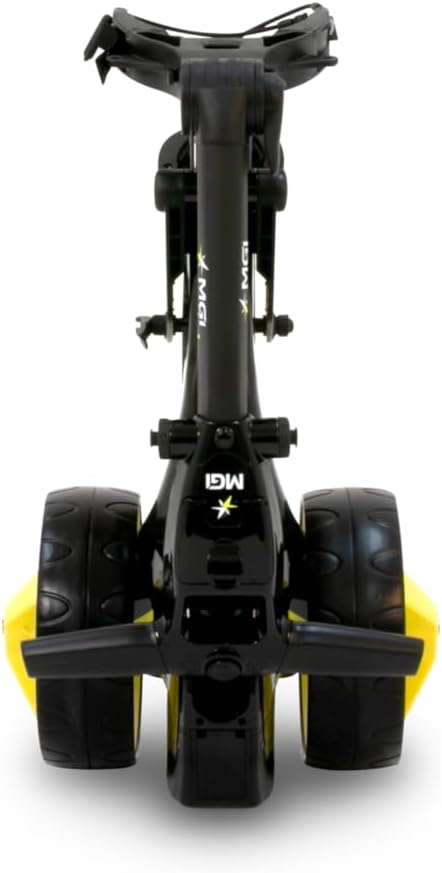
Figure 3: Rear Wheels and Anti-Tip Wheel Detail
Operating the Cart
Speed Control and Display
The MGI Zip X1 features a simple LED display unit on the handle. The central number indicates the current speed setting (1-20). A green LED light indicates sufficient battery life, which will change to amber or red as the battery depletes. Another LED turns green when the trolley is in use and turns off when not. The speed dial is responsive and easy to use, allowing for precise control.

Figure 4: Control Panel and Display
Stability and Anti-Tip Wheel
The integrated rear stabilizing wheel provides enhanced stability, especially when navigating inclines or uneven terrain. This feature significantly reduces the likelihood of the trolley tipping backward, ensuring your golf bag remains secure throughout your round.

Figure 5: Cart Stability in Use
Charging and Battery
Battery System
The MGI Zip X1 is powered by a Zip High Performance Lithium 36 Hole Battery. This light, compact, and powerful battery is designed to provide ample power for up to 36 holes of golf. The battery clicks on vertically via an easy-to-access lifting handle.
Charging Options
You have two primary options for charging the battery. You can charge the battery while it is still attached to the cart by lifting the designated flap and connecting the charger. Alternatively, you can easily remove the battery by lifting the flap and gently pulling it off the top of the unit. The included charger features color-coded indicators (Green for Full Charge, Red for Charging) and a digital display showing the percentage of charge. A USB charging port is also located underneath the top handle for charging your devices while on the course.

Figure 6: Battery Removal and Portability
Maintenance
To ensure the longevity and optimal performance of your MGI Zip X1 Electric Golf Cart, regular maintenance is recommended. After each use, wipe down the cart with a damp cloth to remove dirt and debris. Ensure the battery is fully charged before storage and store it in a cool, dry place. Periodically check all moving parts and connections for any signs of wear or looseness. Refer to the official MGI online user manual for detailed cleaning instructions and maintenance schedules.
Troubleshooting
If you encounter any issues with your MGI Zip X1, please refer to the following common troubleshooting tips:
- Cart Not Moving: Check if the battery is properly seated and fully charged. Ensure the power is turned on and the speed dial is set above zero.
- Unusual Noises: Inspect wheels and axles for any obstructions or loose components.
- Battery Not Charging: Verify that the charger is correctly plugged into both the battery and a power outlet. Check the charger's indicator lights for status.
For more detailed troubleshooting guides or persistent issues, please visit the official MGI support website or contact customer service.
Specifications
| Specification | Value |
|---|---|
| Item Package Dimensions L x W x H | 24.5 x 18 x 16 inches |
| Package Weight | 18.05 Kilograms |
| Item Dimensions LxWxH | 31.5 x 23.2 x 40.9 inches |
| Item Weight | 26.72 Pounds |
| Brand Name | MGI |
| Model Name | MGI Zip X1 Electric Golf Cart - 36 Hole Battery - (GPS Phone) |
| Color | Gloss Black-Matte Black |
| Material | Plastic |
| Manufacturer | MGI |
| Part Number | RZIPX1-BLACK |
| Included Components | Cart, Battery, Battery Charger, Wheels, GPSH, User Manual, Guide, Wipe |
Warranty and Support
MGI offers a 3-year manufacturer warranty (please register within 30 days of purchase) on manufacturing defects of all parts, including the lithium battery and charger. For full terms and conditions, please refer to the online user manual. MGI is committed to customer satisfaction, offering warranty spare parts delivered at no charge and comprehensive DIY videos. In certain circumstances, authorization will be given to send the cart to a preferred service center for repair, freight-free. The cart is expected to be sent in its original carton.
For additional support, product registration, or to explore more MGI products, please visit the Official MGI Store.