
TecTake 800637
TecTake® Lockable Cabinet User Manual
Model: 800637
Brand: TecTake
1. Product Overview
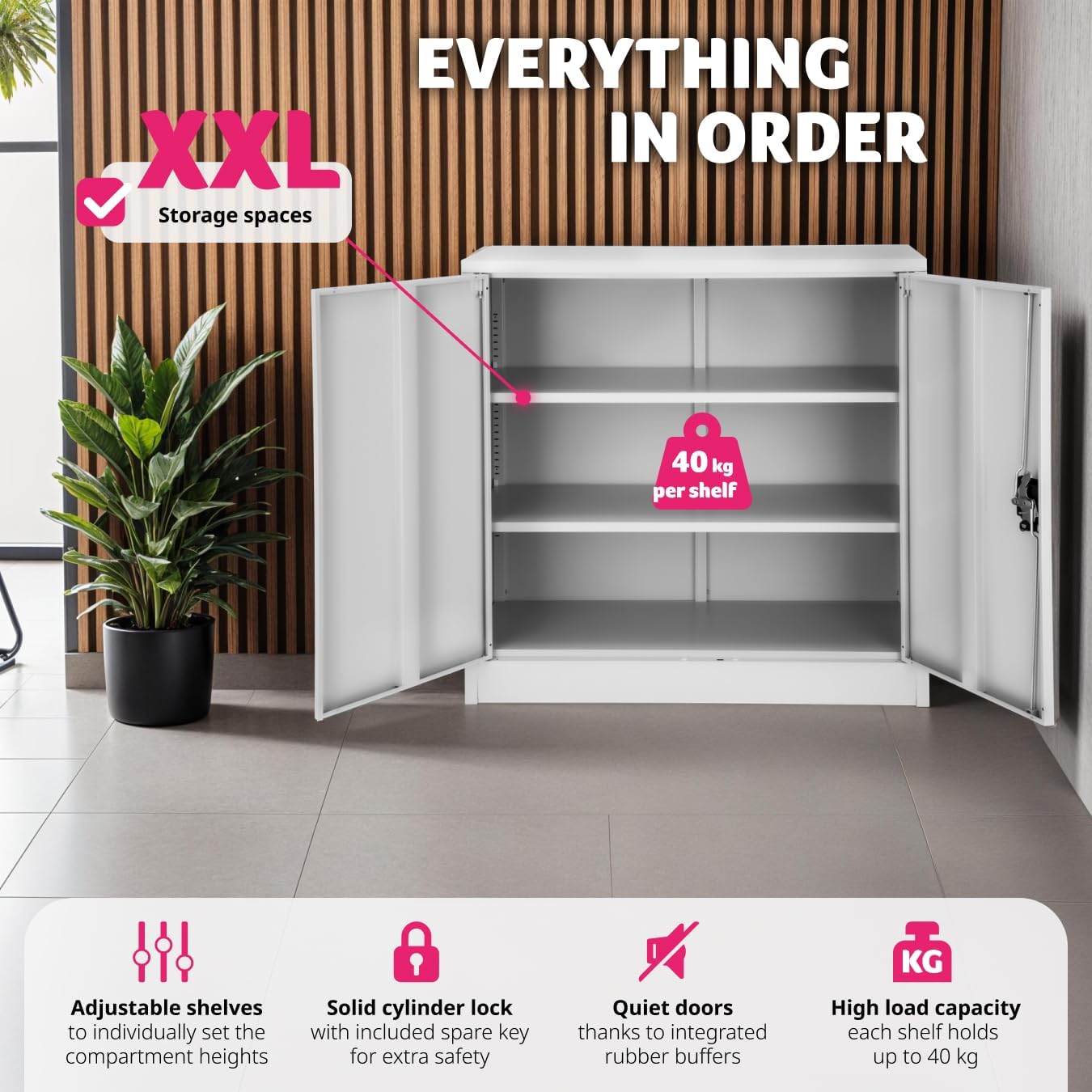
The TecTake® Lockable Cabinet is a versatile and robust storage solution designed for offices, home offices, garages, and other environments requiring secure and organized storage. Constructed from premium, powder-coated steel, this cabinet features three spacious compartments with height-adjustable shelves, a secure cylinder lock, and two keys for controlled access. Its timeless metal design ensures durability and blends seamlessly into various settings.
Key Features:
- Optimal & Adjustable Organisation: Three compartments with height-adjustable shelves for tailored storage.
- Robust Construction: Made from premium, powder-coated steel with stable footing to prevent tipping.
- Simple Setup & Cleaning: Designed for easy assembly and hassle-free maintenance with smooth, pull-out shelves.
- Secure Cylinder Lock: Equipped with a reliable cylinder lock and two keys to safeguard confidential documents and possessions.
- Elegant & Functional Design: A sleek, compact design that enhances any decor while providing ample storage.

2. Safety Information
Please read all safety instructions before assembly and use to prevent injury or damage to the product.
- Always ensure the cabinet is securely mounted to the floor or wall to prevent tipping, especially when loaded.
- Be cautious when using the keyed cylinder lock to avoid injury to fingers.
- Do not exceed the maximum weight capacity per shelf (40 kg) or for the entire cabinet.
- Keep keys out of reach of children.
- Ensure the cabinet is placed on a flat, stable surface.
3. Setup and Assembly
The TecTake® Lockable Cabinet is designed for easy and quick assembly. While specific step-by-step instructions are typically provided with the product packaging, here are general guidelines and tips for setup:
- Unpack Components: Carefully unpack all parts and check against the included parts list to ensure nothing is missing or damaged.
- Prepare Workspace: Choose a clean, flat, and spacious area for assembly. It is recommended to have a soft surface to prevent scratching the cabinet parts.
- Assemble Frame: Follow the instructions to assemble the main frame of the cabinet. This typically involves connecting the side panels, back panel, and top/bottom panels.
- Install Shelves: The cabinet features height-adjustable shelves. Insert the shelf supports into the desired slots on the interior side panels. Ensure all supports are at the same height before placing the shelf.
- Attach Doors and Lock: Securely attach the two hinged doors. Install the cylinder lock mechanism and ensure it operates smoothly with the provided keys.
- Final Placement: Once assembled, move the cabinet to its final desired location. Ensure it is level and stable. For added safety, consider anchoring the cabinet to a wall, especially if it will store heavy items or is in an area with children.

4. Operating Instructions
Using your TecTake® Lockable Cabinet is straightforward:
- Opening/Closing Doors: The cabinet features two large double doors with a 130° opening angle for easy access. The doors are equipped with rubber buffers for quiet closing.
- Adjusting Shelves: To adjust the height of the shelves, remove any items from the shelf. Lift the shelf slightly, remove the shelf supports from their current slots, and reinsert them into the desired new slots. Ensure the shelf supports are level before placing the shelf back.
- Using the Lock: Insert one of the provided keys into the cylinder lock on the door handle. Turn the key to lock or unlock the cabinet. Always remove the key after locking to maintain security.
- Loading Contents: Distribute weight evenly across the shelves. Do not overload individual shelves or the cabinet beyond the specified maximum weight capacity.
5. Maintenance and Care
To ensure the longevity and appearance of your TecTake® Lockable Cabinet, follow these maintenance guidelines:
- Cleaning: The powder-coated steel surface is easy to clean. Use a soft, damp cloth with mild soap and water. Avoid abrasive cleaners, solvents, or harsh chemicals, as these can damage the finish. Dry thoroughly after cleaning.
- Dusting: Regularly dust the cabinet with a dry, soft cloth to prevent dust buildup.
- Lock Maintenance: If the lock mechanism becomes stiff, a small amount of graphite lubricant can be applied to the keyhole. Do not use oil-based lubricants.
- Door Hinges: Periodically check the door hinges for tightness. If they become loose, gently tighten the screws.
- Inspection: Periodically inspect the cabinet for any signs of wear, damage, or loose components. Address any issues promptly to maintain safety and functionality.
6. Troubleshooting
Here are some common issues and their potential solutions:
- Cabinet is Unstable/Wobbly:
- Ensure the cabinet is placed on a completely flat and level surface.
- Check that all assembly screws are tightened securely.
- Consider anchoring the cabinet to a wall for maximum stability.
- Doors Do Not Close Properly:
- Check if the cabinet is level. An uneven surface can cause door misalignment.
- Inspect hinges for damage or looseness. Tighten hinge screws if necessary.
- Ensure no items inside the cabinet are obstructing the doors.
- Lock is Stiff or Not Working:
- Ensure the key is fully inserted and turned correctly.
- Apply a small amount of graphite lubricant to the keyhole if the lock is stiff.
- Check if the door is properly aligned and fully closed when attempting to lock.
- Shelves Sagging:
- Reduce the weight on the shelf. Ensure you are not exceeding the 40 kg per shelf capacity.
- Verify that the shelf supports are correctly seated in their slots.
If you encounter issues not listed here or if the problem persists, please contact TecTake customer support.
7. Specifications
Detailed specifications for the TecTake® Lockable Cabinet (Model: 800637):
| Attribute | Detail |
|---|---|
| Brand | TecTake |
| Model Number | 800637 |
| Colour | Grey |
| Product Dimensions (L x W x H) | 90 x 40 x 90 cm |
| Item Weight | 21.7 kg |
| Maximum Weight Capacity (per shelf) | 40 Kilograms |
| Special Features | Lockable, Height-Adjustable Shelves |
| Material | Powder-Coated Steel |
| Number of Compartments | 3 |

8. Warranty and Support
For information regarding product warranty, please refer to the documentation included with your purchase or visit the official TecTake website. Warranty terms and conditions may vary by region and retailer.
For technical support, spare parts, or any other inquiries, please contact TecTake customer service through their official channels. You can often find contact information on the TecTake brand store page on Amazon or their corporate website.
Online Resources:
- TecTake Store on Amazon: Visit TecTake Store
Related documents800637


Ask a question about this manual
Ask about setup, troubleshooting, compatibility, parts, safety, or missing instructions. Manuals+ will review the question and use this page’s manual context to help answer it.