
Introduction
This manual provides comprehensive instructions for the installation, operation, and maintenance of your Olideauto Automatic Skylight Single Chain Window Opener with Wireless Rain Sensor. This smart window motor is designed for convenience and integrates with smart home systems like Alexa, Google Home, and the TUYA APP.
Please read this manual carefully before installation and operation to ensure proper use and to prevent damage to the product or property.
Safety Information
- The product must not be installed in locations where it will be directly exposed to rain or excessive moisture, unless specifically designed for outdoor use. The rain sensor is for detection, not for direct exposure of the main unit.
- The 24V DC power system is designed for safety. The built-in transformer converts 100V-240V AC to 24V DC. No external transformer is required.
- Ensure all electrical connections are made by a qualified professional and comply with local electrical codes.
- Keep hands and loose clothing clear of the chain mechanism during operation to prevent injury.
- Do not attempt to modify or repair the device yourself. Contact customer support for assistance.
Package Contents
Verify that all components are present in the package:
- Smart WiFi Built-in Window Opener Motor (White color)
- Chain mechanism
- Mounting Brackets
- Screws for installation
- Wireless Rain Sensor
- Wireless Remote Control

Image: Overview of the Olideauto Automatic Skylight Window Opener system, showing the main motor unit, the wireless rain sensor, and a smartphone interface for control.
Setup and Installation
Follow these steps for proper installation of your window opener:
- Mount the Motor Unit: Securely attach the smart WiFi window opener motor to the window frame using the provided brackets and screws. Ensure the unit is level and aligned with the window's opening mechanism. The travel distance is 11.81 inches, suitable for various window types, especially small skylights and hung windows.
- Connect the Chain: Attach the two-layer stainless steel chain to the window sash. Ensure the connection is firm and allows for smooth extension and retraction.
- Install the Wireless Rain Sensor: Position the wireless rain sensor outside the window in a location where it can detect rainfall effectively. Ensure it is connected wirelessly to the main motor unit.
- Power Connection: Connect the motor unit to a standard 100V-240V AC power outlet. The internal transformer will convert the power to 24V DC.
- App Setup (TUYA APP):
- Download the TUYA APP from your smartphone's app store.
- Register or log in to your TUYA account.
- Follow the in-app instructions to add your Olideauto window opener device. This typically involves putting the device into pairing mode and connecting it to your home WiFi network.
- Remote Control Pairing: Pair the included wireless remote control with the window opener according to the instructions provided with the remote.
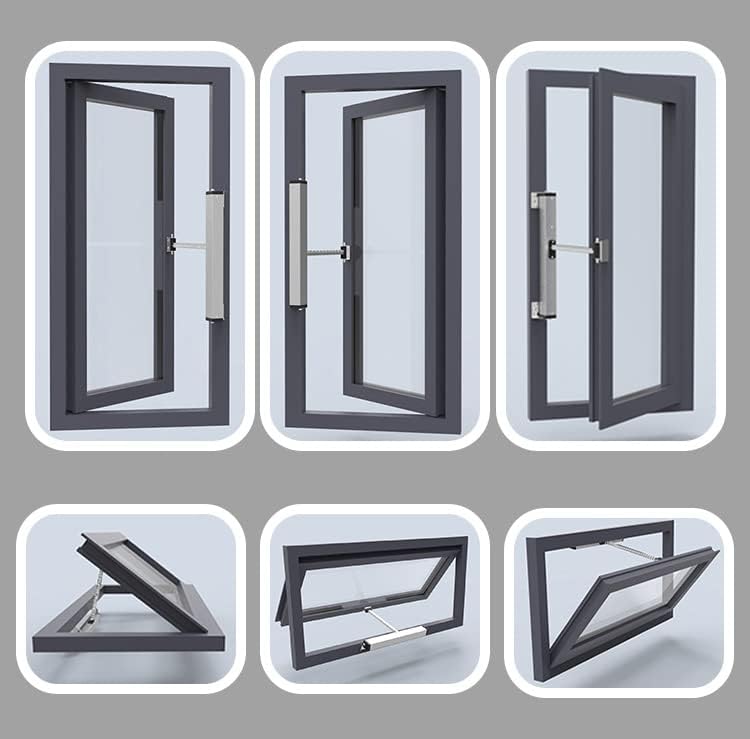
Image: Examples of different window types compatible with the automatic window opener, including skylights and hinged windows.

Image: Dimensional drawing of the Olideauto smart WiFi automatic window opener (Model OS1003DC 300), showing measurements in inches for installation planning.
Operating Instructions
Using the TUYA APP
The TUYA APP provides comprehensive control over your window opener:
- Open/Close: Use the "Open" and "Close" buttons within the app to fully open or close the window.
- Pause: The "Pause" button stops the window at its current position.
- Adjust Travel Distance: The travel distance is adjustable. You can set the opening/closing percentage via a group within the phone APP. This setting is retained even after power cycling.
- Scheduling: Set specific times for the window to open or close automatically, allowing for regular ventilation.
- Remote Control: Control your window from anywhere via the TUYA APP, provided your device and the window opener are connected to the internet.

Image: Detailed view of the TUYA APP interface for controlling the window opener, including open/close/pause functions and a slider to adjust the opening percentage.
Wireless Rain Sensor Functionality
The included wireless rain sensor enhances automation:
- When the rain sensor detects rainfall, it automatically signals the window opener to close the window.
- This feature prevents rain from entering your room, even if you are away or forget to close the window.

Image: The wireless rain sensor in action, shown near skylight windows, demonstrating its ability to detect rain and trigger automatic window closure.
Smart Home Integration (Alexa, Google Assistant)
The Olideauto window opener is compatible with popular smart home platforms:
- Alexa: Enable the TUYA Smart skill in the Alexa app and link your TUYA account. You can then use voice commands like "Alexa, open the window" or "Alexa, close the window."
- Google Assistant: Link your TUYA Smart account in the Google Home app. Use voice commands such as "Hey Google, open the window" or "Hey Google, close the window."
Maintenance
To ensure the longevity and optimal performance of your Olideauto window opener, follow these maintenance guidelines:
- Regular Cleaning: Periodically wipe the motor unit and chain with a soft, dry cloth to remove dust and debris. Avoid using abrasive cleaners or solvents.
- Chain Inspection: Inspect the stainless steel chain for any signs of wear, damage, or obstruction. Ensure it moves freely.
- Rain Sensor Cleaning: Keep the surface of the wireless rain sensor clean to ensure accurate rain detection.
- Firmware Updates: Check the TUYA APP regularly for any available firmware updates for your device to ensure you have the latest features and security enhancements.
- Avoid Obstructions: Ensure there are no objects obstructing the window's path when opening or closing.
Troubleshooting
If you encounter issues with your window opener, refer to the following common troubleshooting steps:
- Device Not Responding:
- Check if the device is properly powered and the power indicator light is on.
- Ensure your home WiFi network is active and the device is connected.
- Restart the device by unplugging it for 10 seconds and plugging it back in.
- Verify that the TUYA APP is updated to the latest version.
- Window Not Opening/Closing Fully:
- Check for any physical obstructions preventing the window from moving.
- Ensure the chain is correctly attached and not tangled.
- Recalibrate the travel distance settings in the TUYA APP if available.
- Rain Sensor Not Working:
- Ensure the rain sensor is clean and free from debris.
- Verify the rain sensor is properly paired with the main unit.
- Check the sensor's battery if applicable (though the description implies it's wireless, it doesn't specify battery type or power source for the sensor itself).
- Smart Home Integration Issues (Alexa/Google Home):
- Confirm that the TUYA Smart skill/service is enabled and linked in your Alexa or Google Home app.
- Ensure your voice commands are clear and match the device name configured in the TUYA app.
- Try unlinking and relinking the TUYA Smart account in your smart home app.
If these steps do not resolve the issue, please contact Olideauto customer support for further assistance.
Specifications
| Product Dimensions | 17.32 x 2.73 x 3.59 inches |
| Item Weight | 6 pounds |
| Item Model Number | OS1003DC 300 |
| Manufacturer | Chinentech Industrial Limited |
| Travelling Distance | 11.81 inches |
| Power Input | 100V-240V AC (with internal conversion to 24V DC) |
| Smart Home Compatibility | Alexa, Google Home, TUYA APP |
| Overload Protection | Built-in overloading protection system |
| Chain Material | High Quality Two-layers Stainless Steel |
Warranty and Support
Warranty: The Olideauto Automatic Skylight Window Opener comes with a 60-month product warranty, ensuring reliability and peace of mind.
Customer Support: For technical assistance, warranty claims, or any questions regarding your product, please contact Olideauto customer support through their official website or the contact information provided at the point of purchase. Please have your model number (OS1003DC 300) and purchase details ready when contacting support.
You can visit the Olideauto Store on Amazon for more information and support resources.