
Introduction
Thank you for purchasing the Portronics POR-781 SoundCake 10 Watt Wireless Bluetooth Portable Speaker. This manual provides essential information for setting up, operating, and maintaining your speaker. Please read these instructions carefully before use to ensure optimal performance and longevity of your device.

The Portronics SoundCake speaker, a compact black cylindrical speaker with a mesh grille, designed for portable audio.
Package Contents
Ensure all items are present in the package:
- Portronics POR-781 SoundCake Speaker
- Aux Cable
- Charging Cable (USB)
- User Manual
Product Overview
Familiarize yourself with the speaker's controls and ports.

This image displays the top panel of the SoundCake speaker, highlighting its function keys. These include buttons for TWS (True Wireless Stereo) connectivity, volume adjustment (up and down), power on/off, a microphone, and a Bluetooth indicator light.
- Power On/Off Button: Press and hold to turn the speaker on or off.
- Volume Up (+): Press to increase volume.
- Volume Down (-): Press to decrease volume.
- TWS Connectivity Button: Used for True Wireless Stereo pairing.
- Microphone: For hands-free calling.
- Bluetooth Indicator: Shows Bluetooth connection status.
- Charging Port: Micro USB port for charging.
- Aux-In Port: 3.5mm jack for wired audio connection.
Setup
Charging the Speaker
Before first use, fully charge the speaker. A full charge provides approximately 7 hours of playtime.
- Connect the provided USB charging cable to the speaker's charging port.
- Connect the other end of the USB cable to a USB power adapter (not included) or a computer's USB port.
- The charging indicator light will illuminate during charging and turn off once fully charged.

This diagram illustrates the charging process for the SoundCake speaker. It shows the USB charging cable connected to the speaker's charging port and then to a USB power adapter for quick recharge.
Power On/Off
- To power on, press and hold the Power On/Off button until the indicator light illuminates.
- To power off, press and hold the Power On/Off button again until the indicator light turns off.
Operating Instructions
Bluetooth Pairing
Connect your speaker wirelessly to a Bluetooth-enabled device.
- Ensure the speaker is powered on and in Bluetooth pairing mode (the Bluetooth indicator light will flash).
- On your device (smartphone, tablet, etc.), enable Bluetooth and search for available devices.
- Select "SoundCake" from the list of devices.
- Once paired, the Bluetooth indicator light on the speaker will stop flashing and remain solid.

This image demonstrates the Bluetooth connectivity of the SoundCake speaker. A smartphone is shown wirelessly streaming music to the speaker using Bluetooth 4.1 technology.
True Wireless Stereo (TWS) Function
Pair two SoundCake speakers for a stereo audio experience.
- Ensure both SoundCake speakers are powered on and not connected to any other Bluetooth device.
- Press the TWS button on one of the speakers. It will enter TWS pairing mode.
- The speakers will automatically search for and pair with each other. A confirmation tone will sound once paired.
- Once TWS is established, connect your device to one of the speakers via Bluetooth as described above. Both speakers will now play audio in stereo.
This image illustrates the TWS (True Wireless Stereo) function, demonstrating how two SoundCake speakers can be connected wirelessly to each other and then to a single smartphone to deliver powerful stereo sound.
Aux-In Connection
For wired audio playback, use the Aux-In port.
- Connect one end of the provided 3.5mm Aux cable to the speaker's Aux-In port.
- Connect the other end of the Aux cable to the audio output jack of your device.
- The speaker will automatically switch to Aux-In mode.

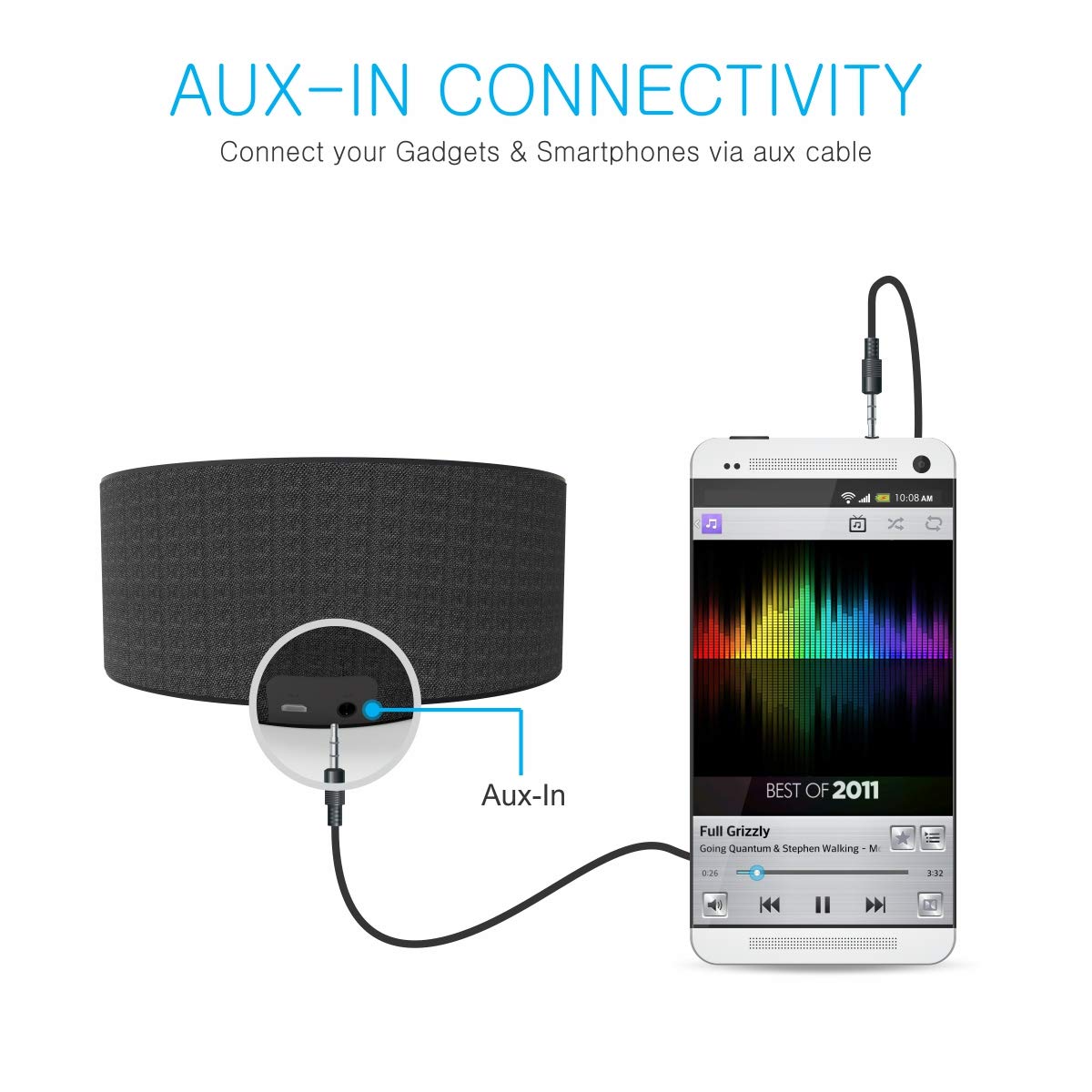
This diagram shows the Aux-In connectivity feature, detailing how to connect a smartphone or other gadgets to the SoundCake speaker using the provided auxiliary cable.
Hands-Free Calling
When connected via Bluetooth to a smartphone, the speaker can be used for hands-free calls.
- When a call comes in, the speaker will ring.
- Press the Power On/Off button once to answer the call.
- Press the Power On/Off button again to end the call.
- Press and hold the Power On/Off button to reject an incoming call.
Volume Control
- Press the '+' button to increase the volume.
- Press the '-' button to decrease the volume.
Maintenance
To ensure the longevity and optimal performance of your speaker, follow these maintenance guidelines:
- Cleaning: Use a soft, dry cloth to clean the speaker's exterior. Do not use abrasive cleaners, solvents, or harsh chemicals.
- Storage: Store the speaker in a cool, dry place away from direct sunlight and extreme temperatures.
- Water Exposure: While the speaker is indicated as waterproof, avoid submerging it in water or exposing it to heavy rain for extended periods. Ensure all ports are securely closed if exposed to moisture.
- Battery Care: To preserve battery life, avoid fully discharging the battery frequently. Charge the speaker regularly, even if not in use for extended periods.
- Handling: Handle the speaker with care. Avoid dropping it or subjecting it to strong impacts.
Troubleshooting
If you encounter issues with your SoundCake speaker, refer to the following common problems and solutions:
| Problem | Possible Cause | Solution |
|---|---|---|
| Speaker does not power on. | Battery is depleted. | Charge the speaker fully. |
| Cannot pair via Bluetooth. | Speaker is not in pairing mode or already connected to another device. Device's Bluetooth is off. | Ensure speaker is in pairing mode (flashing blue light). Disconnect from other devices. Enable Bluetooth on your device. |
| No sound or low volume. | Volume too low on speaker or connected device. Incorrect input mode. | Increase volume on both speaker and connected device. Ensure correct input mode (Bluetooth/Aux). |
| TWS pairing fails. | Speakers are too far apart or already connected to other devices. | Ensure speakers are close to each other. Disconnect both speakers from any other Bluetooth devices before initiating TWS pairing. |
| Poor sound quality. | Low battery. Device too far from speaker. Interference. | Charge the speaker. Move device closer to the speaker. Avoid obstacles between device and speaker. |
Specifications
Detailed technical specifications for the Portronics POR-781 SoundCake speaker:
| Feature | Detail |
|---|---|
| Model Name | Sound Cake |
| Model Number | POR-781 |
| Speaker Type | Bookshelf |
| Special Feature | Built-in Microphone |
| Recommended Uses | Music, Portable, Home, On-the-go |
| Compatible Devices | Personal Computer, Smartphone, Tablet |
| Subwoofer Diameter | 5 Inches |
| Surround Sound Channel Configuration | 2.0 |
| Colour | Black |
| Item Weight | 417 Grams |
| Waterproof | TRUE |
| Control Method | Touch |
| Wireless Communication Technology | Bluetooth |
| Speaker Size | 5 Inches |
| Power Source | Battery Powered |
| Tweeter Diameter | 1 Inches |
| Battery Type | 1 Lithium Polymer (included) |
| Audio Driver Type | Dynamic Driver |
| Audio Input | Auxiliary |
| Speaker Connectivity | Bluetooth, Wired (Aux) |
| Wattage | 10 Watts (2 x 5W) |
| Battery Average Life | 7 Hours |
| Form Factor | Dimension : 122 X 122 X 61.5 mm |
| Product Dimensions (LxWxH) | 12 x 12 x 5.7 Centimeters |
| Mounting Type | Tabletop Mount |
Warranty and Support
The Portronics POR-781 SoundCake speaker comes with a 1-Year Warranty from the date of purchase.
For warranty claims, technical support, or any product-related inquiries, please contact Portronics customer service. Refer to the contact information provided on the product packaging or the official Portronics website.


