
1. Introduction
The Jebao OW-25 Wavemaker is designed to create natural water movement within your aquarium, promoting a healthier environment for aquatic life. This device features an improved motor for enhanced durability and offers adjustable flow rates with multiple operating modes. This manual provides detailed instructions for the safe and efficient use of your OW-25 Wavemaker.

Image 1.1: The Jebao OW-25 Wavemaker, controller, and magnet mount, shown with its retail packaging.
Key Features:
- Improved motor design for increased longevity.
- Adjustable flow rates to suit various aquarium needs.
- Master/slave wireless mode for synchronized operation of multiple units.
- Eight distinct flow patterns.
- Quiet operation.
- One-touch feed mode, temporarily reducing pump activity for 10 minutes.
- Includes a wired controller and a magnet mount for easy installation.
2. Package Contents
Please verify that all items are present and undamaged upon opening the package:
- Jebao OW-25 Wavemaker Pump Unit
- Wired Controller
- Power Supply Adapter
- Magnet Mount
3. Safety Instructions
Read and understand all safety instructions before operating the device. Failure to follow these instructions may result in electric shock, fire, or serious injury.
- Always disconnect the power supply before performing any maintenance or cleaning.
- Ensure your hands are dry when handling the power adapter and controller.
- Do not operate the wavemaker if the power cord or plug is damaged.
- This device is designed for indoor aquarium use only.
- Keep the power adapter and controller away from water.
- Ensure the wavemaker is fully submerged in water during operation. Running it dry can cause damage.
- Do not attempt to modify or repair the device yourself. Refer all servicing to qualified personnel.
- Keep out of reach of children.
4. Setup
4.1 Mounting the Wavemaker
The OW-25 Wavemaker uses a magnet mount for secure placement within your aquarium. Choose a location that allows for optimal water flow distribution without disturbing substrate or delicate corals.
- Place the wavemaker unit (with the internal magnet) inside the aquarium, ensuring it is fully submerged.
- Align the external magnet on the outside of the aquarium glass, directly opposite the internal magnet. The strong magnetic force will hold the wavemaker in place.
- Adjust the position and angle of the wavemaker as needed to direct water flow.
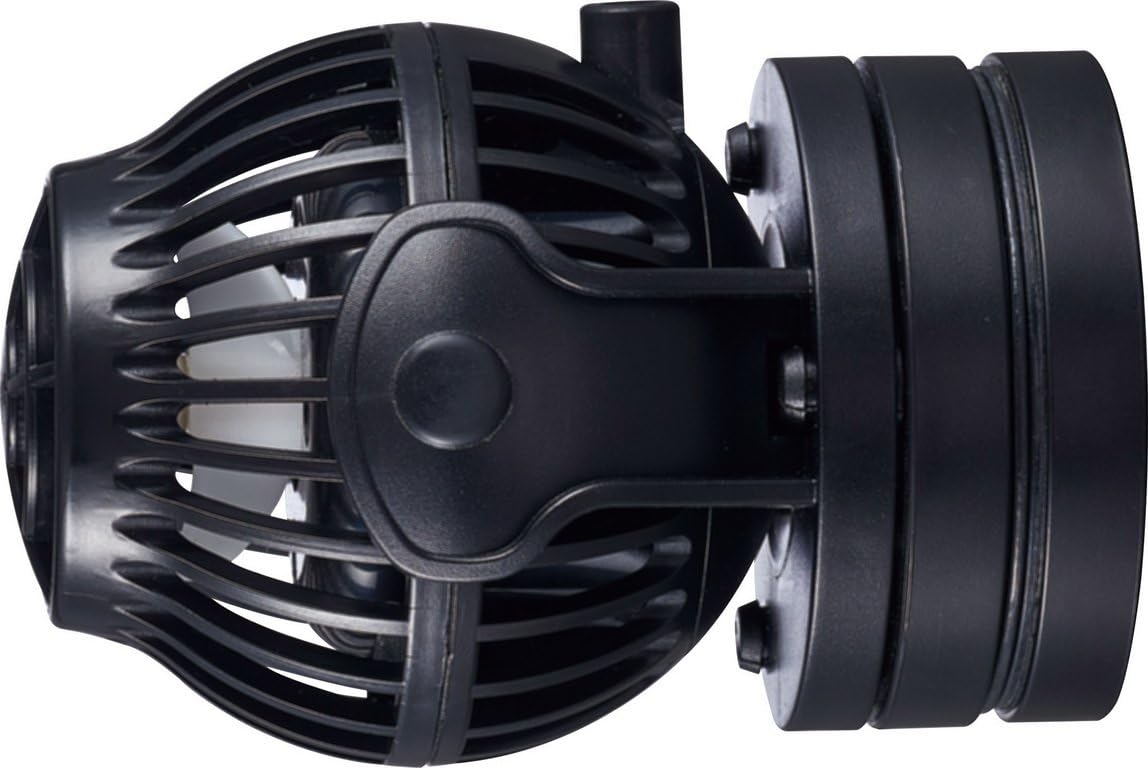
Image 4.1: Side view of the OW-25 Wavemaker demonstrating the magnet mount assembly.
4.2 Connecting the Controller and Power
- Connect the wavemaker pump unit cable to the designated port on the controller.
- Connect the power supply adapter to the controller.
- Plug the power supply adapter into a suitable electrical outlet.
- Ensure all connections are secure before powering on.
5. Operating Instructions
The Jebao OW-25 Wavemaker controller allows for various adjustments to customize water flow. Familiarize yourself with the controller's layout and functions.
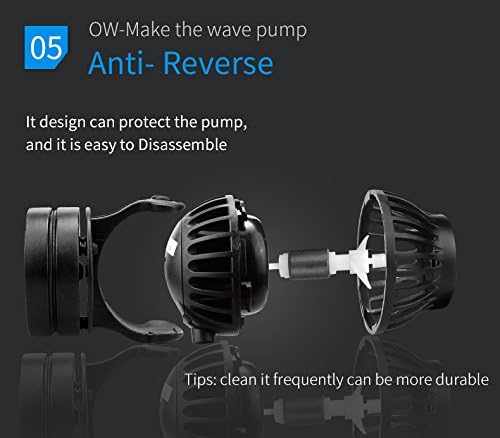
Image 5.1: Overview of the Jebao Wavemaker controller with labeled functions.
Controller Functions:
- Speed Control: Adjusts the overall power/speed of the wavemaker.
- Wavemaker Mode (W1, W2, Else, H, C): Selects different flow patterns.
- W1: Classic Wave Mode - Creates a uniform wave pattern.
- W2: Sine Wave Mode - Generates a smoother, more natural wave.
- Else: Random Flow Mode - Varies flow intensity and direction randomly.
- H: Constant Flow Mode - Maintains a steady, continuous flow.
- C: Feed Mode - Not a flow mode, but activates the feed function.
- Speed/Feeding Button: Press to activate feed mode (pump slows for 10 minutes). Hold to adjust speed.
- Mode/Night Button: Press to cycle through wave modes. Hold to activate/deactivate Night Mode (uses light sensor to reduce flow in darkness).
- WI-LE (Wireless Link) Button: Used for Master/Slave setup. Press to set a unit as Master or Slave.
- Rotate Control Knob: Fine-tunes speed or wave intensity depending on the selected mode.
- Auto Light Sensor: Detects ambient light for Night Mode activation.
Master/Slave Wireless Mode:
To synchronize multiple OW-25 wavemakers, designate one as the Master and others as Slaves using the WI-LE button. The Slave units will mimic the Master's settings, creating coordinated water movement.
6. Maintenance
Regular cleaning of your wavemaker is essential for optimal performance and longevity. Detritus and mineral buildup can reduce efficiency and cause noise.
Cleaning Procedure:
- Disconnect Power: Always unplug the wavemaker from the power outlet before cleaning.
- Remove from Aquarium: Carefully detach the wavemaker from the magnet mount and remove it from the water.
- Disassemble: The OW-25 is designed for easy disassembly. Gently twist and pull apart the pump housing to access the impeller and motor components.
- Clean Components: Use a soft brush (e.g., a toothbrush) and clean water to remove any algae, detritus, or mineral deposits from the impeller, impeller shaft, and pump housing. For stubborn mineral buildup, a diluted vinegar solution can be used, followed by thorough rinsing.
- Inspect: Check the impeller and shaft for any signs of wear or damage. Replace if necessary.
- Reassemble: Carefully reassemble the wavemaker, ensuring all parts fit correctly.
- Reinstall: Place the cleaned wavemaker back into the aquarium and reconnect the power.

Image 6.1: Exploded view of the OW-25 Wavemaker, illustrating how to disassemble for cleaning the impeller and motor.
Tip: Frequent cleaning can significantly extend the lifespan and maintain the quiet operation of your wavemaker.
7. Troubleshooting
If you encounter issues with your Jebao OW-25 Wavemaker, refer to the following common problems and solutions:
| Problem | Possible Cause | Solution |
|---|---|---|
| Wavemaker not operating / No flow |
|
|
| Reduced flow / Weak waves |
|
|
| Excessive noise or vibration |
|
|
| Controller display not working |
|
|
8. Specifications
Detailed technical specifications for the Jebao OW-25 Wavemaker:

Image 8.1: A table displaying specifications for the Jebao OW series wavemakers, including the OW-25 model.
| Specification | Value |
|---|---|
| Model | OW-25 |
| Voltage Input | DC 24V (via 100-250V AC adapter) |
| Power | 23W |
| Flow Rate | Up to 8500 L/H (approximately 2245 GPH) |
| Recommended Aquarium Size | 70-100 cm (approx. 27-39 inches) |
| Max Glass Thickness for Mount | ≤12mm |
| Item Weight | 1.7 pounds |
| Product Dimensions (LxWxH) | 7.3 x 5.3 x 2.8 inches |
| Style | Submersible |
9. Warranty and Support
Warranty Information:
The Jebao OW-25 Wavemaker comes with a 180-day warranty from the date of purchase. This warranty covers manufacturing defects under normal use. It does not cover damage resulting from misuse, improper installation, unauthorized modifications, or normal wear and tear. Please retain your proof of purchase for warranty claims.
Customer Support:
For technical assistance, troubleshooting beyond this manual, or warranty inquiries, please contact your retailer or the manufacturer's customer service department. Refer to the product packaging or manufacturer's website for specific contact details.


