
GoolRC T908W
GoolRC T908W WiFi FPV DIY Detachable Drone
Instruction Manual
1. Important Safety Information
Please read this entire manual carefully before operating the GoolRC T908W drone. Failure to follow these instructions may result in damage to the product, property, or serious injury.
1.1 Battery Safety
- Do not over-charge or over-discharge batteries.
- Do not expose batteries to high temperature conditions.
- Do not throw batteries into fire.
- Do not throw batteries into water.
- Always use the provided charging cable and adapter.
1.2 General Operation Warnings
- This RC model is not a toy and is not suitable for children under 14 years old. Keep it away from children.
- Carefully read the instruction before any use. If you are a beginner, it is advisable to be assisted by an experienced adult.
- Always operate the drone in open, clear areas, away from people, animals, and obstacles.
- Do not fly near airports, restricted airspace, or sensitive areas.
- Ensure the drone battery is fully charged and the controller batteries are fresh before each flight.
- Avoid flying in strong winds or adverse weather conditions.
2. Product Overview
The GoolRC T908W is a WiFi FPV DIY detachable quadcopter designed for beginners, offering stable flight and an enjoyable flying experience with its built-in HD camera and real-time WiFi transmission.
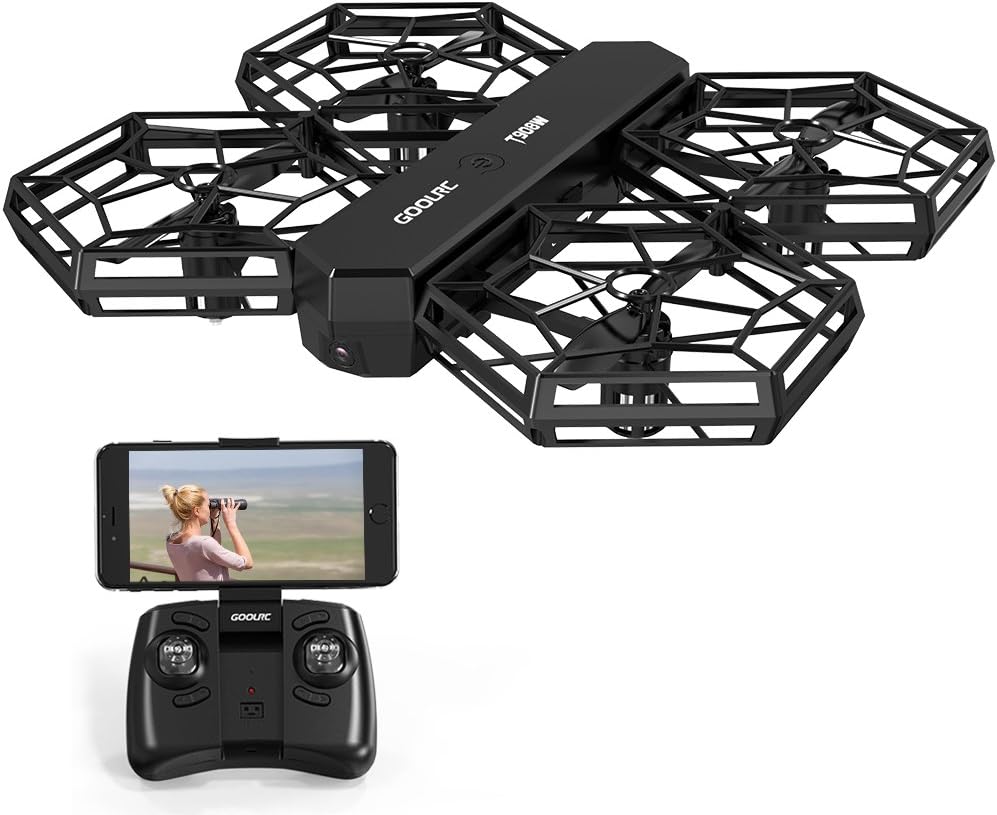
Figure 2.1: GoolRC T908W Drone and Controller
This image displays the GoolRC T908W drone, showcasing its compact, foldable design with propeller guards. Below it, the remote controller is shown with a smartphone mounted, illustrating the FPV capability.

Figure 2.2: 720P HD Camera Detail
A detailed view of the drone's 720P HD camera, highlighting its optical components. This camera enables users to capture high-quality images and videos during flight.

Figure 2.3: DIY Detachable Design
This image illustrates the drone's innovative DIY detachable design, showing both the fully assembled and partially disassembled states. This feature simplifies maintenance and part replacement.
2.1 Key Features
- WiFi FPV HD Camera: Capture photos and videos with the 0.3MP camera and view real-time footage on your smartphone.
- Innovative DIY Modular Design: Easily assemble or disassemble parts for maintenance and cost reduction.
- User Defined Flight Plan: Draw a flight path on the GTENG App, and the drone will automatically follow it.
- Three Remote Control Modes: Control via remote controller, smartphone, or a combination of both.
- Altitude Hold: Equipped with a barometer sensor for stable flights at a set altitude.
- One Key Take Off/Landing: Simplifies initial flight and landing procedures.
- One Key Return: Automatically brings the drone back to the take-off point.
- Headless Mode: Eliminates the need to adjust the position of the aircraft before flying.
2.2 Package Contents
- GoolRC T908W WiFi FPV Drone
- 2.4GHz Remote Controller
- 3.7V 750mAh Lipo Drone Battery (built-in)
- USB Charging Cable
- Spare Propellers
- User Manual
3. Setup Guide
3.1 Charging the Drone Battery
- Connect the drone's built-in 3.7V 750mAh Lipo battery to the provided USB charging cable.
- Plug the USB cable into a USB power source (e.g., computer USB port, USB wall adapter).
- The charging indicator light will show the charging status. Charging time is approximately 90 minutes.
- Once fully charged, disconnect the battery from the charger.
3.2 Installing Controller Batteries
- Open the battery compartment on the back of the remote controller.
- Insert 2 x AAA batteries (not included) into the compartment, ensuring correct polarity (+/-).
- Close the battery compartment securely.
3.3 Assembling the Drone (if disassembled)
The GoolRC T908W features a DIY detachable design. If your drone is not fully assembled, follow these steps:
- Carefully attach the propeller guards to the motor arms.
- Ensure all components are securely fastened before flight. Refer to the diagrams in the packaging for detailed assembly steps.
3.4 App Installation (for FPV and advanced features)
- Scan the QR code provided in the packaging or search for "GTENG" in your smartphone's app store (iOS/Android).
- Download and install the GTENG application.
- Ensure your smartphone's Wi-Fi is enabled.
4. Operating Instructions
4.1 Pairing the Drone and Controller
- Place the drone on a flat, level surface.
- Turn on the drone's power switch. The indicator lights will flash.
- Turn on the remote controller.
- Push the left joystick (throttle) all the way up, then all the way down. The drone's lights will become solid, indicating successful pairing.
4.2 One Key Take Off and Landing
- After pairing, press the One Key Take Off button (usually indicated by an arrow pointing up). The drone will automatically ascend to a stable hovering height.
- To land, press the One Key Landing button (usually indicated by an arrow pointing down). The drone will slowly descend and land automatically.
4.3 Basic Flight Controls
- Throttle (Left Joystick Up/Down): Controls altitude (ascend/descend).
- Yaw (Left Joystick Left/Right): Controls rotation (turn left/right).
- Forward/Backward (Right Joystick Up/Down): Controls forward and backward movement.
- Left/Right Sideward Flight (Right Joystick Left/Right): Controls sideward movement (strafe).
4.4 Altitude Hold Mode
The built-in barometer sensor allows the drone to maintain a stable altitude automatically. Once the drone reaches a desired height, release the throttle stick, and it will hold its position.
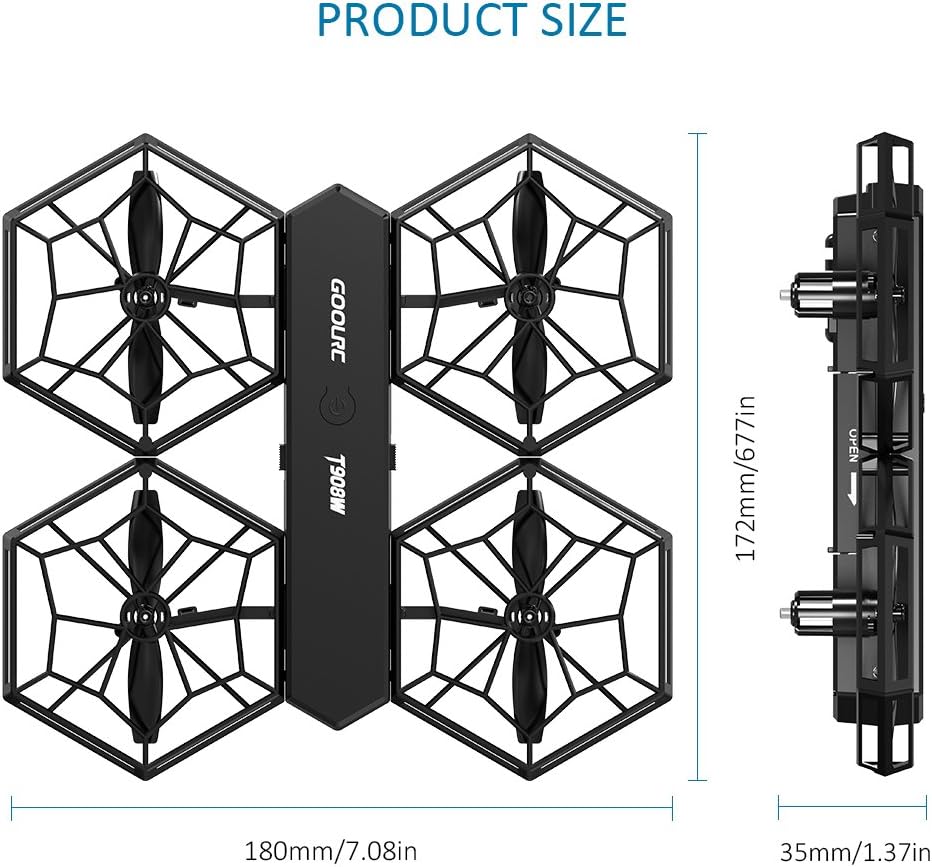
Figure 4.1: Altitude Hold in Operation
This image visually explains the Altitude Hold feature, showing the drone maintaining a fixed height above the ground, enabled by its advanced barometer sensor.
4.5 Headless Mode
In Headless Mode, the drone's orientation is relative to the pilot, regardless of the drone's actual front. This simplifies control, especially for beginners.
- To activate: Press the Headless Mode button on the controller.
- To deactivate: Press the Headless Mode button again.
4.6 One Key Return
This feature allows the drone to automatically return towards its take-off point.
- To activate: Press the One Key Return button on the controller.
- To cancel: Push the right joystick in any direction.

Figure 4.2: One Key Return Home
This image illustrates the One Key Return feature, showing the drone's flight path as it automatically returns to its starting position, preventing loss.
4.7 WiFi FPV and Camera Operation
- Ensure the GTENG App is installed on your smartphone.
- Turn on the drone and connect your smartphone to the drone's Wi-Fi network (usually named "GoolRC_T908W_XXXX").
- Open the GTENG App. You should see the live video feed from the drone's camera.
- Use the app interface to take photos or record videos.
4.8 User Defined Flight Plan
This feature allows you to pre-program a flight path for the drone.
- Open the GTENG App.
- Access the "Flight Plan" or "Waypoint" mode within the app.
- Draw a desired flight route directly on your smartphone screen.
- The drone will then automatically follow the drawn path.

Figure 4.3: User-Defined Flight Plan
This image demonstrates the User-Defined Flight Plan feature, where a flight path is drawn on a smartphone screen, and the drone is shown following that precise route automatically.

Figure 4.4: Anti-Crash and Anti-Collision
This image highlights the drone's anti-crash and anti-collision capabilities, showing it navigating safely indoors, emphasizing its durability and protective design.
5. Maintenance
Regular maintenance ensures the longevity and optimal performance of your GoolRC T908W drone.
- Cleaning: Use a soft, dry cloth to clean the drone after each flight. Avoid using water or harsh chemicals.
- Propeller Inspection: Regularly check propellers for any damage (cracks, bends). Replace damaged propellers immediately using the provided spares.
- Battery Care: Follow the battery safety guidelines in Section 1.1. Store batteries in a cool, dry place when not in use. Do not store fully charged or completely depleted batteries for extended periods.
- DIY Detachable Design: The modular design allows for easy disassembly for cleaning or replacing individual components. Refer to assembly instructions if reassembling.
- Storage: Store the drone and controller in a dry, cool environment, away from direct sunlight and extreme temperatures.
6. Troubleshooting
If you encounter issues with your GoolRC T908W drone, refer to the following common problems and solutions:
| Problem | Possible Cause | Solution |
|---|---|---|
| Drone does not power on. | Battery not charged; Battery not connected; Power switch off. | Charge drone battery; Ensure battery is securely connected; Turn on power switch. |
| Controller does not power on. | Controller batteries low or incorrectly installed. | Replace AAA batteries; Check polarity. |
| Drone does not respond to controller. | Not paired; Out of range; Interference. | Re-pair drone and controller; Fly within 40m range; Avoid areas with strong Wi-Fi signals. |
| Drone flies erratically or drifts. | Not calibrated; Damaged propeller; Strong wind. | Perform gyroscope calibration (refer to controller instructions); Replace damaged propellers; Fly in calm conditions. |
| No FPV video feed. | Not connected to drone Wi-Fi; App not open; Out of Wi-Fi range. | Connect smartphone to drone's Wi-Fi; Open GTENG App; Fly within 35m Wi-Fi range. |
| Short flight time. | Battery not fully charged; Old battery; Over-discharged battery. | Ensure full charge (90 mins); Consider replacing battery if old; Avoid over-discharging. |
7. Specifications

Figure 7.1: Product Dimensions
This diagram provides the precise measurements of the GoolRC T908W drone, including its length (180mm/7.08in), width (172mm/6.77in), and height (35mm/1.37in).
| Feature | Detail |
|---|---|
| Brand | GoolRC |
| Item Name | T908W Wifi FPV Drone |
| Color | Black |
| Remote Control | 2.4GHz (Mode 1/2) |
| Channels | 4 Channels |
| Gyro | 6 Axis Gyro |
| Remote Control Distance | Above 40m |
| Wifi FPV Transmission Distance | Above 35m |
| Motor | Coreless Motor |
| Camera Pixel | 0.3MP (Effective still resolution) |
| Video Capture Resolution | 720p |
| Drone Battery | 3.7V 750mAh Lipo (built-in) |
| Charging Time | About 90 minutes |
| Flying Time | About 6-8 minutes |
| Controller Battery | 2 * AAA battery (not included) |
| Product Size | 180 * 172 * 35mm / 7.08 * 6.77 * 1.37in |
| Package Size | 22.5 * 20 * 9cm / 8.85 * 7.87 * 3.54in |
| Package Weight | 492g / 1.08lb |
| Special Features | Portable, Lightweight, Integrated Camera |
8. Warranty and Support
Specific warranty information for the GoolRC T908W drone is not provided in this manual. For details regarding warranty coverage, returns, or technical support, please contact the manufacturer or your point of purchase directly.
Always retain your proof of purchase for any warranty claims.
Ask a question about this manual
Ask about setup, troubleshooting, compatibility, parts, safety, or missing instructions. Manuals+ will review the question and use this page’s manual context to help answer it.