
Randell RP CNT1100
Randell RP CNT1100 Dixell Control User Manual
Model: RP CNT1100
1. Introduction
This manual provides essential information for the proper installation, operation, and maintenance of the Randell RP CNT1100 Dixell Control, Xr01Cx Phhc-26. This genuine OEM replacement part is designed for commercial foodservice equipment, specifically for refrigeration and freezer applications. Please read this manual thoroughly before installation and use to ensure safe and efficient operation.
2. Safety Information
WARNING:
- Always disconnect power to the appliance before installing, servicing, or removing the control unit. Failure to do so can result in serious injury or death.
- Installation and service should only be performed by qualified personnel.
- Ensure all wiring connections comply with local and national electrical codes.
- Do not operate the control unit if it appears damaged.
- This control unit is designed for specific applications. Do not use it for purposes other than those intended by the manufacturer.
3. Product Overview
The Randell RP CNT1100 Dixell Control is a sophisticated electronic temperature controller designed for precise management of refrigeration and freezer units. It features a digital display for temperature readings and various control buttons for parameter adjustment.

Figure 3.1: Front view of the Dixell Control unit, showing the digital display, 'SET' and 'AUX' buttons, and navigation arrows. The temperature probe and wiring are also visible.
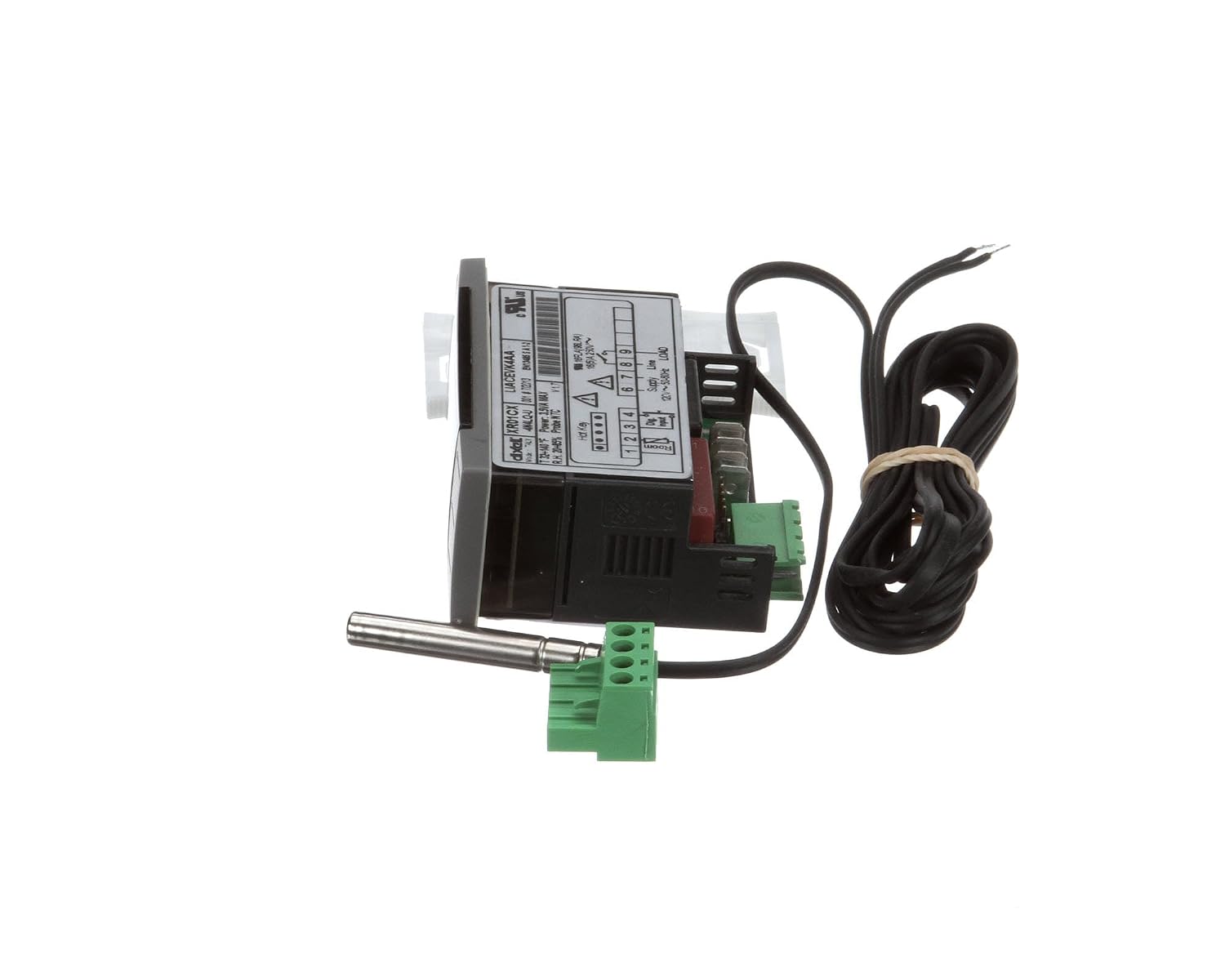
Figure 3.2: Side view of the Dixell Control, highlighting the wiring terminals and the mounting clips. The temperature probe extends from the side.

Figure 3.3: Rear view of the Dixell Control, displaying the product label with model information and a basic wiring diagram. The green terminal blocks for electrical connections are visible.

Figure 3.4: An alternative side view of the Dixell Control, showing the compact form factor and the integrated temperature probe. The white mounting clips are also visible.
Components:
- Digital Display: Shows current temperature and parameter values.
- Control Buttons: 'SET', 'AUX', Up, and Down arrows for navigation and parameter adjustment.
- Temperature Probe: NTC type, for accurate temperature sensing.
- Wiring Terminals: Green screw terminals for electrical connections.
- Mounting Clips: White plastic clips for secure installation.
4. Setup and Installation
Before beginning installation, ensure the main power supply to the appliance is disconnected.
- Mounting: Insert the control unit into the designated panel cutout. Secure it using the provided mounting clips. Ensure it is firmly seated.
- Wiring: Refer to the wiring diagram on the back of the unit (Figure 3.3) and the appliance's specific wiring schematic. Connect the power supply, load (e.g., compressor, fan), and temperature probe to the appropriate terminals. Pay close attention to voltage requirements (120V~ 50/60Hz).
- Probe Placement: Position the temperature probe in the area where temperature needs to be monitored, typically within the refrigerated or frozen compartment, ensuring it is not directly exposed to airflow from fans or defrost heaters.
- Initial Power-Up: Once all connections are secure and verified, restore power to the appliance. The control unit display should illuminate.
IMPORTANT: Incorrect wiring can damage the unit or the appliance. If unsure, consult a qualified electrician or HVAC technician.
5. Operating Instructions
5.1. Display and Basic Functions
Upon power-up, the display will typically show the current temperature measured by the probe.
- Viewing Setpoint: Press and release the SET button. The display will show the current setpoint temperature. Press SET again to return to the current temperature display.
- Adjusting Setpoint: Press and hold the SET button for approximately 2 seconds until the setpoint value flashes. Use the Up and Down arrow buttons to adjust the value. Press SET again to confirm and save the new setpoint.
- Manual Defrost (if applicable): Press and hold the AUX button for approximately 3 seconds to initiate a manual defrost cycle.
5.2. Parameter Programming (Advanced)
Accessing and modifying advanced parameters requires caution and understanding of their functions. Refer to the detailed Dixell XR01CX manual for a complete list of parameters and their descriptions. Incorrect parameter settings can lead to improper operation or damage to the appliance.
- Enter Programming Mode: Press and hold the SET and Down arrow buttons simultaneously for approximately 3 seconds. The display will show the first parameter code (e.g., "Hy").
- Navigate Parameters: Use the Up and Down arrow buttons to scroll through the parameter list.
- View/Edit Parameter Value: Press the SET button to view the value of the selected parameter. Use the Up and Down arrow buttons to change the value.
- Confirm and Save: Press SET to confirm the new value and move to the next parameter.
- Exit Programming Mode: Press and hold the SET and Up arrow buttons simultaneously for approximately 3 seconds, or wait 15 seconds without pressing any button.
6. Maintenance
The Randell RP CNT1100 Dixell Control requires minimal maintenance. Regular checks can help ensure its longevity and proper function.
- Cleaning: Periodically wipe the front panel of the control unit with a soft, damp cloth. Do not use abrasive cleaners or solvents, as these can damage the display or buttons. Ensure no liquid enters the unit.
- Wiring Inspection: Annually, or as part of routine appliance maintenance, inspect all wiring connections to the control unit. Ensure they are secure and free from corrosion or damage.
- Probe Condition: Check the temperature probe for any physical damage or signs of wear. Ensure its placement remains optimal for accurate temperature sensing.
CAUTION: Always disconnect power before performing any maintenance or inspection.
7. Troubleshooting
This section provides solutions to common issues. For problems not listed here, or if issues persist, contact qualified service personnel.
| Problem | Possible Cause | Solution |
|---|---|---|
| Display is blank | No power supply; Incorrect wiring; Unit failure | Check power supply to the appliance. Verify wiring connections. If power is present and wiring is correct, the unit may need replacement. |
| Temperature reading is inaccurate or "P1" error | Faulty temperature probe; Probe disconnected; Incorrect probe placement | Check probe connection to the unit. Inspect probe for damage. Ensure probe is correctly positioned. Replace probe if faulty. |
| Appliance not cooling/heating as expected | Incorrect setpoint; Parameter misconfiguration; External appliance issue | Verify setpoint temperature. Check advanced parameters (e.g., differential, defrost settings). Consult appliance service manual for other potential issues (e.g., compressor, fan). |
| Buttons unresponsive | Unit malfunction; Temporary software glitch | Try cycling power to the unit (disconnect and reconnect). If issue persists, unit may require replacement. |
8. Specifications
| Feature | Detail |
|---|---|
| Product Type | Refrigerator/Freezer Control |
| Model Number | RP CNT1100 (Dixell Xr01Cx Phhc-26) |
| Brand | Randell |
| Country Of Origin | United States |
| Package Dimensions | 6.89 x 4.88 x 1.57 inches (17.5 x 12.4 x 4 cm) |
| Package Weight | 1.6 lbs (0.73 kg) |
| Item Weight | 0.18 Kilograms (0.4 lbs) |
| Form Factor | Compact |
| Specification Met | OEM |
| UPC | 046843125975 |
9. Warranty and Support
As a genuine OEM replacement part, this Randell control unit is typically covered by the original equipment manufacturer's warranty for parts. Please refer to the warranty documentation provided with your specific Randell appliance or contact Randell customer service for detailed warranty information.
For technical support, troubleshooting beyond this manual, or to order replacement parts, please contact Randell customer service or an authorized service provider.
Randell Contact Information: (Please refer to Randell's official website or your appliance documentation for the most current contact details.)
Related documentsRP CNT1100


Ask a question about this manual
Ask about setup, troubleshooting, compatibility, parts, safety, or missing instructions. Manuals+ will review the question and use this page’s manual context to help answer it.