
1. Introduction
Thank you for choosing the KUFATEC MMI 2G AUX IN Upgrade Kit. This kit allows you to integrate an auxiliary audio input into your vehicle's MMI 2G system, enabling connection of external audio sources such as smartphones, tablets, or MP3 players via a standard 3.5mm jack. This manual provides detailed instructions for proper installation, operation, and maintenance to ensure optimal performance and longevity of your device.
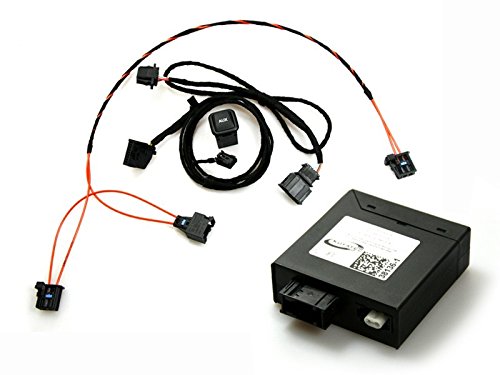
An image showing the KUFATEC MMI 2G AUX IN Upgrade Kit, featuring the main adapter unit and connecting cables.
2. Safety Information
- Professional Installation Recommended: Installation of this kit requires technical knowledge of vehicle electronics and interior disassembly. If you are not confident in your abilities, please seek professional installation.
- Disconnect Battery: Always disconnect the vehicle's battery before beginning any electrical work to prevent short circuits and damage to components.
- Cable Routing: Ensure all cables are routed safely, away from moving parts, heat sources, and sharp edges. Avoid pinching or stretching cables.
- Moisture and Heat: Do not expose the kit to excessive moisture, water, or extreme temperatures.
- Vehicle Compatibility: This kit is designed for MMI 2G systems. Verify compatibility with your specific vehicle model and year before installation.
3. Package Contents
Please check the contents of your package against the following list. If any items are missing or damaged, contact your vendor immediately.
- KUFATEC MMI 2G AUX IN Interface Module
- Connection Cable Set (Power, MMI connection, AUX-in jack)
- Installation Guide (this document or supplementary material)
4. Setup and Installation
The installation process involves accessing the MMI 2G unit, typically located in the glove compartment or dashboard. Due to variations in vehicle models, specific disassembly instructions are not provided here. Refer to your vehicle's service manual or a reputable online resource for detailed instructions on how to safely access your MMI 2G unit.
General Installation Steps:
- Prepare Vehicle: Ensure the vehicle is turned off and the ignition key is removed. Disconnect the negative terminal of the vehicle's battery.
- Access MMI 2G Unit: Carefully remove the necessary trim panels and components to gain access to the rear of the MMI 2G head unit.
- Connect Interface Module: Connect the provided cable set to the KUFATEC AUX IN interface module.
- Integrate with MMI 2G: Connect the interface module's cable to the appropriate port on the MMI 2G head unit. This usually involves connecting to the CD changer input or a dedicated AUX port, depending on your MMI 2G configuration.
- Route AUX-in Cable: Route the 3.5mm AUX-in jack cable to a convenient location in the vehicle's interior (e.g., glove compartment, center console) for easy access.
- Secure Components: Secure the KUFATEC interface module and all cables to prevent rattling or damage.
- Reassemble: Carefully reassemble all removed trim panels and components.
- Reconnect Battery: Reconnect the vehicle's battery.
- Test Functionality: Turn on the vehicle and test the AUX IN functionality as described in the Operating Instructions section.
5. Operating Instructions
Once the KUFATEC MMI 2G AUX IN Upgrade Kit is successfully installed, follow these steps to use it:
- Power On: Turn on your vehicle's ignition and the MMI 2G system.
- Select AUX Input: Navigate through your MMI 2G menu to select the auxiliary audio input. This option may be labeled as "AUX," "External Source," or similar, often found under the "Media" or "CD Changer" menu.
- Connect Audio Device: Plug your external audio device (smartphone, tablet, MP3 player) into the 3.5mm AUX-in jack.
- Play Audio: Start playing audio on your connected device. The sound should now be routed through your vehicle's MMI 2G audio system.
- Volume Control: Adjust the volume using your MMI 2G system's volume control. Fine-tune the output volume on your connected device for optimal sound quality and to avoid distortion.
Note: Playback control (e.g., track skipping, pause) will typically be managed directly from your connected audio device. The MMI 2G system will primarily act as an audio receiver.
6. Maintenance
The KUFATEC MMI 2G AUX IN Upgrade Kit is designed for maintenance-free operation. However, following these simple guidelines can help ensure its longevity:
- Keep Connections Clean: Periodically check the 3.5mm AUX-in jack for dust or debris. Use a dry, soft cloth or compressed air to clean if necessary.
- Avoid Physical Damage: Ensure the AUX-in cable is not subjected to excessive pulling, bending, or crushing.
- Protect from Liquids: Prevent any liquids from coming into contact with the AUX-in jack or the interface module.
7. Troubleshooting
If you encounter issues with your KUFATEC MMI 2G AUX IN Upgrade Kit, refer to the following troubleshooting guide:
- No Audio Output:
- Ensure the MMI 2G system is set to the correct AUX input source.
- Verify that your external audio device is playing audio and its volume is turned up.
- Check all cable connections, ensuring they are securely plugged into both the interface module and the MMI 2G unit.
- Try a different 3.5mm audio cable.
- Test with a different external audio device.
- Poor Audio Quality (Static, Distortion, Low Volume):
- Adjust the volume levels on both your external audio device and the MMI 2G system. Avoid setting either to maximum, which can cause distortion.
- Ensure the 3.5mm audio cable is fully inserted and not damaged.
- Check for potential electromagnetic interference from other electronic devices in the vehicle.
- Ensure the ground connection for the interface module is secure (if applicable to your installation).
- MMI 2G Does Not Recognize AUX Input:
- Double-check all connections to the MMI 2G unit.
- Ensure the MMI 2G system has been properly coded or configured to recognize the external audio input (this may require diagnostic tools, consult a professional).
- Verify that the kit is compatible with your specific MMI 2G version.
If these steps do not resolve the issue, please contact KUFATEC customer support or your installer for further assistance.
8. Specifications
| Brand | KUFATEC |
| Model Number | KUFATEC-MMI2G-JACK-AVRECEIVER |
| Connectivity Technology | Auxiliary |
| Connector Type | AUX (3.5mm Jack) |
| Compatible Devices | Tablet, Smartphone |
| Audio Output Mode | Stereo |
| Output Power | 50 Watts (Refer to vehicle's amplifier output) |
| Controller Type | iOS (Refers to compatible source devices) |
9. Warranty and Support
This KUFATEC product is covered by a manufacturer's warranty. Please refer to the warranty information provided with your purchase or visit the official KUFATEC website for details regarding warranty terms and conditions.
For technical support, installation queries, or warranty claims, please contact KUFATEC customer service directly. Have your product model number (KUFATEC-MMI2G-JACK-AVRECEIVER) and proof of purchase ready when contacting support.
KUFATEC Official Website: www.kufatec.com


