
Otech D028SN-13100208
Otech D028SN-13100208 Battery User Manual
Compatible with I-GOTU GT800 Devices
1. Introduction
This manual provides essential information for the safe and effective use of your Otech D028SN-13100208 replacement battery. This battery is specifically designed to be compatible with I-GOTU GT800 devices, offering reliable power and extended service life. Please read this manual thoroughly before installation and use.
2. Safety Information
To ensure safe operation and prevent damage to the battery or your device, please observe the following safety precautions:
- Do not disassemble: Attempting to disassemble the battery can lead to short circuits, fire, or explosion.
- Avoid extreme temperatures: Do not expose the battery to high temperatures (above 60°C / 140°F) or direct sunlight. Do not store in very cold environments.
- Protect from moisture: Keep the battery dry. Do not expose it to water or other liquids.
- Handle with care: Avoid dropping, puncturing, or crushing the battery. Physical damage can compromise its integrity.
- Proper disposal: Do not dispose of the battery in fire or with household waste. Recycle responsibly according to local regulations.
- Use compatible chargers: Only use chargers specifically designed for your I-GOTU GT800 device or compatible battery chargers.
- Keep out of reach of children: Batteries can be a choking hazard and contain hazardous materials.
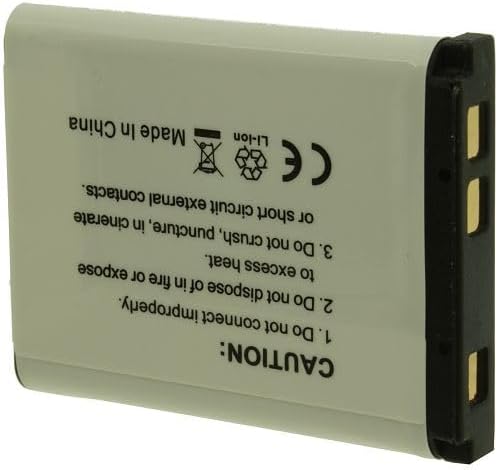
Image 1: Back view of the Otech D028SN-13100208 battery. Note the caution text regarding proper handling and disposal, including symbols for recycling and not disposing in general waste.
3. Installation
Follow these steps to properly install the Otech D028SN-13100208 battery into your I-GOTU GT800 device:
- Power Off Device: Ensure your I-GOTU GT800 device is completely powered off before attempting battery replacement.
- Locate Battery Compartment: Refer to your I-GOTU GT800 device's original manual to locate and open the battery compartment. This is typically on the back or bottom of the device.
- Remove Old Battery (if applicable): Carefully remove the existing battery. Note its orientation.
- Insert New Battery: Align the Otech D028SN-13100208 battery with the battery compartment's terminals. Ensure the positive (+) and negative (-) contacts on the battery match the corresponding markings in the compartment. Gently push the battery into place until it clicks or sits securely.
- Close Compartment: Close the battery compartment cover securely.
- Initial Charge: It is recommended to fully charge the new battery before its first use. Connect your device to its charger and allow it to charge until the charging indicator shows full.

Image 2: Front view of the Otech D028SN-13100208 battery. This side displays the Otech brand, "BATTERY PACK", and specifications like "3.7V 750mAh 2.8Wh Li-ion", along with positive and negative indicators.
4. Operation
Once installed, the Otech D028SN-13100208 battery operates seamlessly with your I-GOTU GT800 device. Here are some operational considerations:
- Charging: Charge the battery using the standard charger provided with your I-GOTU GT800 device. The battery is designed for optimal charging performance.
- Discharge: The battery is designed for a low self-discharge rate, meaning it retains its charge for longer periods when not in use.
- Battery Life Indicator: Monitor the battery level through your I-GOTU GT800 device's display. Recharge when the battery level is low to avoid unexpected power loss.
5. Maintenance and Storage
Proper maintenance and storage can significantly extend the lifespan of your Otech D028SN-13100208 battery:
- Regular Charging: For optimal performance, avoid completely draining the battery frequently. Recharge it regularly.
- Temperature Control: Store the battery in a cool, dry place, away from direct sunlight and extreme temperatures. Ideal storage temperature is between 0°C and 25°C (32°F and 77°F).
- Long-Term Storage: If storing the battery for an extended period, charge it to approximately 50-60% capacity. Recharge every 3-6 months to prevent deep discharge.
- Clean Contacts: Periodically clean the battery contacts and device terminals with a clean, dry cloth to ensure good connection.
- Avoid Short Circuits: Do not allow metal objects to come into contact with the battery terminals, as this can cause a short circuit.
6. Troubleshooting
If you encounter issues with your Otech D028SN-13100208 battery, consider the following common solutions:
| Problem | Possible Cause | Solution |
|---|---|---|
| Device does not power on after battery installation. | Battery not properly seated; battery not charged; faulty battery. | Ensure battery is correctly inserted and contacts are clean. Charge the battery fully. If issues persist, contact support. |
| Battery drains quickly. | High device usage; battery nearing end of life; background apps. | Reduce device usage. Check device settings for power-saving options. If battery life is significantly shorter than expected, consider replacement. |
| Battery not charging. | Faulty charger/cable; dirty contacts; device issue. | Try a different charger or cable. Clean battery and device contacts. Test the battery in another compatible device if possible. |
7. Specifications
Key technical specifications for the Otech D028SN-13100208 battery:
- Brand: Otech
- Model: D028SN-13100208
- Compatible Devices: I-GOTU GT800
- Battery Type: Li-ion
- Voltage: 3.7 Volts
- Capacity: 750 Milliampere Hour (mAh)
- Energy: 2.8 Wh
- Item Weight: 100 g
- Date First Available: October 6, 2017
Note: The voltage listed on the product label (Image 2) is 3.7V.
8. Warranty and Support
Otech batteries are individually tested before shipment to ensure functional equipment. For any questions, technical assistance, or warranty inquiries regarding your Otech D028SN-13100208 battery, please contact the seller or manufacturer directly. Refer to your purchase documentation for specific warranty terms and contact information.
The seller specializes in the sale of batteries and chargers since 2009, indicating experience in the field.
Ask a question about this manual
Ask about setup, troubleshooting, compatibility, parts, safety, or missing instructions. Manuals+ will review the question and use this page’s manual context to help answer it.