
1. Product Overview
The ORICO 6828US3-C is an aluminum dual-bay hard drive docking station designed for 2.5-inch and 3.5-inch SATA HDDs and SSDs. It provides high-speed data transfer via USB 3.0, supporting speeds up to 5Gbps. This docking station also features an offline clone function, allowing direct duplication of hard drives without requiring a computer connection. Its tool-free design ensures easy installation and removal of drives.
2. Package Contents
Please verify that all items are present in the package:
- 1 x ORICO Hard Drive Docking Station (6828US3-C)
- 1 x USB 3.0 Data Cable
- 1 x 12V Power Adapter
- 1 x User Manual
- 1 x Service Card
3. Product Diagram

Figure 3.1: Front and Rear View of the ORICO 6828US3-C Docking Station. This image highlights the PC-Clone button, DC Port, Power Switch, LED indicators, and the Source/Target drive slots for both 2.5-inch and 3.5-inch SATA hard disk drives.

Figure 3.2: Dimensions of the ORICO 6828US3-C Docking Station, showing its compact design.
4. Setup Instructions
Follow these steps to set up your ORICO 6828US3-C docking station:
- Connect Power: Connect the provided 12V power adapter to the DC port on the back of the docking station and then plug it into a power outlet.
- Connect to PC (Optional): If using the docking station with a computer, connect the USB 3.0 data cable from the docking station's USB 3.0 port to an available USB port on your computer.
- Insert Hard Drives: Carefully insert your 2.5-inch or 3.5-inch SATA hard drives or SSDs into the designated slots. Ensure they are firmly seated. The slots are labeled 'Source' and 'Target' for cloning operations, but can be used interchangeably for individual drive access.
- Power On: Press the power switch on the back of the docking station to turn it on. The LED indicators will illuminate.

Figure 4.1: Diagram illustrating the connection of the DC adapter, USB cable to PC, and insertion of SSD/HDD into the docking station, along with the power button.

Figure 4.2: The docking station supports both 2.5-inch and 3.5-inch SATA hard drives and SSDs, offering tool-free installation.
5. Operating Instructions
5.1. PC Connection Mode
When connected to a computer via the USB 3.0 cable, the ORICO 6828US3-C functions as an external hard drive enclosure. Your operating system (Windows, Mac OS X, Linux) should automatically detect the inserted drives. You can then access, read, and write data to the drives as you would with any other external storage device.
- Ensure the docking station is powered on.
- Connect the USB 3.0 cable to your computer.
- Insert your SATA HDD/SSD into either slot.
- The drive will appear as a removable disk in your computer's file explorer.

Figure 5.1: The ORICO 6828US3-C docking station connected to a laptop with a 3.5-inch hard drive inserted, ready for data access.
5.2. Offline Clone Function
The offline clone function allows you to duplicate a hard drive without connecting the docking station to a computer. This is useful for creating backups or migrating data to a new drive.
Important Considerations:
- The Target drive must be equal to or larger in capacity than the Source drive.
- All data on the Target drive will be erased during the cloning process. Ensure you have backed up any important data from the Target drive before proceeding.
- Do not disconnect the power or drives during the cloning process.
Steps for Offline Cloning:
- Power Off: Ensure the docking station is powered off and disconnected from any computer.
- Insert Source Drive: Insert the hard drive you wish to clone (the original drive) into the slot labeled 'Source'.
- Insert Target Drive: Insert the hard drive you wish to clone to (the destination drive) into the slot labeled 'Target'.
- Power On: Turn on the docking station.
- Initiate Clone: Press and hold the 'Clone' button (refer to Figure 3.1 for location) for approximately 3-5 seconds until the LED indicators begin to flash.
- Monitor Progress: The LED indicators (25%, 50%, 75%, 100%) will light up sequentially to indicate the cloning progress.
- Completion: Once all four LED indicators remain solid, the cloning process is complete. You can then safely power off the docking station and remove the drives.
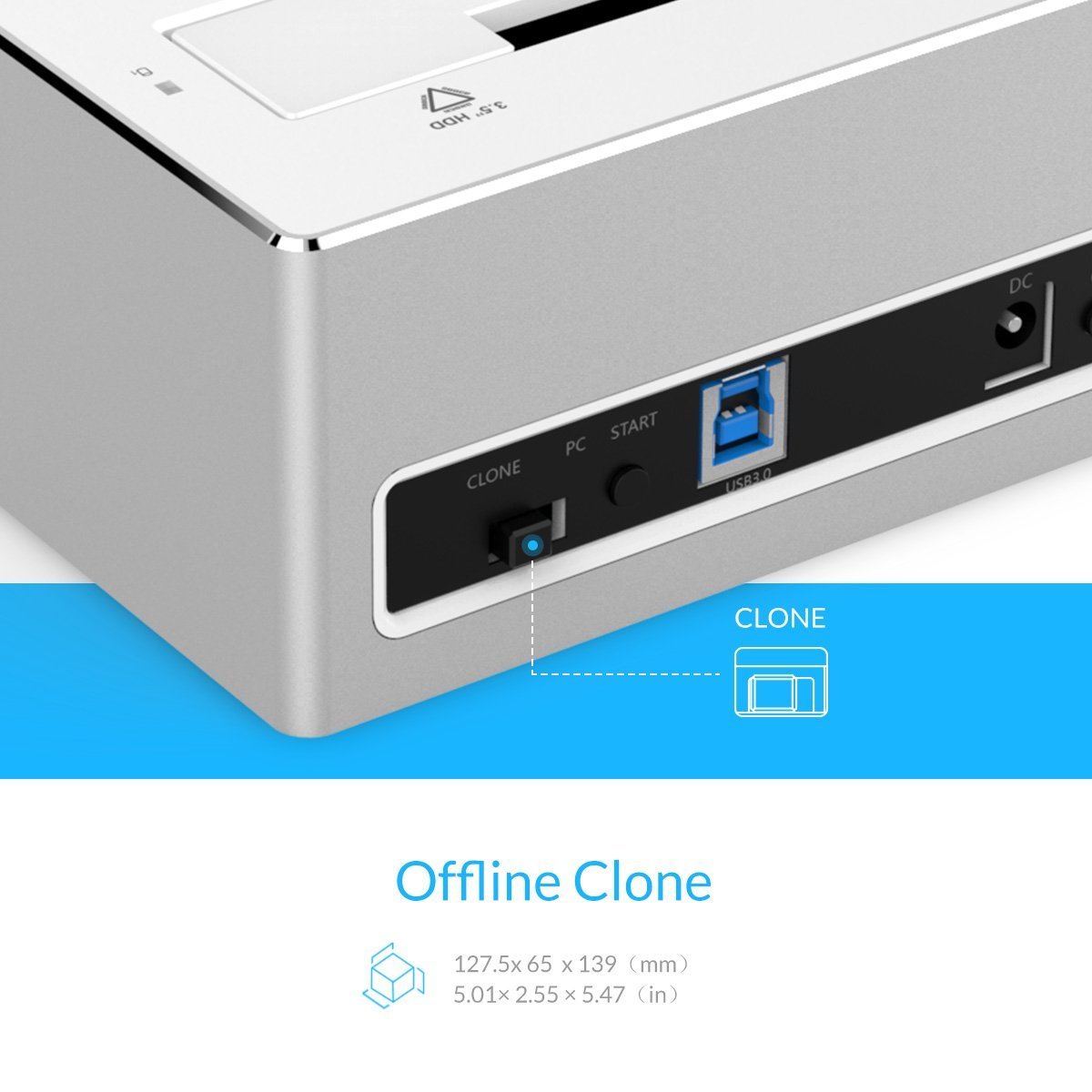
Figure 5.2: Close-up view of the 'Clone' button on the ORICO 6828US3-C docking station, used to initiate the offline cloning process.
6. Maintenance
To ensure the longevity and optimal performance of your ORICO 6828US3-C docking station, follow these maintenance guidelines:
- Cleaning: Use a soft, dry cloth to clean the exterior of the docking station. Avoid using liquid cleaners or solvents, as they may damage the finish or internal components.
- Dust Prevention: Keep the docking station in a clean, dust-free environment to prevent dust accumulation in the drive slots and ventilation areas.
- Storage: When not in use for extended periods, store the docking station in a cool, dry place.
- Handling: Handle the device with care. Avoid dropping it or subjecting it to strong impacts.
7. Troubleshooting
If you encounter issues with your ORICO 6828US3-C, refer to the following troubleshooting tips:
- Drive Not Detected by PC:
- Ensure the docking station is powered on and the USB 3.0 cable is securely connected to both the dock and the computer.
- Try connecting to a different USB port on your computer.
- Verify that the hard drive is properly seated in the slot.
- Check Disk Management (Windows) or Disk Utility (Mac) to see if the drive is recognized but uninitialized or unformatted.
- Test with a different hard drive to rule out a drive issue.
- Slow Data Transfer Speed:
- Ensure you are connected to a USB 3.0 port on your computer. USB 2.0 ports will result in slower speeds.
- Check the condition of the USB 3.0 cable. Try a different cable if available.
- The actual speed can be affected by the performance of the hard drive itself and your computer's system resources.
- Offline Clone Fails or Does Not Start:
- Ensure the docking station is disconnected from the computer before starting the clone process.
- Verify that the Target drive's capacity is equal to or greater than the Source drive's capacity.
- Make sure both drives are properly inserted into their respective 'Source' and 'Target' slots.
- Press and hold the 'Clone' button for the required 3-5 seconds until the LEDs start flashing.
- If the issue persists, try using different drives.
- Power LED Not On:
- Ensure the power adapter is securely connected to both the docking station and a working power outlet.
- Press the power switch on the back of the unit.
- Test the power outlet with another device.
8. Specifications
| Feature | Specification |
|---|---|
| Model | 6828US3-C |
| Hard Disk Form Factor | 2.5 Inches, 3.5 Inches |
| Max Number of Supported Devices | 2 (Source and Target for clone, or 2 independent drives) |
| Connectivity Technology | SATA, USB 3.0 |
| Data Transfer Rate | Up to 5Gbps (USB 3.0) |
| Max Hard Drive Capacity | Up to 8 TB per slot (16 TB total) |
| Compatible Operating Systems | Windows XP/7/8/8.1/10, Mac OS X 9.1 or above, Linux |
| Special Features | Offline Clone Function, Tool-free installation, Hot-swappable |
| Material | Aluminum, ABS (Acrylonitrile Butadiene Styrene) |
| Item Weight | 950 g |
| Package Dimensions | 20.6 x 15 x 10.3 cm |
9. Warranty and Support
ORICO provides a 12-month warranty on this product. To register your product for warranty and for service & support, please visit the official ORICO India website or contact customer care.
- Warranty Registration: www.oricoindia.in
- Customer Care Number: 022-24118805

Figure 9.1: ORICO 1-Year Warranty information, including website and customer care contact details.


