
GLOBO 41337-24
GLOBO LIGHTING LED Ceiling Light User Manual
Model: 41337-24
1. Introduction
Thank you for purchasing the GLOBO LIGHTING LED Ceiling Light, Model 41337-24. This modern and energy-efficient ceiling light is designed to provide optimal illumination for your indoor spaces, such as living rooms. Featuring a classic white metal design and dimmable functionality, it offers versatile lighting options. Please read this manual carefully before installation and use to ensure safe operation and proper maintenance.
2. Safety Instructions
Always follow basic safety precautions when installing and operating electrical appliances. Failure to do so may result in fire, electric shock, or serious injury.
- Disconnect Power: Always turn off the main power supply at the circuit breaker or fuse box before beginning any installation, maintenance, or cleaning.
- Qualified Electrician: Installation should be performed by a qualified electrician or competent person in accordance with all local and national electrical codes.
- Indoor Use Only: This product is designed for indoor use (IP20 rating). Do not expose it to water or high humidity.
- Proper Mounting: Ensure the mounting surface is structurally sound and can support the weight of the fixture.
- Handle with Care: Do not drop or subject the light fixture to strong impacts.
- No User Serviceable Parts: The LED light source is integrated and not user-replaceable. Do not attempt to disassemble the fixture.
- Cleaning: Use a soft, dry cloth for cleaning. Do not use abrasive cleaners or solvents.
3. Package Contents
Carefully unpack the box and ensure all items are present and undamaged. If any parts are missing or damaged, contact your retailer immediately.
- GLOBO LIGHTING LED Ceiling Light (Model 41337-24)
- Mounting Hardware (screws, anchors)
- Remote Control
- Instruction Manual

Figure 3.1: Front view of the GLOBO LIGHTING LED Ceiling Light. This image shows the main body of the light fixture, which is square-shaped with rounded corners and a white finish, designed for flush mounting on a ceiling.
4. Setup and Installation
Before installation, ensure the power is OFF at the circuit breaker. This fixture is designed for direct wiring to a standard electrical junction box.
- Prepare the Area: Ensure the power is disconnected. Clear the installation area and gather necessary tools (screwdriver, wire strippers, drill if needed).
- Mounting Bracket: Attach the mounting bracket (usually found inside the fixture) to the ceiling junction box using the provided screws. Ensure it is securely fastened.
- Electrical Connections: Carefully connect the electrical wires from the ceiling to the fixture's wires. Typically, connect the live (black/brown) wire to the live wire of the fixture, the neutral (white/blue) wire to the neutral wire of the fixture, and the ground (green/yellow) wire to the ground wire of the fixture. Use wire nuts to secure connections.
- Secure the Fixture: Carefully align the light fixture with the mounting bracket and secure it in place using the provided screws or twist-lock mechanism. Ensure no wires are pinched.
- Restore Power: Once the fixture is securely installed, restore power at the circuit breaker.

Figure 4.1: Angled view of the GLOBO LIGHTING LED Ceiling Light. This perspective highlights the slim profile and the subtle texture of the light-diffusing surface, which may include small, sparkling elements.
5. Operating Instructions
This LED ceiling light can be operated via a standard wall switch or the included remote control for advanced features like dimming and color temperature adjustment.
5.1 Using the Remote Control
The remote control allows for convenient adjustment of brightness and color temperature. Ensure the remote has working AAA batteries (2 required, not included).
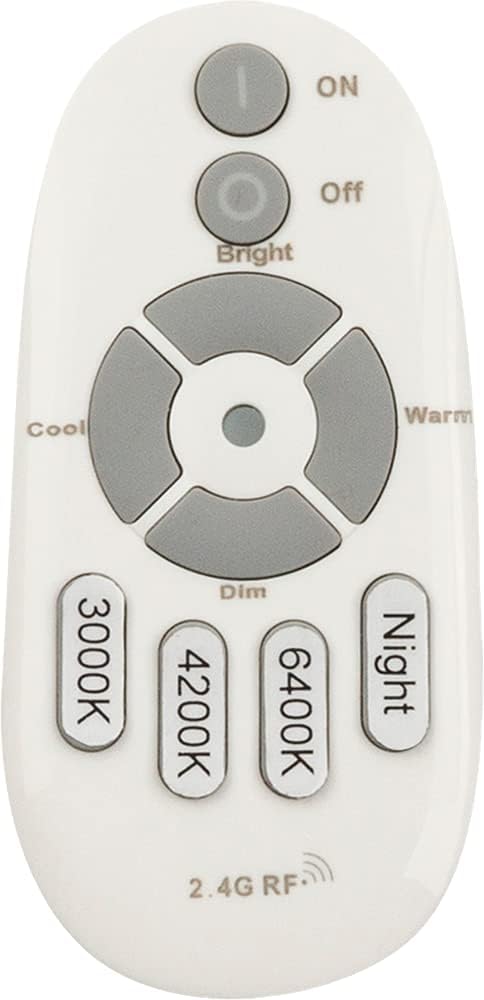
Figure 5.1: Remote control for the GLOBO LIGHTING LED Ceiling Light. The remote is white with grey buttons, featuring controls for ON/OFF, Bright/Dim, Cool/Warm color temperature, and specific color temperature presets (3000K, 4200K, 6400K), and a Night mode button.
- ON/OFF: Press the ON button to turn the light on, and OFF to turn it off.
- Brightness Adjustment: Use the Bright and Dim buttons to increase or decrease the light intensity.
- Color Temperature Adjustment: Use the Cool and Warm buttons to adjust the color temperature from cool white to warm white.
- Preset Color Temperatures:
- 3000K: Warm White
- 4200K: Neutral White
- 6400K: Cool White
- Night Mode: Press the Night button for a very low brightness setting, suitable for night illumination.
6. Maintenance
Regular maintenance ensures the longevity and optimal performance of your LED ceiling light.
- Cleaning: Before cleaning, ensure the power supply to the fixture is turned off. Use a soft, dry, lint-free cloth to wipe the surface of the light. Do not use harsh chemicals, abrasive cleaners, or sprays directly on the fixture, as they may damage the finish or electrical components.
- Bulb Replacement: The LED light source in this fixture is integrated and cannot be replaced by the user. If the LEDs fail, the entire fixture may need to be replaced.
- Inspection: Periodically check the fixture for any signs of damage, loose wiring, or unusual operation. If any issues are observed, disconnect power and consult a qualified electrician.
7. Troubleshooting
If you experience issues with your GLOBO LIGHTING LED Ceiling Light, refer to the following common problems and solutions:
| Problem | Possible Cause | Solution |
|---|---|---|
| Light does not turn on. | No power supply; loose wiring; faulty wall switch; remote control battery dead. | Check circuit breaker. Ensure all wiring connections are secure. Test wall switch. Replace remote control batteries. |
| Light flickers or dims unexpectedly. | Loose wiring; incompatible dimmer switch (if applicable); power fluctuations. | Check wiring connections. Ensure dimmer switch is LED-compatible. Consult an electrician if power fluctuations are suspected. |
| Remote control not working. | Dead batteries; remote out of range; interference. | Replace AAA batteries. Ensure remote is within effective range of the light. Remove any obstructions or sources of interference. |
| Light color or brightness cannot be adjusted. | Remote control issue; internal fault. | Ensure remote control is working (see above). If problem persists, contact customer support. |
8. Specifications
Detailed technical specifications for the GLOBO LIGHTING LED Ceiling Light, Model 41337-24:
| Feature | Specification |
|---|---|
| Brand | GLOBO |
| Model Number | 41337-24 |
| Product Dimensions | 43.5 x 43.5 x 6.5 cm (17.1 x 17.1 x 2.6 inches) |
| Item Weight | 1.4 kg (3.1 lbs) |
| Color | White |
| Material | Metal |
| Style | Classic |
| Light Source Type | LED (Integrated) |
| Number of Light Sources | 1 |
| Maximum Wattage | 24 Watts |
| Voltage | 230 Volts |
| Special Feature | Dimmable |
| IP Rating | IP20 (Indoor Use) |
| Power Source | Corded Electric |
| Batteries Required | No (for light fixture); Yes, 2x AAA (for remote control, not included) |
9. Recycling and Disposal
This product contains electronic components and should not be disposed of with general household waste at the end of its life cycle. Please follow local regulations for the proper disposal of electronic waste and light fixtures.
- Recycling Information: For information on recycling this and other types of light bulbs/fixtures, please consult your local waste management authority or recycling centers.
- Disposal of Broken Bulbs: If the fixture is damaged or broken, handle with care. Do not touch broken glass or exposed wires. For information on how to clean up and dispose of broken or damaged light fixtures, refer to local guidelines.
10. Warranty and Support
GLOBO LIGHTING products are manufactured to high-quality standards. For warranty information or technical support, please contact your retailer or visit the official GLOBO LIGHTING website. Please have your model number (41337-24) and purchase date ready when contacting support.
For further assistance, you may visit the GLOBO LIGHTING official website: www.globo-lighting.com
Related documents41337-24


Ask a question about this manual
Ask about setup, troubleshooting, compatibility, parts, safety, or missing instructions. Manuals+ will review the question and use this page’s manual context to help answer it.