
1. Introduction
Thank you for choosing the Klarstein Omnichef 30 2G Mini Oven. To ensure safe and proper operation, please read this user manual carefully before using the appliance. Keep this manual for future reference.
2. Safety Instructions
Always observe the following basic safety precautions when using electrical appliances:
- Read all instructions before use.
- Do not touch hot surfaces. Use handles or knobs.
- To protect against electrical shock, do not immerse the cord, plug, or any part of the oven in water or other liquid.
- Close supervision is necessary when any appliance is used by or near children.
- Unplug from outlet when not in use and before cleaning. Allow to cool before putting on or taking off parts.
- Do not operate any appliance with a damaged cord or plug, or after the appliance malfunctions or has been damaged in any manner. Contact customer service for examination, repair, or adjustment.
- The use of accessory attachments not recommended by the appliance manufacturer may cause hazards.
- Do not use outdoors.
- Do not let the cord hang over the edge of a table or counter, or touch hot surfaces.
- Do not place on or near a hot gas or electric burner, or in a heated oven.
- Extreme caution must be used when moving an appliance containing hot oil or other hot liquids.
- Always attach the plug to the appliance first, then plug the cord into the wall outlet. To disconnect, turn any control to 'OFF', then remove the plug from the wall outlet.
- Do not use the appliance for other than intended use.
- Oversize foods or metal utensils must not be inserted in a toaster oven as they may create a fire or risk of electric shock.
- A fire may occur if the oven is covered or touching flammable material, including curtains, drapes, walls, and the like, when in operation.
- Do not place any materials other than manufacturer's recommended accessories in this oven when not in use.
- Do not place any of the following materials in the oven: paper, cardboard, plastic, and similar products.
- Do not cover crumb tray or any part of the oven with metal foil. This will cause overheating of the oven.
- Always wear protective, insulated oven mitts when inserting or removing items from the hot oven.
3. Product Overview
Familiarize yourself with the components and controls of your Klarstein Omnichef 30 2G Mini Oven.

Figure 1: The Klarstein Omnichef 30 2G Mini Oven in operation, showing a pizza baking inside. The oven features a black exterior with a stainless steel handle and control panel on the right side.
3.1 Control Panel

Figure 2: A close-up front view of the Klarstein Omnichef 30 2G Mini Oven, highlighting the control panel. It features three distinct rotary knobs for temperature, function selection, and timer, along with a red power indicator light at the bottom right.
- Temperature Control Knob: Used to set the desired cooking temperature (e.g., 100°C to 230°C).
- Function Selector Knob: Allows selection of various cooking modes, such as top heat, bottom heat, top and bottom heat, convection, and rotisserie.
- Timer Knob: Sets the cooking duration (e.g., 0 to 60 minutes) or continuous operation (stay on). The oven automatically switches off when the timer reaches zero.
- Power Indicator Light: Illuminates when the oven is operating.
3.2 Accessories
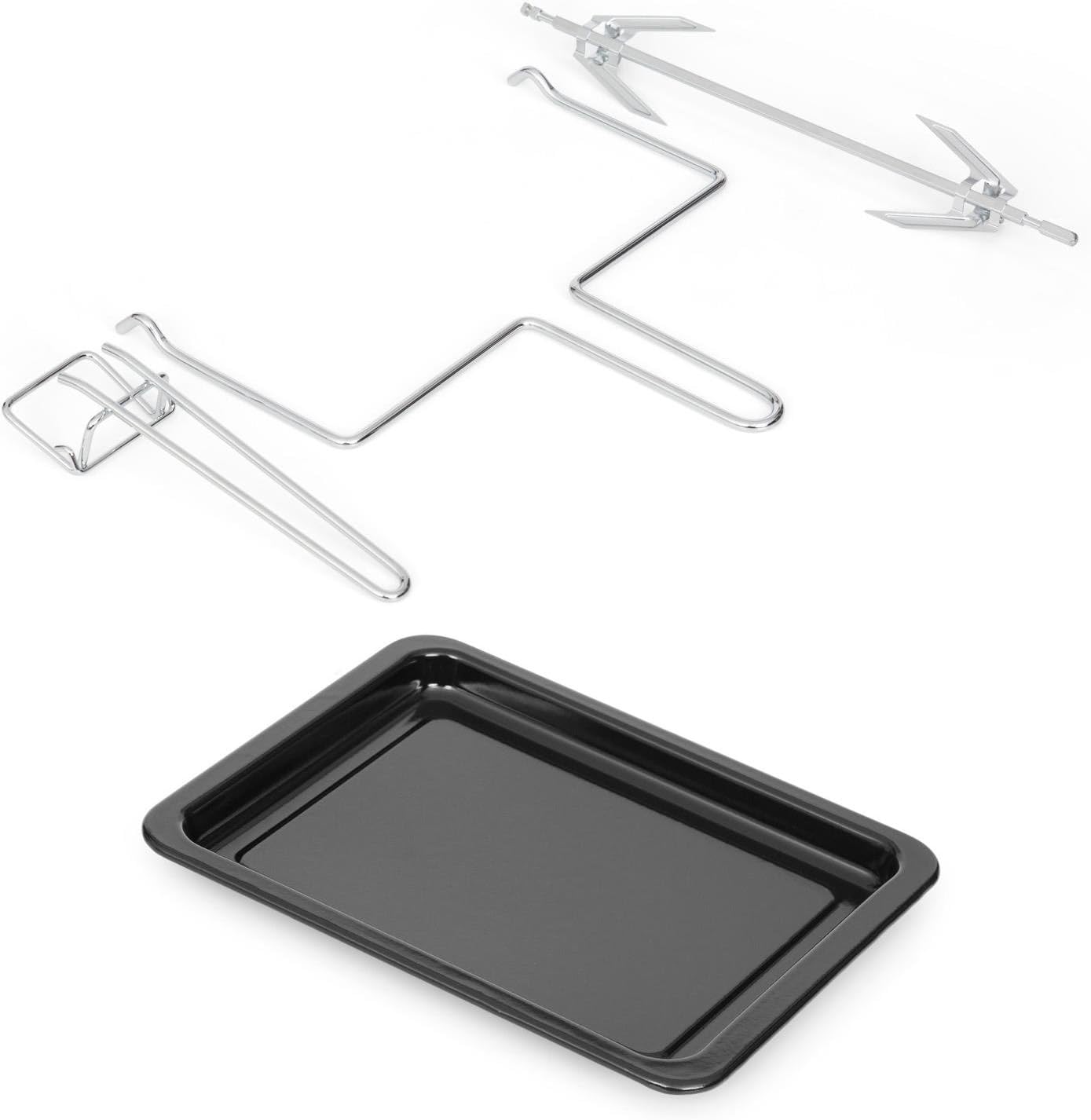
Figure 3: The standard accessories included with the Klarstein Omnichef 30 2G Mini Oven. These include a rectangular baking tray, a wire grill rack, and a rotisserie spit with two sets of forks for roasting.
- Baking Tray: For baking, roasting, and collecting drips.
- Grill Rack: For grilling and placing dishes.
- Rotisserie Spit: For roasting whole chickens or other meats.
- Rotisserie Handle: For safely inserting and removing the hot rotisserie spit.
4. Setup
- Unpacking: Carefully remove the oven and all accessories from the packaging. Remove any protective films or stickers.
- Placement: Place the oven on a stable, heat-resistant, and level surface. Ensure there is adequate ventilation around the oven (at least 10 cm clearance on all sides) to prevent overheating. Do not place it near flammable materials or under cabinets.
- Initial Cleaning: Before first use, wipe the interior of the oven and all accessories with a damp cloth and mild detergent. Dry thoroughly.
- First Use (Burn-in): To eliminate any manufacturing odors, operate the empty oven for approximately 15 minutes at the maximum temperature (230°C) using the top and bottom heat function. Ensure the room is well-ventilated during this process. A small amount of smoke or odor is normal during this initial burn-in.
5. Operating Instructions
5.1 General Operation
- Prepare Food: Place your food on the baking tray or grill rack.
- Insert Food: Carefully slide the tray or rack into the desired rack position inside the oven. Close the oven door.
- Set Temperature: Turn the Temperature Control Knob to the desired cooking temperature.
- Select Function: Turn the Function Selector Knob to choose the appropriate cooking mode (e.g., top heat, bottom heat, top and bottom heat, or convection).
- Set Timer: Turn the Timer Knob to the desired cooking time. The oven will begin heating immediately, and the power indicator light will illuminate. For continuous operation, turn the timer past the 60-minute mark to the 'Stay On' position.
- Monitor Cooking: Observe the cooking process through the oven door.
- End of Cooking: When the set time elapses, the timer will ring, and the oven will automatically switch off. If using 'Stay On' mode, manually turn the timer knob to 'OFF' to stop cooking.
- Remove Food: Using oven mitts, carefully remove the cooked food from the oven.
5.2 Using the Rotisserie Function

Figure 4: The Klarstein Omnichef 30 2G Mini Oven demonstrating the rotisserie function, with a perfectly roasted whole chicken rotating on the spit inside the illuminated oven cavity.
- Prepare Food: Securely attach the food (e.g., a whole chicken) onto the rotisserie spit using the forks. Ensure the food is balanced to allow for even rotation.
- Insert Spit: Insert the pointed end of the rotisserie spit into the drive socket on the right side of the oven interior. Rest the square end of the spit onto the support on the left side.
- Select Function: Turn the Function Selector Knob to the rotisserie symbol.
- Set Temperature and Timer: Set the desired temperature and cooking time using the respective knobs.
- Remove Food: Once cooking is complete, use the rotisserie handle to carefully lift and remove the hot spit from the oven.
6. Maintenance and Cleaning
Regular cleaning and maintenance will ensure the longevity and optimal performance of your oven.
- Always unplug the oven from the power outlet and allow it to cool completely before cleaning.
- Exterior: Wipe the exterior surfaces with a soft, damp cloth. Do not use abrasive cleaners, scouring pads, or harsh chemicals, as these can damage the finish.
- Interior: Wipe the interior walls with a damp cloth and a mild detergent. For stubborn stains, a non-abrasive oven cleaner designed for conventional ovens can be used, following the product instructions carefully. Ensure all cleaner residue is removed.
- Accessories: The baking tray, grill rack, and rotisserie spit can be washed in warm, soapy water. Rinse thoroughly and dry completely before storing or reusing.
- Crumb Tray: Regularly remove and clean the crumb tray to prevent grease buildup and potential fire hazards.
- Do not immerse the oven body in water or any other liquid.
7. Troubleshooting
If you encounter any issues with your oven, refer to the table below for common problems and solutions.
| Problem | Possible Cause | Solution |
|---|---|---|
| Oven does not heat up. | 1. Oven is not plugged in. 2. Timer is set to 'OFF' or 0. 3. Temperature or function knob not set. | 1. Ensure the power cord is securely plugged into a working outlet. 2. Turn the timer knob to the desired cooking time. 3. Set both the temperature and function knobs to the desired settings. |
| Food is not cooking evenly. | 1. Incorrect rack position. 2. Oven overcrowded. | 1. Adjust the grill rack to a different position for better heat distribution. 2. Avoid overcrowding the oven; cook in smaller batches if necessary. |
| Smoke or unusual odor during first use. | Manufacturing residues burning off. | This is normal during the initial burn-in process. Ensure adequate ventilation. If smoke persists after initial use, contact customer support. |
| Rotisserie spit is not rotating. | 1. Rotisserie function not selected. 2. Spit not correctly inserted into drive socket. | 1. Ensure the function selector knob is set to the rotisserie symbol. 2. Check that the pointed end of the spit is fully engaged in the drive socket. |
8. Technical Specifications
- Brand: KLARSTEIN
- Model: Omnichef 30 2G
- Capacity: 20 Liters
- Dimensions (W x D x H): 46 x 32 x 30 cm
- Weight: 9 kg
- Special Feature: Timer
- Color: Black
- Manufacturer Reference: 4060656075209
9. Disposal Information
If there is a legal regulation for the disposal of electrical and electronic devices in your country, this symbol on the product or on the packaging indicates that this product must not be disposed of with household waste. Instead, it must be taken to a collection point for the recycling of electrical and electronic equipment. By disposing of it in accordance with the rules, you are protecting the environment and the health of your fellow human beings from negative consequences.
10. Warranty and Support
For warranty claims, technical support, or any questions regarding your Klarstein Omnichef 30 2G Mini Oven, please contact your retailer or the Klarstein customer service department. Please retain your proof of purchase for all warranty-related inquiries.
