
Product Overview
The Angelcare AC115 Movement and Sound Monitor provides parents with peace of mind by combining movement monitoring with digital audio and temperature sensing. This system is designed to help you better respond to your baby's needs while they are resting.
It features a patented sensor pad placed under the mattress to detect subtle movements, alerting parents if no movement is detected after 20 seconds. The system also includes a low-profile nursery unit with an audio and temperature sensor, and a newly designed audio parent unit with a digital temperature display and two-way audio communication.

Figure 1: Angelcare AC115 Baby Movement Monitor components.
Box Contents
Please ensure all items listed below are present in your package:
- 1 x Rechargeable Parent Unit
- 1 x Nursery Unit
- 1 x Table Top Stand (for Nursery Unit)
- 1 x Movement Sensor Pad
- 1 x AC Adaptor (Parent Unit)
- 1 x AC Adaptor Plug (Parent Unit)
- 1 x Flat Cable (Nursery Camera)
- 2 x Rechargeable NiMH Batteries
- Quick Start Guide

Figure 2: Contents of the Angelcare AC115 package.
Setup Guide
1. Movement Sensor Pad Installation
The Movement Sensor Pad is designed to be placed under your baby's mattress. For optimal performance, it must be placed directly on a solid, flat surface beneath the mattress. If your crib base is slatted or not solid, consider adding a wooden board to provide a stable surface for the sensor pad.

Figure 3: Proper placement of the Movement Sensor Pad.
2. Nursery Unit Placement
Place the Nursery Unit on a flat surface near the crib, ensuring it has a clear line of sight to the baby and is within range of the Parent Unit. The Nursery Unit also monitors room temperature.

Figure 4: Example placement of the Nursery Unit.
3. Parent Unit Setup
The Parent Unit is portable and rechargeable. Charge it fully before first use. It displays the room temperature and allows for two-way communication with the Nursery Unit.

Figure 5: The portable Parent Unit.
4. Connecting Components
Connect the Movement Sensor Pad to the Nursery Unit using the provided flat cable. Plug in both the Nursery Unit and Parent Unit to their respective AC adaptors to power them and charge the Parent Unit's batteries.
Figure 6: All components connected and ready.
Operating Instructions
Movement Monitoring
The core feature of the AC115 is its movement monitoring capability. The sensor pad detects your baby's subtle movements. If no movement is detected for 20 seconds, an alarm will sound from the Parent Unit to alert you.
Room Temperature Display
The Nursery Unit features a colour-changing room temperature display, providing a quick visual indication of the nursery's temperature:
- Blue: Indicates the room is too cold.
- White: Indicates the room temperature is just right.
- Red: Indicates the room is too warm.
The exact Celsius temperature is also displayed on the Parent Unit, allowing for precise monitoring of optimal nursery conditions.

Figure 7: Nursery Unit temperature indicators.
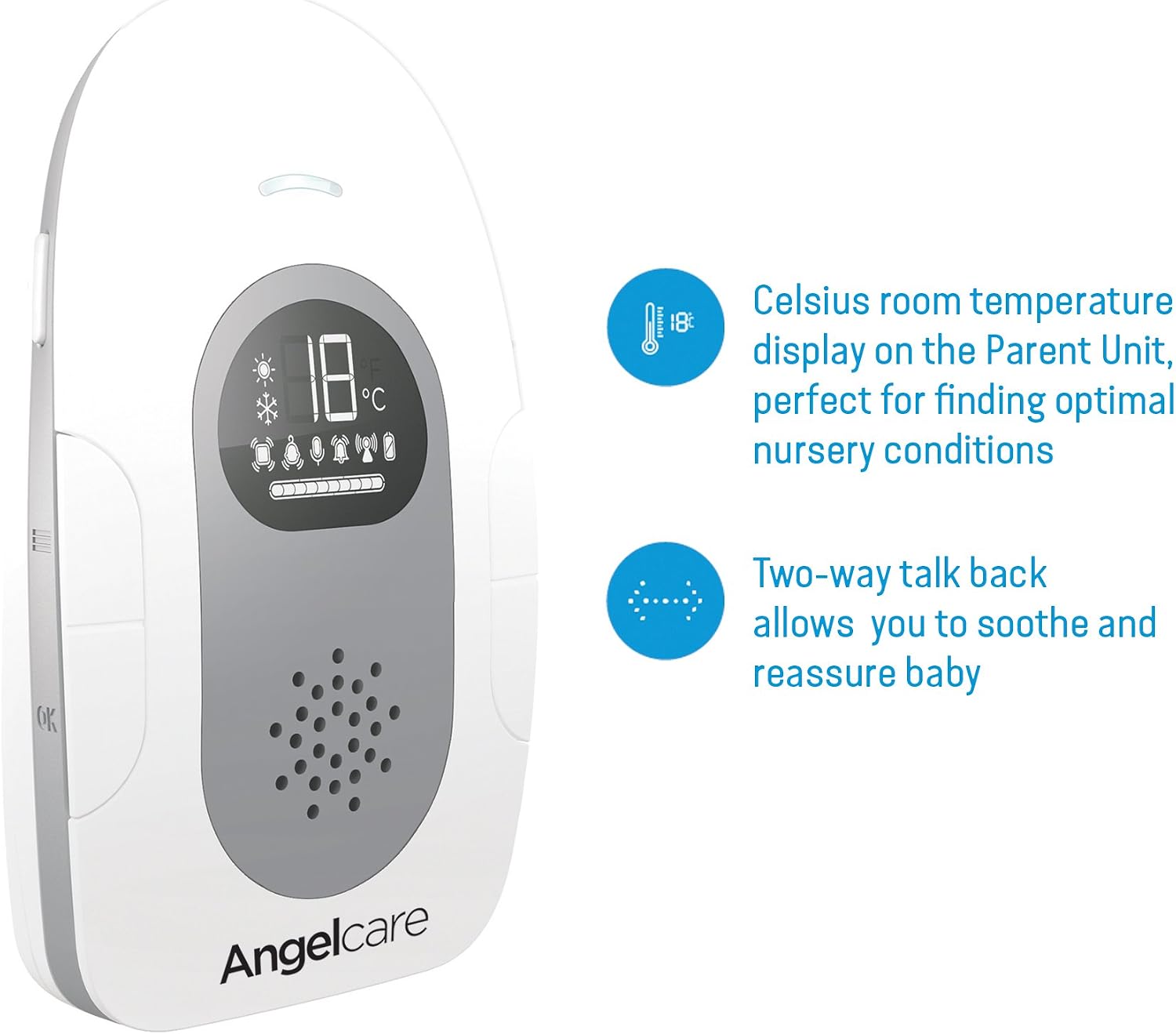
Figure 8: Parent Unit displaying room temperature and two-way talk feature.
Two-Way Talk Back
The two-way talk back feature allows you to soothe and reassure your baby from another room, providing comfort without immediate physical presence.
Digital Sound and Transmission
The monitor provides clear digital sound and secure digital transmission up to 250 meters, operating at 1.8 GHz, ensuring a reliable connection between the Nursery and Parent Units.
Official Product Video
Watch the official product video for a visual guide on setting up and using your Angelcare AC115 Baby Movement Monitor. This video demonstrates the key features including movement monitoring, temperature display, and two-way talk back.
Video: Angelcare AC115 Baby Movement Monitor, with Sound - Official Product Overview.
Maintenance
Cleaning Instructions
To clean your Angelcare monitor units, gently wipe them with a soft, dry cloth. Do not use abrasive cleaners or solvents, as these can damage the product. Ensure units are unplugged before cleaning.
Battery Care
The Parent Unit uses rechargeable NiMH batteries. For optimal battery life, allow the unit to fully discharge occasionally before recharging. If the unit will not be used for an extended period, remove the batteries.
Troubleshooting
If you encounter issues with your Angelcare AC115 monitor, please refer to the following common troubleshooting tips:
- No Signal/Connection Issues: Ensure both the Nursery Unit and Parent Unit are powered on and within range. Check that the sensor pad is properly connected to the Nursery Unit. Move the units closer if necessary.
- False Movement Alarms: Verify the Movement Sensor Pad is placed on a solid, flat surface under the mattress. Ensure there are no external vibrations (e.g., from fans, air conditioning, or other devices) that could interfere with the sensor. Adjust sensitivity settings if available (refer to the Quick Start Guide for specific instructions).
- No Alarm for No Movement: Double-check that the sensor pad is correctly installed and activated. Ensure the baby is placed directly over the sensor pad area.
- Temperature Display Inaccuracy: Ensure the Nursery Unit is not placed near heat sources (e.g., direct sunlight, heaters) or cold drafts, which could affect its temperature readings.
- Audio Issues (Static/No Sound): Check for interference from other electronic devices. Try changing the channel if your model supports it, or move the units to a different location.
For more detailed troubleshooting or persistent issues, please consult the comprehensive Quick Start Guide included with your product or visit the official Angelcare support website.
Specifications
| Feature | Detail |
|---|---|
| Model Number | AC6115 |
| Product Dimensions | 24.5 x 8.5 x 24.5 cm |
| Item Weight | 1.09 kg |
| Parent Unit Batteries | 2 x Rechargeable NiMH batteries (included) |
| Nursery Unit Power | AC Adaptor |
| Wireless Technology | Digital, 1.8 GHz |
| Range | Up to 250 meters (open field) |
| Movement Sensor | Under-the-mattress wired sensor pad |
| Temperature Sensor | Integrated in Nursery Unit, displayed on Parent Unit |
| Two-Way Talk | Yes |
| UPC | 666594202819 |
| Color | White |
Warranty and Support
For information regarding product warranty, returns, or technical support, please refer to the warranty card included in your product packaging or visit the official Angelcare website. Keep your proof of purchase for any warranty claims.
You can visit the Angelcare Store for more products and support information: Angelcare Official Store


