
SAMVIX BASIC
SAMVIX Basic MP3 Player User Manual
Model: BASIC
1. Introduction
This manual provides comprehensive instructions for the SAMVIX Basic MP3 Player. Designed for simplicity and functionality, this device allows for audio playback, voice recording, and e-book reading. It is specifically designed without FM radio, video playback, or picture viewing capabilities.

Image: Front view of the SAMVIX Basic MP3 Player, showcasing its display and control buttons.
2. What's in the Box
Upon opening the packaging, please verify that all the following items are included:
- 1 x SAMVIX Basic MP3 Player
- 1 x USB Cable (for charging and data transfer)
- 1 x Earphones
- 1 x User Manual (this document)
3. Key Features
The SAMVIX Basic MP3 Player offers a range of functionalities designed for a focused audio experience:
- Audio Playback: Supports multiple music formats including MP3, WMA, OGG, APE, FLAC, WAV, AAC-LC, and ACELP.
- Voice Recorder: High-quality voice recording capability.
- E-Book Reader: Functionality to read e-books.
- File Browser: Easy navigation and access to stored songs and files.
- Long Battery Life: Up to 80 hours of audio playback on a single charge, with a standby time of over 80 hours.
- Expandable Storage: Internal 4GB memory, expandable up to 128GB via Micro SD card (not included).
- Time & Date Display: Integrated clock function.
- Alarm Clock: Can be used as a personal alarm clock.
- Kosher Compliance: Designed without FM radio, video, or picture viewing capabilities.

Image: Visual representation of the MP3 player's extended battery life, indicating up to 80 hours of playback.

Image: The 'Menutak' seal, signifying the device's compliance with specific Kosher requirements by omitting certain features like radio and video.
4. Setup
4.1 Charging the Device
Before first use, fully charge your SAMVIX Basic MP3 Player. Connect the provided USB cable to the device's USB port and the other end to a computer's USB port or a compatible USB wall adapter (not included). The device typically takes approximately 2 hours for a full charge.
4.2 Transferring Files
To transfer music, e-books, or other compatible files to your MP3 player:
- Connect the MP3 player to your computer using the supplied USB cable.
- The device will appear as a removable disk drive on your computer.
- Drag and drop your desired audio files or e-book files into the appropriate folders on the MP3 player.
- Safely eject the device from your computer before disconnecting the USB cable.
4.3 Inserting a Micro SD Card
The device supports external storage via a Micro SD card up to 128GB. Locate the Micro SD card slot on the side of the player. Gently insert the Micro SD card with the gold contacts facing down until it clicks into place.
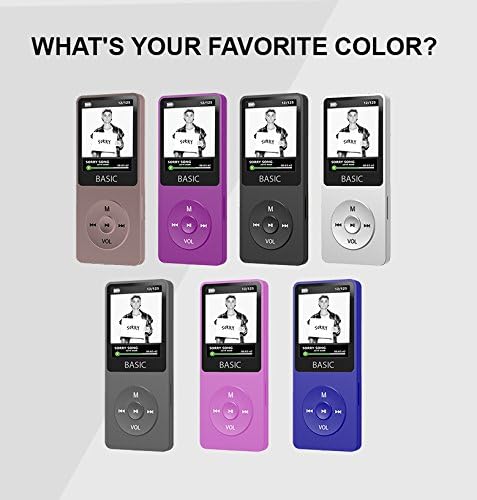
Image: The SAMVIX Basic MP3 Player with an arrow pointing to the Micro SD card slot, illustrating its expandable storage capability up to 128GB.
5. Operating Instructions
5.1 Basic Navigation
The MP3 player features a simple button layout:
- 'M' Button: Typically used to access the main menu or return to the previous menu.
- Play/Pause Button (Center): Starts or pauses playback. Also used to confirm selections.
- Previous/Next Buttons (Left/Right): Skips to the previous or next track. In menus, navigates left or right.
- Volume Up/Down (VOL): Adjusts the audio volume.
5.2 Music Playback
- From the main menu, select "Music".
- Navigate through your folders or select "All Songs" to browse your music library.
- Press the Play/Pause button to start playback of a selected song.
- Use the Previous/Next buttons to skip tracks.
- Adjust volume using the VOL button.
5.3 Voice Recording
- From the main menu, select "Voice Recorder".
- Press the Play/Pause button to start recording.
- Press the Play/Pause button again to stop and save the recording.
- Recordings can be found and played back within the "Voice Recorder" menu or via the "File Browser".
5.4 E-Book Function
- From the main menu, select "E-Book".
- Browse for your desired e-book file.
- Press the Play/Pause button to open and read the e-book.
- Use the navigation buttons to scroll through pages.
5.5 Setting Clock and Alarm
Access the "Settings" menu to find options for setting the current time and date. Within the settings, you can also configure the alarm clock function, including setting the alarm time and selecting an audio file for the alarm sound.
6. Maintenance
6.1 Cleaning
To clean the device, use a soft, dry, lint-free cloth. Do not use abrasive cleaners, alcohol, or solvents, as these may damage the surface or internal components. Keep the device free from dust and debris, especially around the ports and buttons.
6.2 Battery Care
To prolong battery life:
- Avoid fully discharging the battery frequently.
- Charge the device regularly, even if not in frequent use.
- Store the device in a cool, dry place when not in use for extended periods.
6.3 Storage
When storing the MP3 player for a long time, ensure it is charged to about 50% and stored in a cool, dry environment away from direct sunlight and extreme temperatures.
7. Troubleshooting
If you encounter issues with your SAMVIX Basic MP3 Player, please refer to the following common problems and solutions:
| Problem | Possible Cause / Solution |
|---|---|
| Device does not turn on. | Battery may be depleted. Connect to a power source and charge for at least 30 minutes. |
| Cannot play music files. | Ensure files are in a supported format (MP3, WMA, FLAC, etc.). Files may be corrupted. Re-transfer files. |
| Computer does not recognize the device. | Try a different USB port or USB cable. Ensure the device is powered on. Restart your computer. |
| Poor audio quality. | Check if earphones are fully plugged in. Try different earphones. Ensure audio files are not low quality. |
| Device freezes or becomes unresponsive. | Press and hold the power button for 10-15 seconds to force a restart. If available, use a reset pinhole. |
8. Specifications
Detailed technical specifications for the SAMVIX Basic MP3 Player:
| Brand | SAMVIX |
| Model (Manufacturer Reference) | BASIC |
| Memory Storage Capacity | 4 GB (expandable up to 128 GB via Micro SD) |
| Supported Audio Formats | MP3, WMA, OGG, APE, FLAC, WAV, AAC-LC, ACELP |
| Connectivity Technology | USB |
| Wireless Communication Technologies | AUX (for external speaker connection) |
| Special Features | Voice Recorder, E-Book Reader, Clock, Alarm Clock, Stopwatch |
| Screen Size | 1.8 Inches |
| Colour | Black |
| Batteries | 1 Lithium Polymer battery (included) |
| Battery Life (Audio Playback) | Up to 80 hours |
| Item Weight | 31.7 g |
| Parcel Dimensions | 19.3 x 10.1 x 2.9 cm |
| ASIN | B0763P44MY |
| Date First Available | Dec 7 2017 |
9. Warranty and Support
For information regarding warranty coverage and technical support for your SAMVIX Basic MP3 Player, please refer to the documentation provided at the time of purchase or visit the official SAMVIX website. Keep your proof of purchase for warranty claims.
For further assistance, please contact SAMVIX customer support through the channels listed on their official website.
Related documentsBASIC


Ask a question about this manual
Ask about setup, troubleshooting, compatibility, parts, safety, or missing instructions. Manuals+ will review the question and use this page’s manual context to help answer it.