
Introduction
This manual provides essential instructions for the safe and effective use of your VAULTEK VR10 Bluetooth Smart Handgun Safe. Please read all instructions carefully before operating the device. Proper understanding of this manual ensures optimal performance and security.

Image: The VAULTEK VR10 Smart Handgun Safe, highlighting its secure, smart, and rugged design.
Package Contents
Verify that all items listed below are included in your package. If any items are missing or damaged, please contact VAULTEK customer support.
- VAULTEK VR10 Smart Handgun Safe
- Manual Keys (2)
- Rechargeable Lithium-ion Battery
- Charging Kit (USB cable and power adapter)
- Mounting Hardware
- 4ft Steel Security Cable

Image: The VAULTEK VR10 safe displayed with its complete set of accessories, including keys, battery, charging kit, mounting hardware, and security cable.
Setup
1. Initial Battery Charge
Before first use, fully charge the included lithium-ion battery. Connect the USB cable to the safe's charging port and the power adapter, then plug into a wall outlet. The charging indicator light will show charging status.
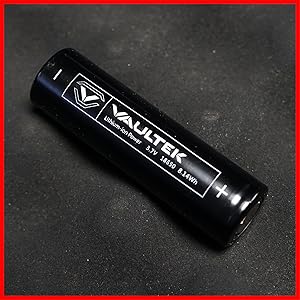
Image: A close-up of the rechargeable lithium-ion battery, which powers the safe's electronic features.
2. Setting up the Keypad Code
- Open the safe using a manual key.
- Locate the 'PROGRAM' button inside the safe. Press and hold it until the keypad lights up.
- Enter your desired 4-8 digit code on the backlit numeric keypad.
- Press and hold the 'PROGRAM' button again to save the code.
- Test your new code with the safe open before closing it.

Image: A detailed view of the backlit numeric keypad, which illuminates upon touch for easy code entry.
3. App Connection (Bluetooth)
Download the VAULTEK app from your device's app store. Follow the in-app instructions to pair your VR10 safe via Bluetooth. The app allows for remote management, battery status checks, and access logs.
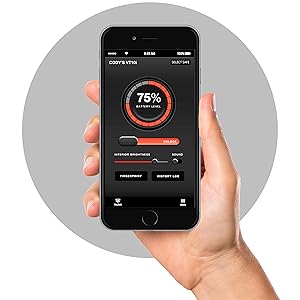
Image: Screenshots of the VAULTEK smartphone application, demonstrating features like battery level display and safe management.
4. Mounting Options
The VR10 safe can be secured using the included mounting hardware or the steel security cable. For permanent installation, use the pre-drilled holes to bolt the safe to a flat surface. For portable security, loop the steel security cable around a fixed object and secure it to the safe's cable port.
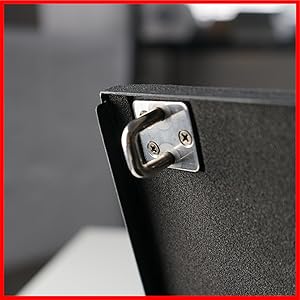
Image: The VAULTEK VR10 safe shown secured with its anti-theft steel security cable, demonstrating a portable securing method.
Operating the Safe
1. Opening with Keypad
To open the safe using the keypad, simply place your hand over the keypad to activate the backlight. Enter your programmed 4-8 digit code. Upon correct entry, the lid will automatically open.

Image: The VAULTEK VR10 safe resting on a wooden surface, with its numeric keypad visible and ready for access.
2. Opening with Manual Keys
In case of battery depletion or forgotten code, the safe can be opened using the provided manual keys. Insert the key into the keyhole and turn to unlock. The lid will then open.

Image: A hand inserting a manual key into the VAULTEK VR10 safe's lock, demonstrating an alternative access method.
3. Opening with Bluetooth App
Ensure your smartphone is paired with the safe via the VAULTEK app. Open the app and select your VR10 safe. Use the 'Unlock' feature within the app to remotely open the safe. This feature requires Bluetooth proximity.
4. Auto-Open Lid
The VR10 features an auto-open lid mechanism. Once successfully unlocked via keypad, manual key, or Bluetooth app, the lid will automatically spring open for quick access to contents.

Image: The VAULTEK VR10 safe with its lid fully open, revealing a handgun and an extra magazine securely stored inside.
Maintenance
1. Battery Management
The VR10 safe is powered by a rechargeable lithium-ion battery. Monitor the battery level via the VAULTEK app or by checking the safe's indicator lights. Recharge the battery when low to ensure continuous operation. A full charge can last over 4 months.
2. Cleaning
Clean the exterior of the safe with a soft, damp cloth. Avoid abrasive cleaners or solvents that could damage the finish or electronic components. Ensure the keypad remains free of debris for optimal performance.
Troubleshooting
- Keypad Not Responding: Ensure the battery is charged. If the battery is low, use the manual keys to open and then recharge.
- Lid Not Opening: Verify the correct code is entered. If using manual keys, ensure they are fully inserted and turned. Check for any obstructions preventing the lid from opening.
- Bluetooth Connectivity Issues: Ensure Bluetooth is enabled on your smartphone and the safe. Try restarting the app or the safe (by temporarily removing and reinserting the battery). Ensure you are within Bluetooth range.
- Tamper Alert: If the safe indicates a tamper alert, check the access log in the VAULTEK app to review unauthorized access attempts.
Specifications
| Feature | Detail |
|---|---|
| Brand | VAULTEK |
| Model Number | VR10 |
| Lock Type | Electronic Touchpad Lock |
| Color | Gray |
| Special Feature | Durable, Portable |
| Mounting Type | Freestanding, Tabletop |
| Item Weight | 5.18 Pounds |
| Water Resistance Level | Not Water Resistant |
| UPC / GTIN | 851245007480 |
Safety Information
- Always keep manual keys in a secure location away from the safe and out of reach of unauthorized individuals.
- Do not store the manual keys inside the safe.
- Ensure the safe is securely mounted or cabled to prevent unauthorized removal.
- Keep the safe closed and locked when not in use.
- This safe is designed to deter theft and provide quick access; it is not fireproof or waterproof.
Warranty and Support
For warranty information, technical support, or to purchase replacement parts, please visit the official VAULTEK website or contact their customer service department. Keep your purchase receipt for warranty claims.


