
1. Introduction
The Zoom LiveTrak L-12 is a versatile digital console designed for mixing, recording, and monitoring live performances. It integrates the functionalities of a mixer, a multi-track recorder, and a USB audio interface into a single unit. The L-12 allows for the mixing of live audio, simultaneous recording of up to 14 tracks, and provides five independent custom headphone mixes for performers.
This manual provides essential information for setting up, operating, maintaining, and troubleshooting your LiveTrak L-12. Please read it thoroughly to ensure proper and safe use of the device.
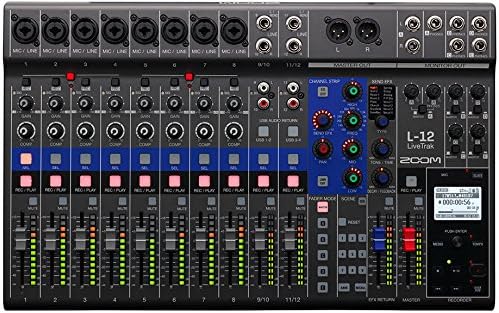
Figure 1.1: Top view of the Zoom LiveTrak L-12 digital mixer, highlighting its compact design and comprehensive control surface.
2. Setup
2.1 Unpacking and Inspection
Carefully remove the LiveTrak L-12 from its packaging. Inspect the unit for any signs of damage that may have occurred during transit. Retain the packaging materials for future transport or storage.
2.2 Power Connection
Connect the supplied AC adapter to the DC IN jack on the rear panel of the L-12. Plug the AC adapter into a standard electrical outlet. Ensure the power switch is in the OFF position before connecting the power.
2.3 Input and Output Connections
The LiveTrak L-12 features 12 discrete channels: eight mono channels and two stereo channels. Each mono channel is equipped with an XLR/TRS combo jack, while stereo channels use TRS phone/RCA pin jacks.
- Microphone/Line Inputs (Channels 1-8): Use XLR cables for microphones or TRS cables for line-level instruments/devices. These channels also feature a dedicated compressor.
- Stereo Line Inputs (Channels 9/10, 11/12): Use TRS or RCA cables for stereo line-level sources.
- Master Output: Connect your main PA system or recording device to the MASTER OUT XLR jacks.
- Monitor Outputs: Connect headphones or personal monitors to the five MONITOR OUT jacks. Each output can have a unique mix.
2.4 USB Audio Interface Connection
The L-12 functions as a 14-in/4-out USB audio interface. Connect the L-12 to your computer using a USB cable. For iOS device compatibility, ensure the L-12 is in class compliant mode.

Figure 2.1: Rear panel connections of the LiveTrak L-12, including power input, USB ports, and various audio connections.
3. Operating Instructions
3.1 Channel Controls
Each channel on the LiveTrak L-12 provides comprehensive controls for shaping your sound:
- Gain Knob: Adjusts the input level for each channel. Use the PAD switch for high-level signals.
- Compressor (Channels 1-8): Engages a built-in compressor to control dynamics.
- 3-Band Mid-Parametric EQ: Allows precise tonal shaping with adjustable frequency, gain, and Q for the mid-range.
- Send Effects: Access 16 built-in delay and reverb effects. Adjust parameters to suit your needs.
- Pan Knob: Positions the channel's sound in the stereo field.
- Mute Button: Silences the channel output.
- Fader: Controls the overall volume level of the channel.
3.2 Monitoring
The L-12 offers five independent monitor outputs, allowing each performer to create and save a personalized mix. Use the dedicated monitor controls to adjust levels for each output.
3.3 Recording and Playback
The LiveTrak L-12 can record up to 14 tracks simultaneously to an SD card. Use the REC/PLAY buttons on each channel to arm tracks for recording. The dedicated transport controls (Play, Stop, Record, Fast Forward, Rewind) manage recording and playback operations. The L-12 also supports 12-track playback.
3.4 Scene Memory
The L-12 allows you to save and recall up to nine scenes, which store all mixer settings. This feature is useful for quickly switching between different setups for various songs or performances.

Figure 3.1: Angled view of the LiveTrak L-12, illustrating the layout of channel faders, EQ, and effects controls.
4. Maintenance
4.1 Cleaning
To clean the LiveTrak L-12, use a soft, dry cloth. Do not use abrasive cleaners, waxes, or solvents, as these can damage the finish and internal components. Ensure the unit is powered off and disconnected from the power source before cleaning.
4.2 Environmental Considerations
Avoid exposing the unit to extreme temperatures, high humidity, dust, or direct sunlight. Operate the L-12 in a well-ventilated area to prevent overheating. Do not block ventilation openings.
4.3 Firmware Updates
Periodically check the official Zoom website for firmware updates. Firmware updates can improve performance, add new features, or resolve known issues. Follow the instructions provided by Zoom carefully when performing any firmware update.
5. Troubleshooting
If you encounter issues with your LiveTrak L-12, refer to the following common problems and solutions:
- No Sound Output:
- Check all cable connections (inputs, master out, monitor outs).
- Ensure channel faders and the master fader are raised.
- Verify that channels are not muted.
- Check input gain levels for each channel.
- Distorted Sound:
- Reduce input gain if the signal is clipping (indicated by red peak LEDs).
- Check for proper impedance matching with connected devices.
- Ensure cables are not damaged.
- Unit Does Not Power On:
- Verify the AC adapter is securely connected to both the L-12 and a working power outlet.
- Ensure the power switch is in the ON position.
- USB Audio Interface Not Recognized:
- Ensure the USB cable is properly connected to both the L-12 and your computer.
- Check your computer's sound settings to ensure the L-12 is selected as the input/output device.
- Install any necessary drivers if prompted by your operating system (though the L-12 supports class compliant mode).
If the problem persists after trying these steps, please contact Zoom customer support.
6. Specifications

Figure 6.1: Side angled view of the LiveTrak L-12, showcasing its profile and robust build.
| Feature | Description |
|---|---|
| Number of Input Channels | 8 Mono (MIC/LINE), 2 Stereo (LINE) |
| Number of Output Channels | 1 Master Out, 5 Monitor Outs |
| Mono Input Type | XLR/TRS combo jacks (XLR: 2 HOT, TRS: TIP HOT) |
| Stereo Input Type | TRS phone/RCA pin (unbalanced) jacks |
| Phantom Power | +48 V |
| USB Audio Interface | 14-in/4-out |
| Recording Tracks | 14-track simultaneous recording |
| Playback Tracks | 12-track playback |
| Built-in Effects | 16 (Delay and Reverb) |
| Item Weight | 12.23 pounds (approx. 5.55 kg) |
| Package Dimensions | 24.1 x 14.4 x 8.4 inches (approx. 61.2 x 36.6 x 21.3 cm) |
| Power Source | Corded Electric |
| Connectivity Technology | USB |
| Model Number | AUS-L12-COMBO-STD |
7. Warranty and Support
For detailed warranty information, please refer to the warranty card included with your product or visit the official Zoom website. Warranty terms and conditions may vary by region.
If you require technical assistance, have questions about product operation, or need to report a defect, please contact Zoom customer support through their official website or the contact information provided in your product documentation. When contacting support, please have your product model number (AUS-L12-COMBO-STD) and serial number ready.
Zoom Official Website: www.zoom.co.jp


