
1. Introduction
The NUTBRO VP+RT4 is a versatile 4-channel LED RF controller designed for RGBW, RGB, CCT, and dimming LED systems. It features a DC power input and provides a constant voltage output. This controller is compatible with various single color, dual color, and RGB/RGBW remote controls, enabling a wide range of static and dynamic lighting effects. It supports smooth dimming and flicker-free operation.
Utilizing 2.4GHz wireless technology, the controller can pair with up to 10 remote controls. Its auto-transmitting function allows one receiver to relay the remote signal to another within 15 meters, extending the control range up to 100 meters. The auto-synchronization function ensures that multiple receivers operate in unison when controlled by the same remote, maintaining consistent dynamic modes and speeds. For advanced functionality, the controller can be managed via a mobile app on iOS or Android devices when integrated with a WiFi-Relay controller, allowing users to customize RGB change mode lists.
2. Safety Information
- Installation and servicing of this product must be performed by a qualified person.
- This product is not waterproof. Avoid exposure to direct sunlight and rain.
- Ensure good ventilation to promote proper heat dissipation, which will prolong the working life of the controller.
- Verify that the output voltage of any connected power supplies complies with the working voltage requirements of this product.
- Before applying power, ensure all wire connections and polarities are correct and secure to prevent damage to the LED lights.
- In case of a fault, return the product to your supplier. Do not attempt to repair this product yourself.
3. Technical Specifications
| Parameter | Value |
|---|---|
| Input Voltage | 12-24VDC |
| Output Type | PWM Constant Voltage |
| Output Current | Max 6A/CH, Total Max 15A |
| Grey Levels | 4096/CH |
| Dimming Range | 0-100% |
| Remote Distance | 30m (up to 100m with auto-transmitting) |
| Working Temperature | -30°C to 55°C |
| Product Dimensions (L×W×H) | 114mm × 38mm × 20mm |
| Net Weight | 53g |
4. Product Overview and Interface
The controller features clearly labeled input and output terminals, along with a match key for remote pairing.
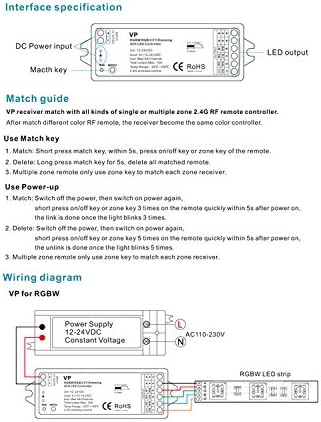
Image: Front and side view of the NUTBRO VP+RT4 controller, showing DC power input, match key, and LED output terminals. Dimensions are also indicated.
5. Setup and Installation
5.1 Wiring Diagrams
Ensure correct wiring based on your LED strip type (RGBW, Dual Color, or Single Color) and power supply. Always connect the power supply to the controller's input and the LED strip to the controller's output.

Image: Detailed wiring diagrams for connecting the VP+RT4 controller with RGBW, dual color (WW/CW), and single color LED strips. It illustrates connections to a 12-24VDC constant voltage power supply and AC110-230V input.
5.2 Remote Matching Guide
The VP+RT4 receiver must be matched with a compatible 2.4G RF remote controller. After matching, the receiver will adopt the color settings of the remote.
- To Match: Short press the match key on the controller within 5 seconds. Then, press the on/off key or a zone key on your remote.
- To Delete All Matched Remotes: Long press the match key on the controller for 5 seconds.
- For Multiple Zone Remotes: Use the specific zone key on the remote to match each zone receiver individually.
5.3 Power-up Matching Procedure
This method can also be used for matching or unlinking remotes.
- To Match: Switch off the power to the controller, then switch it back on. Within 5 seconds after power-on, quickly press the on/off key or a zone key on the remote 3 times. The link is successful when the LED light blinks 3 times.
- To Unlink (Delete): Switch off the power to the controller, then switch it back on. Within 5 seconds after power-on, quickly press the on/off key or a zone key on the remote 5 times. The unlink is successful when the LED light blinks 5 times.
- For Multiple Zone Remotes: When using a multiple zone remote, only use the specific zone key to match each zone receiver.
6. Operating Instructions
Once the controller is properly installed and matched with a remote, you can control your LED lighting. The controller supports various modes and functions:
- Color Control: Create static colorful or dynamic effects using your RGB/RGBW remote.
- Dimming: Adjust brightness smoothly from 0-100% without flicker.
- Color Temperature Control: Can function as a CCT controller for dual-color LED strips.
- Dynamic Modes: Built-in 10 dynamic modes for RGB/RGBW lighting, including various jump and gradual change styles.
- Extended Control: Connect with a WiFi-Relay controller for mobile app control (iOS/Android) and advanced customization of RGB change mode lists.
- Power Expansion: Connect an unlimited number of 4-channel CV or CC power repeaters in series or parallel to extend output power while maintaining synchronized control.
6.1 RGB Change Mode List
The controller includes the following pre-programmed RGB dynamic modes:
| No. | Name | No. | Name |
|---|---|---|---|
| 1 | RGB jump | 6 | RGB fade in and out |
| 2 | RGB smooth | 7 | Red fade in and out |
| 3 | 6 color jump | 8 | Green fade in and out |
| 4 | 6 color smooth | 9 | Blue fade in and out |
| 5 | Yellow cyan purple smooth | 10 | White fade in and out |
7. Maintenance
The NUTBRO VP+RT4 controller requires minimal maintenance. Ensure the device is kept in a dry environment, away from direct sunlight and rain, as it is not waterproof. Periodically check for dust accumulation around the unit and ensure proper ventilation to prevent overheating. Do not use harsh chemicals or abrasive cleaners on the device. If cleaning is necessary, use a soft, dry cloth.
8. Troubleshooting
Refer to the table below for common malfunctions and their corresponding solutions.

Image: A table detailing common malfunctions, their causes, and troubleshooting steps for the VP+RT4 controller.
| Malfunction | Causes | Troubleshooting |
|---|---|---|
| No light |
|
|
| Wrong color |
|
|
| Uneven intensity (voltage drop) |
|
|
| No response from remote |
|
|
9. Warranty and Support
For warranty information and technical support, please refer to the documentation provided at the point of purchase or contact your supplier directly. Do not attempt to repair the product yourself, as this may void the warranty.


